

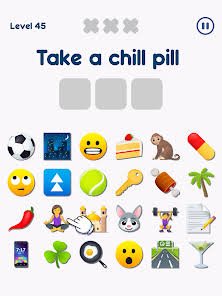
Words Emoji is a word puzzle game where emojis act as clues for hidden answers. Each level shows one or more emoji symbols along with a group of letters. You work out what the pictures are suggesting, then connect the correct letters to build the word. The first thing that slowed me down was treating every emoji too literally. I had better results once I started thinking about related actions, objects, places, and common phrases instead of only the exact picture shown.
| Game Detail | Information |
|---|---|
| Game | Words Emoji |
| Developer | We Do You Play |
| Genre | Word, Brain, Puzzle |
| Gameplay Style | Emoji clues and letter connecting |
| Controls | Click and drag across letters |
| Supported Devices | Desktop, phone and tablet |
| Release Date | April 2021 |
| More Specific Listed Release | April 23, 2021 |
| Latest Verified Update | June 2021 |
| Current Rating | 4.1 |
| Current Votes | 74K+ |
| Progression | Increasingly difficult word puzzles |
| Rewards | Coins |
| Hint System | Spend coins to reveal a word |
| Multiplayer | Single-player |
Read The Emojis Before Touching The Letters
The easiest mistake in Words Emoji is starting with the letter grid.
I did that at first.
I would look for familiar letter combinations and try to build something that looked like a word.
That can occasionally work, but it ignores the strongest clue on the screen.
A better order is:
- Look carefully at the emojis.
- Decide what ideas they could represent.
- Estimate the likely word.
- Then check whether the letters support that answer.
This reduces random guesses.
How To Play Words Emoji
The control system is simple.
Controls
- Click a letter: Start forming a word
- Drag across other letters: Continue the word
- Release: Submit the connected letters
- Touchscreen: Tap and swipe across letters on supported devices
The verified browser controls use a click-and-drag interaction, and the game currently supports desktop, phone, and tablet.
Modern browsers can process mouse and touchscreen interactions through common pointer-input systems. MDN explains that pointer events can represent input from mice, pens, and touch surfaces through one general event model.
Emojis Are Clues, Not Always Exact Answers
An emoji can represent more than one idea.
A picture of a sun might suggest:
- sun,
- sunny,
- hot,
- summer,
- day,
- light.
That is what makes Words Emoji more interesting than simply naming pictures.
You often need to interpret the symbol in the context of the other emojis.
I find it useful to describe every emoji with two or three possible words before choosing an answer.
That creates more possibilities without turning the puzzle into random guessing.
Combine The Clues
Some puzzles make more sense when the emojis are considered together.
One icon may suggest the first part of an idea while another narrows the meaning.
Instead of solving every emoji independently, ask:
What single word could connect all of these pictures?
That shift helped me on levels where none of the individual emojis seemed to match the available letters perfectly.
The combination often points toward a broader word or phrase.
Check The Available Letters
Once you have a possible answer, the letter grid becomes a confirmation tool.
Suppose the emojis strongly suggest one word.
Check whether:
- the necessary letters are present,
- they can be connected in a valid path,
- and the length looks reasonable.
If the letters do not fit, reconsider the emoji meaning.
This is much faster than repeatedly dragging random letter combinations.
Words Become More Difficult
Words Emoji uses level progression.
Early puzzles are relatively easy to interpret.
As you continue, the words become harder and the connection between the emoji clue and answer may be less obvious.
This is where a more systematic approach becomes useful.
I normally separate the challenge into two parts:
meaning first, spelling second.
Trying to solve both at once makes difficult levels feel more confusing than they need to be.
Coins Reward Correct Answers
Correct solutions earn coins.
Those coins form the game’s basic reward system.
The useful part is that coins are not only a score.
They can help later when a puzzle becomes difficult.
That creates a simple progression loop:
solve words → earn coins → reach harder levels → use coins for hints when necessary
I prefer saving some coins rather than spending them immediately.
Easy puzzles usually do not need extra help.
How Hints Work
A hint button appears at the top of the game.
If you become stuck, you can spend earned coins to reveal one of the words.
I use hints after I have already tried several interpretations of the emoji.
Using one immediately removes much of the puzzle.
Waiting too long can turn one level into unnecessary frustration.
A reasonable approach is to use the hint when you understand the emojis but still cannot connect the correct letters after several attempts.
Start With The Most Obvious Emoji
When several icons appear, one may be much easier to interpret than the others.
Start there.
If you can confidently identify one idea, it can provide context for everything else.
For example, recognizing that one emoji clearly represents food may tell you that another unclear symbol should also be interpreted in a food-related way.
This is more efficient than giving every image equal attention from the beginning.
Look For Common Word Associations
Some emoji clues depend on association rather than literal description.
Useful categories to consider include:
- objects,
- actions,
- feelings,
- places,
- weather,
- animals,
- food,
- jobs,
- travel,
- and everyday activities.
The Unicode Consortium notes that emoji cover broad concepts including faces, weather, vehicles, buildings, food, animals, and many other subjects.
That broad range is exactly why one small icon can suggest several possible words.
Why Emojis Work Well For Word Puzzles
Emoji are small symbols designed to communicate information visually.
Unicode’s current emoji standard defines the characters and sequences used across digital platforms and provides guidance intended to improve consistency between systems.
In Words Emoji, those symbols become puzzle clues.
The game essentially asks you to move from:
picture → idea → word → letters
That gives the word-search format a visual layer that ordinary spelling games do not have.
Do Not Assume Every Emoji Looks Identical Everywhere
Emoji appearance can vary slightly between operating systems and platforms.
The Unicode standard defines the characters and sequences, while individual platforms create their own visual presentations.
For Words Emoji, the important clue is usually the underlying concept rather than tiny visual details.
If an icon looks slightly unfamiliar, think about what general object or idea it represents.
Use Word Length As Another Clue
The available letters can tell you something about the likely answer.
If your first idea is a very long word but the puzzle seems to require something short, consider a synonym.
For example, the clue may suggest:
automobile
while the intended answer may simply be:
car
This is why vocabulary flexibility helps.
The same concept can often be expressed with several words.
Think About Synonyms
When the emoji meaning seems obvious but your word cannot be formed, do not discard the idea immediately.
Try another word with the same meaning.
Common alternatives might include:
- big / large
- quick / fast
- home / house
- car / auto
- happy / glad
The correct answer may use the simpler or more common version.
I found that synonyms solved many puzzles where the basic idea was correct but the exact letters were not.
Check Spelling Before Changing Your Interpretation
Sometimes the clue is correct and the spelling is the problem.
Before abandoning an answer, mentally spell it once.
That helps with repeated letters and similar vowel patterns.
Because Words Emoji asks you to physically connect letters, one incorrect letter can make an otherwise correct idea appear impossible.
A quick spelling check is often easier than restarting your interpretation of the emojis.
Do Not Drag Random Words
Random word building can produce lots of wasted attempts.
A better routine is:
- Interpret the emoji.
- Think of a likely answer.
- Spell it mentally.
- Locate the first letter.
- Check whether the rest can be connected.
- Drag only when the path makes sense.
This gives each attempt a reason.
Phone And Tablet Play
Words Emoji currently supports:
- desktop,
- phone,
- tablet.
The drag-based control system works naturally on touchscreens.
Instead of holding a mouse button, you move your finger through the letters.
Because the game does not require several virtual buttons, most of the screen can remain available for the emoji clue and letter grid.
That makes the basic layout suitable for smaller displays.
Mouse Versus Touch
Both input methods use essentially the same idea.
Desktop
The mouse pointer can make it easier to see the exact letter path before dragging.
Touchscreen
Swiping directly across letters feels faster and more natural for short words.
Neither method changes the actual puzzle rules.
The important skill remains interpreting the emoji correctly.
Who Created Words Emoji?
Words Emoji was created by WeDoYouPlay.
WeDoYouPlay’s official site describes the studio as having worked in games for more than a decade and highlights experience across HTML5, mobile, Flash, and other game markets.
The developer is also associated with browser games including:
- Bounce Ball
- Nonogram
- Sugar Eyes
- Word Chains
- Goblock
- Circus Contest
- Hospital Stories: Doctor Soccer
- Hospital Stories: Doctor Basketball
- Hospital Stories: Doctor Rugby
Words Emoji fits the puzzle side of the studio’s catalogue.
Release And Latest Update
The current verified browser information gives:
Release: April 2021
Specific listed date: April 23, 2021
Latest update: June 2021
Current rating: approximately 4.1 from more than 74,000 votes.
The vote total can continue changing.
The release and update dates are more useful as stable historical information.
Do Not Mix It With Similar Emoji Games
There are many games and apps with names such as:
- Guess Words Emoji
- Guess the Emoji
- Emoji Word
- Emoji Quiz
- Words Emoji
They are not automatically the same game.
For this page, the correct version is the browser puzzle created by WeDoYouPlay and released in April 2021.
Keeping the developer attached to the title prevents unrelated app-store features from being added by mistake.
Common Words Emoji Mistakes
My first mistake was searching the letter grid before understanding the clue.
Another is interpreting every emoji only by its literal name.
I also found that ignoring synonyms made some easy ideas seem impossible.
Another mistake is spending coins on a hint before trying several reasonable possibilities.
A better routine is to understand the clue first and use the letters to confirm it.
A Better Puzzle Routine
My approach is:
- Look at all emojis.
- Give each icon two or three possible meanings.
- Look for an idea connecting them.
- Think of the simplest likely word.
- Check its spelling.
- Find the letters.
- Drag through them carefully.
- Try a synonym if the path does not work.
- Use a coin hint only when the clue remains unclear.
This keeps guessing focused.
What Makes Words Emoji Different?
Words Emoji combines:
- visual emoji clues,
- word association,
- letter connecting,
- level progression,
- increasing difficulty,
- coin rewards,
- optional hints,
- and mouse or touchscreen controls.
The basic controls are easy.
The challenge comes from translating a small visual clue into the exact word the puzzle expects.
That makes it a good fit for players who prefer vocabulary and association puzzles rather than reaction-based games.
Related Game Categories
Words Emoji fits naturally into:
- Word Games
- Brain Games
- Puzzle Games
- Vocabulary Games
- Emoji Games
- Spelling Games
- Mouse Games
- Mobile Games
Its strongest identity is a word-association puzzle where emoji clues help you identify hidden words and connect the correct letters.
About Words Emoji
Words Emoji combines visual clues with a familiar word-connecting puzzle.
You study the emojis at the bottom of the screen, work out what they represent, and drag across the available letters to form the hidden answers. Correct words earn coins, while the hint system lets you spend those coins when a harder puzzle stops your progress.
The biggest improvement in my own approach came from interpreting the emojis before looking for words in the grid. Once I stopped randomly searching for letter combinations and started treating each image as a clue with several possible meanings, difficult levels became much easier to narrow down.


Reviews
There are no reviews yet.