

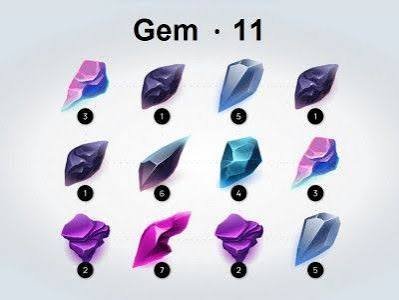
Gem 11 is a number-merging puzzle game where you connect matching gems to create increasingly valuable stones. Each gem has a color, size, and number, and matching identical pieces produces the next level in the sequence. The controls are simple, but the board becomes difficult once empty spaces begin disappearing. My first mistake was making every available merge immediately. I had stronger runs once I started checking which new gem would appear next and kept some open spaces available for future combinations.
| Game Detail | Information |
|---|---|
| Game | Gem 11 |
| Developer | Air Guslar |
| Creator | Stefan Nikolic |
| Genre | Puzzle, Brain, Merge |
| Gameplay Style | Number merging and grid management |
| Controls | Mouse click and drag or touchscreen |
| Supported Devices | Desktop, phone and tablet |
| Release Date | April 2019 |
| Latest Verified Update | June 2025 |
| Current Verified Rating | 4.3 |
| Current Verified Votes | 86K+ |
| Technology | HTML5 |
| Multiplayer | Single-player |
| Main Objective | Merge matching gems and work toward Gem 11 |
Building Your First Higher-Value Gem
The basic rule is straightforward.
Two compatible gems can be connected so they combine into a higher-level stone.
The important detail is that the gems need to match in the ways required by the game, including their number, color, and size.
That creates a progression chain where low-value stones gradually turn into better ones.
At first, I concentrated only on whether two gems could merge.
Later, the more useful question became whether merging them now would leave the board in a better position.
How To Play Gem 11
The game uses a simple drag interaction.
Controls
- Mouse: Click and drag to connect matching gems
- Touchscreen: Press and drag between matching stones
- Release: Complete the merge when the connection is valid
You do not need keyboard movement or a complicated control layout.
The MDN Pointer Events guide explains how modern browser applications can interpret input from a mouse, touchscreen, or pen through a shared pointer system.
Matching The Right Gems
You cannot simply connect any two stones.
The matching gems need to belong to the same level and appearance group.
That makes visual recognition important.
When the grid becomes crowded, I try to scan it systematically rather than moving the pointer around until something works.
I usually check:
- low-number gems,
- obvious matching colors,
- potential merge pairs,
- and the spaces those merges will create.
That keeps the board easier to read.
Look At The Next Gem Before Moving
One of Gem 11’s most useful pieces of information appears above the board.
A black circle indicates which type of gem will appear in the next empty space.
Ignoring that preview was one of my biggest early mistakes.
A merge may look useful on its own, but knowing what arrives afterward can change the decision.
If the next stone will immediately create another pair, making space near a matching gem can set up a second merge.
That turns the preview into a planning tool rather than decoration.
Empty Space Is A Resource
The board eventually becomes difficult because every new gem occupies space.
That makes empty cells valuable.
A move that creates one strong gem but leaves the board packed can be worse than a smaller merge that opens several useful positions.
I started treating empty spaces almost like another score.
When the grid had plenty of room, I could experiment.
When only a few spaces remained, creating room became more important than chasing the highest visible number.
Why Immediate Merges Are Not Always Best
Suppose you have two matching gems available.
The natural reaction is to combine them immediately.
But imagine another matching gem is likely to appear soon.
Keeping the original pair temporarily may allow you to position the next stone more effectively or create a better sequence of merges.
This does not mean you should avoid merging.
It means every merge changes the layout.
The strongest move is often the one that improves both the number value and the shape of the board.
Gem 11 And 2048
Gem 11 is loosely inspired by the logic of 2048, where matching numerical values are combined into larger ones.
The major difference is interaction.
Traditional 2048 moves the whole grid in one direction.
Gem 11 focuses more directly on connecting matching pieces and considering which gem will appear next.
Both games reward thinking beyond the current move.
The mathematical idea underneath is repeated doubling and number growth. For readers interested in the arithmetic itself, Khan Academy’s multiplication resources provide straightforward explanations of repeated multiplication and related number concepts.
Creating Merge Chains
The most satisfying turns happen when one merge helps create another.
For example, combining one matching pair may produce a gem that now matches another stone already on the board.
That creates the possibility of a second merge without waiting through many unrelated moves.
I actively look for these situations because they provide two benefits:
- higher-value gems,
- and more free board space.
A single isolated merge is useful.
A sequence that reorganizes several gems at once is usually much stronger.
Work From The Board, Not Just The Number
Reaching higher numbers is the obvious objective.
But watching only the highest-value gem can cause poor decisions elsewhere.
A board with one impressive gem and almost no available space may be much closer to failure than a more balanced board with several prepared pairs.
I check the entire grid before making a larger merge.
If one area is becoming cluttered with unmatched gems, that problem usually deserves attention before chasing another high number.
When The Grid Becomes Crowded
Late-game decisions become much harder because fewer spaces remain available.
This is where planning one move ahead stops being enough.
I begin looking for combinations that could produce two or three useful moves in sequence.
A practical approach is:
- Identify an available merge.
- Work out which gem it will create.
- Check whether that new gem has another match.
- Look at the next-gem preview.
- Decide where you want free space to appear.
That small planning routine can prevent the grid from filling unnecessarily.
Higher Values Need More Preparation
Early upgrades are easy because low-level gems appear frequently.
Higher-level stones require more work because every one depends on several earlier merges.
That creates an interesting progression curve.
You might need multiple low-level gems just to produce two matching middle-level stones, which can then become one higher-level gem.
So a single high-value stone represents several earlier decisions.
This is why destroying your board structure for one quick merge can create problems later.
Mouse And Touchscreen Play
Gem 11 supports:
- desktop computers,
- phones,
- tablets.
The drag mechanic works naturally with both mouse and touch input.
On desktop, the cursor makes it easier to see precisely which gem you are starting from.
On a phone, dragging directly with your finger feels natural, although smaller boards can make crowded late-game positions slightly harder to inspect.
The W3C Pointer Events specification provides the technical standard behind browser interfaces that need to handle mouse, touch, and pen interactions consistently.
Why Planning Beats Fast Play
There is little reason to rush Gem 11.
Unlike a reflex game, the difficulty comes mainly from the consequences of each move.
That gives you time to inspect:
- matching gems,
- available spaces,
- the next-gem preview,
- possible chains,
- and high-value stones already on the board.
My better sessions came when I stopped dragging the moment I noticed a pair.
Waiting a few seconds often revealed a second option that gave me much more room.
Do Not Scatter Similar Gems Everywhere
Board organization becomes more useful as the game progresses.
If similar gems are spread across opposite sides of the grid, future merges can become awkward.
I try to keep related values reasonably close when the layout allows it.
This does not mean arranging everything perfectly.
The next gem is not entirely under your control.
But keeping some structure makes potential pairs easier to identify and reduces the number of moves spent fixing scattered pieces.
Use Low-Level Gems To Prepare Future Moves
Low-number stones may look unimportant once higher gems appear.
They are still the foundation of future upgrades.
Ignoring them can create clutter.
Instead, I look for opportunities to combine lower values before too many accumulate.
This keeps the board cleaner while gradually producing the middle-level gems needed for larger combinations.
The game rewards maintaining the whole progression chain rather than concentrating only on the highest number.
When To Prioritize Space Over Value
If the board is almost full, space becomes the main objective.
At that point, I prefer a merge that clears useful cells over a technically higher-value move that leaves the grid awkward.
This is one of the main strategic shifts as a run develops.
Early Game
Focus on building values and organizing pairs.
Middle Game
Balance progression with available space.
Late Game
Protect empty cells and look for multi-step merge chains.
The rules remain identical, but the priority changes depending on board pressure.
Who Created Gem 11?
Gem 11 was created by Stefan Nikolic, with the current developer name listed as Air Guslar.
The same current developer listing is also associated with:
- Shady Bears
- Fixing Time
Older records sometimes identify the creator directly as Stefan Nikolic rather than Air Guslar, which explains why different developer names can appear on historical listings.
For current game information, Air Guslar is the appropriate developer label while Stefan Nikolic can be noted as the creator.
Release And Latest Update
The current verified browser dates are:
Release Date: April 2019
Latest Update: June 2025
The current listing also shows a rating of approximately 4.3 from nearly 87,000 votes.
Other websites may display later publication dates because they added Gem 11 to their own libraries after its original release.
Those hosting dates should not replace the April 2019 release currently documented for the game.
Why HTML5 Helps Cross-Device Play
Gem 11 is presented as an HTML5 browser game.
That helps it run across modern browsers without depending on the old Flash plugin.
Modern HTML provides APIs and browser features used for interactive web applications, while JavaScript, rendering technologies, and input APIs handle much of the gameplay behavior.
The WHATWG HTML specification documents the modern HTML standard used by browsers.
For players, the important result is simpler: Gem 11 can work directly in supported browsers across computers and mobile devices.
Common Gem 11 Mistakes
The first mistake is merging every available pair immediately.
Another is ignoring the next-gem preview.
I also found that concentrating only on the highest-value stone allowed low-level gems to clutter the board.
A fourth mistake is letting useful empty spaces disappear without considering how difficult they will be to recreate.
Finally, avoid judging a move only by what it creates.
Look at what the board will look like after the merge.
That is usually more important.
A Better Gem 11 Routine
Before each move, I follow a simple check.
First, find all obvious matching pairs.
Next, look at the next-gem indicator.
Then ask which merge creates the most useful space.
After that, check whether the resulting gem can immediately connect with another matching stone.
If two moves look equally good, I choose the one that keeps the board more organized.
This takes slightly longer than merging instantly, but it makes crowded boards much easier to manage.
What Makes Gem 11 Different?
Gem 11 combines several familiar puzzle ideas:
- matching identical pieces,
- numerical progression,
- merging,
- grid management,
- next-piece prediction,
- and limited board space.
Its controls require almost no learning.
The challenge comes from planning what each merge does to the rest of the grid.
That makes it a good fit for players who enjoy number puzzles but want more direct piece interaction than a traditional sliding-grid game.
Related Game Categories
Gem 11 fits naturally into:
- Puzzle Games
- Brain Games
- Merge Games
- Number Games
- Logic Games
- Matching Games
- Mobile Games
- Casual Games
Its strongest identity is a number-merging puzzle built around grid management and planning future combinations.
About Gem 11
Gem 11 takes a simple matching rule and turns it into a steadily more demanding board-management puzzle.
You connect gems with matching values and appearances, create higher-level stones, watch which piece will appear next, and try to preserve enough space for future combinations.
The early moves are easy to understand, but reaching the higher gems requires much more planning because every new stone changes the possibilities available on the grid.
The biggest improvement in my own approach came from paying attention to empty space. Once I stopped treating every immediate merge as automatically good and started thinking about what the next board would look like, reaching higher values became much more consistent.




Reviews
There are no reviews yet.