

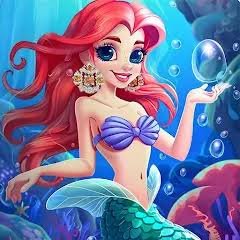
Mermaid Dress Up is a creative dress-up game from Benri Games where you design your own underwater character by combining different skin tones, hairstyles, facial features, clothes, accessories, and colorful mermaid tails.
There is no race, score target, or complicated challenge to learn. The fun comes from trying combinations until the character looks the way you want. I found the shuffle button especially useful when I had already tried several similar designs and wanted the game to give me a completely different starting point.
| Game Detail | Information |
|---|---|
| Game | Mermaid Dress Up |
| Developer | Benri Games |
| Genre | Beauty, Dress Up |
| Gameplay | Character customization |
| Controls | Mouse click or touchscreen tap |
| Supported Devices | Desktop, Phone, Tablet |
| Release | January 2024 |
| Latest Verified Update | March 2024 |
| Current Rating | 4.5 |
| Current Votes | 128K+ |
| Save Creation | Yes |
| Shuffle Feature | Yes |
| Multiplayer | Single-player |
The current Poki listing identifies Benri Games as the developer and confirms January 2024 as the browser release and March 2024 as the latest listed update.
How Mermaid Dress Up Works
You begin with a mermaid character and customize different parts of the design.
The available choices include areas such as:
- Skin tone
- Hair color
- Facial features
- Clothing
- Mermaid tails
- Tail colors
- Tail patterns
- Crowns
- Ocean-themed accessories
You can add or remove individual elements until the full character design feels finished.
There is no required order.
You can start with the tail, change the hair first, or build the whole look around one accessory.
That freedom is the main idea behind the game.
Mermaid Dress Up Controls
The controls are very simple.
Desktop: Click an item or color.
Phone: Tap an item or color.
Tablet: Tap an item or color.
Selecting an item equips it.
Selecting it again, or choosing another option in the same category, changes or removes it depending on the menu.
The current browser listing officially supports desktop, phone, and tablet.
Start With One Main Idea
One thing that helped me was choosing one part of the mermaid first instead of randomly changing everything.
For example, you might start with:
- A particular tail pattern
- A hairstyle
- A crown
- One main color
- A simple ocean theme
Then choose the other parts around that idea.
This makes it easier to tell which items actually work together.
Changing every category randomly can make it difficult to decide what you like.
Mermaid Tails Are The Main Visual Feature
The tail is one of the most noticeable customization options.
Benri Games includes several tail choices with different colors, patterns, and visual styles.
Because the tail takes up a large part of the character, changing it can completely alter the overall design.
I usually choose the tail early.
Once its main colors are clear, choosing the hair and accessories becomes easier.
Mix Different Tail Patterns
You do not need to stick to one visual style every time.
Trying a bright patterned tail with simple accessories can create a very different result from using a quieter tail with a detailed crown and hairstyle.
There is no scoring system telling you which combination is best.
That means the game encourages experimentation rather than one correct answer.
Change The Hair Color
Hair color is another major part of the character.
A different hair color can make the same tail and clothing combination feel completely new.
If a design feels too similar to your previous one, changing the hair is one of the quickest ways to give it a different look.
I found it more useful than changing several small accessories at once.
Facial Features Add More Variety
Mermaid Dress Up also lets you change facial features.
This adds another layer beyond simply changing clothes.
You can create characters that feel noticeably different even when they share the same tail or hairstyle.
For players who like character creators, this is one of the more useful parts of the game.
Skin Tone Options
The character creator includes different skin tone choices.
These options are simply part of the game’s visual customization system.
The game does not assign better scores or abilities based on appearance choices.
Every option is there to give players more ways to create different characters.
Clothing Can Tie The Design Together
Clothing sits between the larger choices such as the tail and smaller accessories.
I found it useful to choose clothes after deciding on the main colors.
If you already know the tail and hair combination, clothing becomes easier to match with the overall design.
You can also deliberately choose contrasting colors if you want the clothing to stand out more.
Crowns Create A Royal Theme
The current game description specifically highlights elegant crowns as part of the underwater styling options.
A crown can quickly change a simple character into something that looks more like underwater royalty.
Because crowns are visually noticeable, I would choose them after deciding on the hairstyle.
That makes it easier to see whether the two parts work well together.
Ocean Accessories Add Small Details
Smaller accessories help finish a design without changing the entire character.
These are useful when you already like the main look but feel that something is missing.
I normally leave these until near the end.
That prevents a small accessory from deciding the whole design too early.
Use The Shuffle Button For New Ideas
Mermaid Dress Up includes a shuffle option that can generate a different combination of appearance choices.
This is useful when you are unsure what to create next.
Instead of starting from exactly the same base each time, press shuffle and look at what the game creates.
You do not have to keep the entire result.
Sometimes one randomly selected tail or hairstyle is enough to give you a new idea.
Shuffle Does Not Need To Decide Everything
I prefer using shuffle as inspiration rather than treating the generated result as finished.
For example:
Shuffle once.
Keep the hairstyle.
Change the tail.
Replace the accessories.
Adjust the colors.
That gives you a starting point without removing your own choices from the process.
You Can Save Your Finished Design
Once your character is complete, the game allows you to save the finished creation to your device.
This is useful because the main result of the game is the character you created.
Saving the image means you do not need to rebuild the same design just to see it again later.
It can also make repeated sessions more interesting because you can compare new creations with older ones.
Make Several Different Characters
There is little reason to stop after one mermaid.
Because the game is built around customization rather than levels, replay value comes from making different designs.
You could create one character around cooler colors and another with brighter colors.
Or keep the same tail while changing every other category.
Small restrictions like that can make the character creator feel more interesting.
Try A Limited Color Palette
A simple way to create a cleaner design is to choose two or three main colors.
Then use those colors across:
- Hair
- Clothing
- Tail
- Accessories
This is not a rule.
The game works perfectly well with many colors.
But limiting your choices can make it easier to create a character where all the parts feel intentionally connected.
Try Contrasting Colors Too
Matching everything is not the only approach.
A contrasting hairstyle or accessory can make one part of the character stand out.
For example, if most of the design uses one color family, a very different crown or tail detail can become the visual focus.
Because Mermaid Dress Up has no scoring system, experimentation is more useful than following one fixed fashion formula.
Build Around The Tail
Another easy method is to start with your favorite tail.
Then work upward.
Choose:
- Tail
- Clothing
- Hair
- Facial features
- Crown
- Smaller accessories
I found this particularly easy because the tail is such a large part of the character.
Or Build Around The Hair
The opposite approach also works.
Choose a hairstyle and hair color first.
Then create the rest of the mermaid around it.
This produces noticeably different results compared with always choosing the tail first.
Changing your starting category is a simple way to stop your designs from becoming repetitive.
There Is No Wrong Combination
Mermaid Dress Up does not judge your character against a fixed answer.
There are no required colors.
There is no correct tail.
There is no best hairstyle.
That makes it different from fashion games where you are trying to satisfy a customer, judge, or score target.
Here, the goal is simply making a design you like.
Desktop Play
Desktop controls use the mouse.
The larger screen gives you plenty of room to see the character and customization menu together.
Clicking between categories is straightforward, and it is easy to compare small details.
I prefer desktop when I want to spend more time adjusting individual parts.
Phone Play
The current browser version also supports phones.
Tap controls work naturally because there is no movement system.
You simply select customization options.
The smaller screen means some details may be easier to compare on desktop, but the basic gameplay transfers well to mobile.
Tablet Play
Tablet support is also officially listed.
For this type of game, tablet is a comfortable middle ground.
You still get touch controls while having more screen space than most phones.
Because Mermaid Dress Up depends almost entirely on selecting visual options, touch input fits the game well.
Who Created Mermaid Dress Up?
Mermaid Dress Up was created by Benri Games.
Poki identifies Benri Games directly as the developer and says this was the studio’s first game on the platform.
Benri Games describes its own work as colorful dress-up games and links to additional character-creation projects through its official profile.
That makes Mermaid Dress Up a strong match for the developer’s broader focus.
Benri Games Focuses On Dress-Up Games
Benri Games’ official profile describes the studio around colorful dress-up experiences.
Its listed projects include titles such as:
- Barb’s Movie Wardrobe Dress Up
- Moonlight Warrior Dress Up
- Modern Fairy Dress Up
That helps explain why Mermaid Dress Up has more customization options than a simple outfit-changing mini-game.
Character design is clearly a major part of the developer’s work.
Mermaid Dress Up Was Benri Games’ First Poki Game
The current Poki listing specifically says Mermaid Dress Up was Benri Games’ first game on Poki.
That makes the January 2024 release useful when discussing the studio’s browser history.
It does not necessarily mean it was the first game Benri Games ever made.
It means it was their first title published on that platform.
Release And Update History
The strongest current browser record gives:
Release: January 2024
Latest update: March 2024
A more specific localized Poki record gives January 15, 2024 as the release date.
For the Mopoga details table, January 2024 is the safest simple format.
Current Mermaid Dress Up Rating
The current English Poki listing gives approximately:
4.5 from more than 128,000 votes.
The number of votes changes as more users rate the game.
That means this should be treated as a current platform snapshot rather than a permanent statistic.
Is Mermaid Dress Up Multiplayer?
Mermaid Dress Up is best described as a single-player character customization game.
The current primary description focuses entirely on creating and saving your own mermaid and does not list a multiplayer or matchmaking system.
There is therefore no need to wait for another player before starting.
Common Mermaid Dress Up Mistakes
There are no real failure conditions, but a few habits can make designing less enjoyable.
One is changing every category at the same time.
Another is using shuffle repeatedly without stopping to keep the parts you actually like.
Players can also overlook smaller categories because the tail and hair are more noticeable.
Another mistake is forgetting to save a finished design before starting a completely different one.
A Better Way To Create A Mermaid
Choose one main feature first.
Build two or three colors around it.
Add the larger visual options such as the tail, hair, and clothing.
Then adjust facial features.
Finish with smaller accessories and a crown if you want one.
If the design is not working, use shuffle for a fresh starting point instead of changing every item individually.
Finally, save the result before starting another character.
The simple workflow is:
choose → combine → adjust → accessorize → save
Related Categories
Mermaid Dress Up fits naturally into:
- Dress Up Games
- Fashion Games
- Beauty Games
- Mermaid Games
- Character Creator Games
- Fantasy Games
- Fish-Themed Games
- Mobile Games
- Single-Player Games
The current browser listing places it primarily under Beauty Games and also associates it with dress-up, fashion, fish, and easy-game categories.
What Makes Mermaid Dress Up Different?
Mermaid Dress Up gives you more control than simply choosing between a handful of completed outfits.
You can change the character piece by piece.
Skin tone.
Hair.
Face.
Clothes.
Tail.
Colors.
Patterns.
Crowns.
Accessories.
Then the shuffle button gives you a quick way to start again when you want a different idea, while the save option lets you keep the characters you like.
There is no pressure to win or complete a level.
The whole game is built around making a mermaid look different each time you play.



Reviews
There are no reviews yet.