

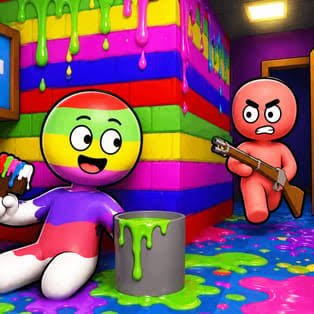
Hide and Paint is a multiplayer hide-and-seek simulation game by OnRush Studio where you become a blank white chameleon and try to disappear into colorful environments. Instead of simply standing behind an object, you paint your character to match nearby colors and find an angle that makes your disguise difficult for the hunters to notice.
The idea is easy to understand, but a convincing disguise takes some thought. You need to choose a suitable location, match your appearance with the environment, position yourself carefully, and stay unnoticed while the searching phase takes place.
| Game Detail | Information |
|---|---|
| Game | Hide and Paint |
| Developer | OnRush Studio |
| Genre | Simulation, Multiplayer, Hide and Seek |
| Gameplay | Hide, paint your character, blend into maps, avoid detection |
| Controls | WASD or Arrow Keys, Mouse, F |
| Supported Devices | Desktop, Phone, Tablet |
| Release | July 2026 |
| Latest Update | September 2026 |
| Current Rating | 4.2 |
| Current Votes | 230K+ |
| Friends | Invite and join supported |
| Quests | Yes |
| Leaderboard | Yes |
| Multiplayer | Online multiplayer |
Poki directly credits OnRush Studio and currently describes Hide and Paint as a multiplayer game built around camouflage and hide-and-seek.
How Hide and Paint Works
A match begins by placing players inside a colorful map.
As a hiding player, you need to:
- Move around the environment
- Look for a convincing hiding place
- Match your character with nearby colors
- Position yourself carefully
- Stay hidden while hunters search
- Survive the round
The basic loop is:
search map → choose location → paint character → line up disguise → stay hidden → survive round
Poki describes your character as a blank white chameleon that needs to visually blend into the surrounding world.
Hide and Paint Controls
The current Poki desktop controls are:
- WASD: Move
- Arrow Keys: Alternative movement
- Mouse: Move the camera
- F: Paint yourself
On mobile, Poki provides on-screen controls for movement, camera control, and painting.
Start By Learning The Camera
Movement is straightforward, but the camera matters just as much.
A hiding spot may look convincing from one direction and obvious from another.
Move the camera around before settling into position.
This helps you see whether your character actually fits the background.
You Begin As A White Chameleon
Poki describes the playable hiding character as a blank white chameleon.
That blank appearance is important because the main mechanic involves changing your colors to match the environment.
Instead of starting with a fixed costume, your disguise comes from the area around you.
Painting Is The Main Mechanic
Press F on desktop to use the painting system.
The goal is to make your character visually similar to nearby objects or surfaces.
Painting alone does not automatically create a strong hiding place.
Your location and angle still matter.
Color Matching Helps You Blend In
A bright character standing against a very different background will be easier to notice.
Look at the dominant colors around the place where you want to hide.
Then adjust your character so the contrast is less obvious.
The game turns camouflage into a creative visual puzzle.
Position Matters As Much As Color
Poki specifically highlights finding the correct angle as one of the keys to staying hidden.
That means the best hiding strategy is not simply:
find matching color → stop
A better game sequence is:
find location → paint → check angle → adjust position → stay still
Look For Natural Hiding Locations
A useful hiding location is somewhere your character does not immediately look out of place.
Large props, walls, decorative objects, and visually busy areas can provide more choices than an empty open space.
The game rewards observation more than speed during the hiding phase.
Staying Still Can Help Your Disguise
Movement is easier to notice than a well-positioned stationary character.
Once you have selected a convincing spot, unnecessary movement may make the disguise easier to notice.
That gives the game two distinct stages:
preparation: move, paint, adjust.
hiding: stay convincing and avoid drawing attention.
Hunters Search The Map
Once hiding is complete, the searching side tries to identify the disguised players.
Current Poki screenshots show the hunter perspective looking through environments filled with painted objects and hidden characters.
The game keeps this interaction cartoon-like and focused on visual searching rather than realistic action.
The Game Uses Different Roles
Hide and Paint is not simply a group of players all doing the same thing.
Different rounds can involve hiding and searching roles.
That creates two very different experiences:
Hiders: camouflage themselves.
Hunters: search the environment for disguised players.
The contrast helps repeated matches feel less repetitive.
Maps Have Different Visual Themes
Current Poki material shows multiple environments and a central lobby with portals leading toward different maps and themed locations.
This matters because camouflage works differently depending on the environment.
A color combination that works well on one map may stand out badly on another.
Learn Each Map Gradually
You do not need to memorize every hiding place immediately.
During early matches, notice:
- Large objects
- Corners
- Wall colors
- Decorative areas
- Busy textures
- Open spaces
After several rounds, you start recognizing which parts of each map give you more creative camouflage options.
Some Objects Have Strong Patterns
One current Poki screenshot shows a player painting a large striped popcorn-bucket-style disguise and customizing its appearance to match the environment.
Patterns make the painting mechanic more interesting because matching one flat color may not always be enough.
Do Not Use The Same Hiding Place Every Round
A location that worked once may be checked more carefully later.
Multiplayer games become less predictable when human players remember common hiding spots.
Try different parts of the map rather than relying on one favorite position every match.
Friends Can Play Together
Poki’s current multiplayer menu shows options to create an invitation or join a friend’s game.
That means Hide and Paint is not limited to completely random multiplayer sessions.
You can also join friends through the game’s current invitation system.
Multiplayer Is A Core Feature
Hide and Paint should be described as an online multiplayer game.
The other players are central to the hide-and-seek structure rather than being an optional side mode.
There is no traditional offline single-player campaign advertised on the main Poki listing.
The Lobby Connects Different Activities
Current Poki screenshots show a central hub or lobby.
Players can move around this area and use portals leading toward maps and themed locations.
This gives the game more structure than simply loading directly into one repeated arena.
A Leaderboard Is Available
Poki’s current screenshots also show a leaderboard in the main hub with player positions and scores.
That gives returning players another progression goal beyond surviving one match.
You can compare performance across multiple sessions.
Quests Add Extra Goals
The September 2026 version includes a quest screen.
Poki’s current screenshots show challenges involving goals such as winning matches and completing objectives for rewards.
This means the game now gives you something to work toward outside the immediate hide-and-seek round.
Rewards Support Longer-Term Progress
Quest rewards add progression to a game that could otherwise be only a sequence of short matches.
Instead of every session being completely separate, completing objectives can contribute to wider account or character progress.
The exact reward pool can change as the game receives updates.
The September 2026 Update Matters
Hide and Paint is a very recent game.
Poki currently lists:
Release: July 2026
Latest update: September 2026.
Because the update happened in the current month, older guides may already miss features shown in the newest Poki screenshots, such as the current quest and multiplayer invitation interfaces.
Current Rating
Poki currently shows approximately:
4.2 from 230,000+ votes.
Localized Poki pages crawled at slightly different times show totals above 233K and 234K, which confirms the vote count is changing quickly.
For publishing, 4.2 from 230K+ votes is the safer rounded format.
Desktop Play
Poki officially supports desktop computers.
Desktop gives you:
WASD or Arrow Keys for movement,
Mouse for the camera,
and F for painting.
The mouse makes fine camera adjustments especially easy when positioning a disguise.
Phone Play
Poki officially supports phones.
The mobile version replaces keyboard and mouse input with on-screen controls.
A current Poki screenshot specifically shows Hide and Paint running on mobile with touch controls.
Tablet Play
Tablets are also officially supported.
The larger touch display may make it easier to see environmental details while still using mobile-style controls.
Who Created Hide and Paint?
Hide and Paint was created by OnRush Studio.
Poki directly credits the developer.
The Poki listing also links to OnRush Studio’s privacy information, providing another direct connection between the game and the developer.
Other OnRush Studio Games
Poki currently connects OnRush Studio with:
- Tribals.io
- Venge.io
- Eat the World
- Shipo.io
- Arcane Archer
- Jungle Friends
- Burger Bounty
- MagicLand.io
- Fishing League
- Sprint League
- Build League
- Soccer League
- TexasWorm.io
Burger Bounty Comes From The Same Studio
Burger Bounty is another OnRush Studio game listed by Poki.
Its restaurant gameplay is completely different from Hide and Paint, but both use accessible browser controls and progression systems.
The main connection is the developer.
Sprint League Is Another Recent OnRush Game
Poki also connects Sprint League with OnRush Studio.
Again, its mechanics differ significantly, but it shows that OnRush Studio works across several casual browser genres.
Venge.io Is Part Of The Developer Catalogue
Venge.io is another OnRush-associated title on Poki.
For Hide and Paint, however, the defining mechanic is camouflage and visual matching rather than ordinary arena action.
Do Not Confuse It With Other Games Named Hide and Paint
There are other games using the same or a very similar name.
For example, Roblox currently has a separate Hide and Paint experience by Dabloonian Empire.
Google Play also has Hide and Paint: Online from AIM Studio, which is a different mobile title.
For the Mopoga page discussed here, the correct version is:
Developer: OnRush Studio
Poki release: July 2026
Latest update: September 2026
Common Hide and Paint Mistakes
One common mistake is choosing a hiding spot before checking its colors.
Another is matching the color but ignoring the viewing angle.
Players can also keep moving after reaching a good position, making the disguise easier to notice.
Using the same obvious location every round can also become less effective as other players learn the map.
A Better Way To Play
Start by learning the movement and camera controls.
Look around the map before settling somewhere.
Choose a location with useful surrounding colors.
Paint your character.
Rotate the camera to check the disguise from different angles.
Make a small position adjustment if needed.
Then avoid unnecessary movement during the searching phase.
A useful game rhythm is:
look → move → choose spot → paint → check angle → hide
Related Categories
Hide and Paint fits naturally into:
- Multiplayer Games
- Simulation Games
- Hide and Seek Games
- Chameleon Games
- Camouflage Games
- Party Games
- 3D Games
- Mobile Games
- Online Games
Poki currently places it under Simulation Games and describes the main experience as multiplayer hide-and-seek.
What Makes Hide and Paint Different?
Hide and Paint changes the normal hide-and-seek idea by making camouflage itself the main puzzle.
You are not only looking for a hidden corner.
You start as a blank white chameleon.
Choose a location.
Paint yourself to match it.
Adjust your angle.
Then try to visually disappear into the map while other players search.
The July 2026 release is already supported by a September update with friend invitations, quests, rewards, multiple themed environments, and a leaderboard, giving the game more long-term structure than a basic one-round hide-and-seek browser title.



Reviews
There are no reviews yet.