

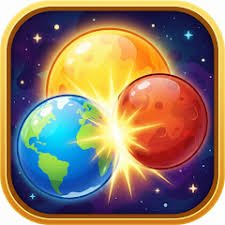
Planet Merge is a physics-based merge puzzle game by JMD where you launch small planets into a circular play area and combine matching ones into larger worlds. Gravity keeps the planets moving after each shot, so a placement that looks safe at first can roll, bump into another planet, and trigger an unexpected chain of merges.
What changed the game for me was stopping my habit of aiming only at the nearest matching planet. The better move is often the one that keeps the whole orbit area open. A quick merge helps now, but a crowded edge can make the next few shots much harder.
| Game Detail | Information |
|---|---|
| Game | Planet Merge |
| Developer | JMD |
| Genre | Skill / Merge Puzzle |
| Gameplay Style | Physics-based planet merging |
| Main Objective | Merge matching planets into larger celestial bodies |
| Controls | Click and hold to aim, release to shoot |
| Supported Devices | Desktop, Phone, Tablet |
| Browser Release | July 2026 |
| Latest Verified Update | August 2026 |
| Current Rating | About 4.2 |
| Current Votes | 5.9K+ |
| Multiplayer | Single-player |
Aim First, Then Let Gravity Work
Planet Merge is not a simple place-and-forget puzzle.
You choose where a planet enters the play area, but once it is released, gravity and collisions influence where it finally settles.
The basic loop is:
aim → release → watch the collision → merge matching planets → make room for the next shot
That last part matters most.
I found that the best move was not always the one that created the biggest immediate merge. Sometimes placing a smaller planet into a safer gap made the next two shots much easier.
Planet Merge Controls
The controls are very simple.
Desktop
- Click and hold to aim.
- Move the pointer to adjust direction.
- Release to shoot the planet.
Phone And Tablet
- Touch and hold to aim.
- Drag to adjust the shot.
- Release to launch.
The current browser listing confirms support for desktop, phone, and tablet.
For technical background, the MDN Pointer Events documentation explains how web apps can handle mouse and touchscreen input through a common event system.
The W3C Pointer Events standard provides the wider browser standard behind that kind of hardware-independent input.
Matching Planets Creates Bigger Worlds
Two matching planets combine into a larger one.
That gives the game its core progression system.
You begin with very small celestial bodies.
As matching pairs combine, larger and more valuable planets appear.
The current browser description says the progression moves from tiny moons toward much larger planets and gas giants.
That means every merge does two things:
- clears some space
- creates a larger object that now needs even more careful positioning
The board therefore becomes harder to manage as your progress improves.
Do Not Crowd The Edge
The edge of the play area is where I became most cautious.
A planet placed too close to the boundary can create trouble once another object collides with it.
Even if the first shot looks stable, a later impact can push the whole cluster outward.
I prefer leaving more breathing room around the outer area whenever possible.
That gives new planets space to roll inward instead of immediately contributing to a crowded wall.
Watch The Whole Board Before Shooting
The obvious matching pair can distract you from the rest of the layout.
Before every shot, I check:
- where the largest planet sits
- which side is most crowded
- whether a matching pair is already close together
- where a new planet is likely to roll
- whether one collision could trigger another merge
That short scan made my placement much more consistent.
Planet Merge rewards planning the board rather than only the next pair.
Chain Reactions Can Be Very Useful
One shot can affect several planets.
If the new object hits one pair, that merge can shift another object and cause a second match.
Those chain reactions are satisfying, but I would not depend on them blindly.
A better approach is to create conditions where a chain reaction is possible without making the board unstable if it does not happen.
That keeps your strategy useful either way.
Leave Gaps Between Large Planets
Large planets take up more room.
If several of them become packed together too early, smaller planets can get trapped in awkward spaces.
I found it easier to maintain some open gaps between the biggest objects.
That gives smaller planets somewhere to move while you wait for the matching piece needed to upgrade them.
A clean-looking board is not always necessary, but a board with usable gaps is much easier to continue.
Do Not Force Every Match Immediately
A matching planet may be visible, but the shot angle can still be bad.
If reaching it requires bouncing off several larger objects, I would often wait.
A safer placement can be more useful than forcing a risky merge.
The important question is not only:
Can these two planets merge?
It is:
Can they merge without making the rest of the board worse?
That distinction becomes more important as the play area fills.
Physics Changes Every Round
Planet Merge uses collisions and gravity rather than a perfectly fixed grid.
That means the same basic placement can behave slightly differently depending on what is already touching nearby objects.
I like that uncertainty because it prevents the puzzle from becoming a simple pattern memorization exercise.
You still plan the shot.
But you also need to react to what happens afterward.
Take A Moment After Every Collision
I initially fired the next planet as soon as the previous one stopped moving.
That was often too fast.
Sometimes a cluster needs another moment to settle after a merge.
Waiting briefly lets you see the true shape of the board.
That gives you more accurate information for the next shot and reduces the chance of aiming at a space that is about to disappear.
Phone Play Fits The Aiming Mechanic Well
Planet Merge officially supports phones.
The hold-drag-release control works naturally on a touchscreen.
A phone also suits short sessions because there are no complicated menus or keyboard controls.
The main limitation is screen size.
When the board becomes crowded, I found it useful to aim more slowly because small gaps can be harder to judge accurately.
Tablet Gives You Better Visual Space
Tablet play uses the same touch controls but gives the board more room.
That can help when several planets are clustered tightly together.
You can see:
- small open gaps
- crowded edges
- likely collision paths
- larger planets that need future matches
The gameplay itself does not change, but the larger display can make planning easier.
Desktop Gives Precise Aiming
Desktop play uses mouse control.
That can make fine aiming easier when you want to place a planet into a narrow gap.
The same hold-and-release idea remains intact.
From a player’s perspective, the main difference is precision rather than different rules.
Who Created Planet Merge?
Planet Merge was created by JMD.
The current browser listing identifies it as JMD’s first game on Poki.
That detail is useful because several unrelated games called Planet Merge exist elsewhere under different developers.
For this Mopoga page, the correct browser version is:
Developer: JMD
Do Not Confuse It With Other Planet Merge Games
There are several unrelated games using the same or very similar title.
For example, another browser game called Planet Merge is attributed to ZeusBro Studio on a different platform.
There are also separate mobile apps with the Planet Merge name from other developers.
For Mopoga, keep the version details tied to the JMD browser game:
- Developer: JMD
- Release: July 2026
- Latest Update: August 2026
- Rating: about 4.2
- Devices: desktop, phone, tablet
That prevents unrelated app-store and browser records from being mixed together.
Release And Latest Update
The current verified browser timeline is:
Release: July 2026
Latest Update: August 2026
That makes Planet Merge a recent browser release.
For Mopoga, I would keep both dates in the details table so later updates can be added without changing the original release information.
Current Planet Merge Rating
The current browser listing shows approximately:
4.2 from 5,925 votes.
That total can continue changing as more players rate the game.
For evergreen content, 5.9K+ votes is safer than treating one exact number as permanent.
Is Planet Merge Multiplayer?
Planet Merge is currently a single-player merge puzzle game.
The browser listing does not show local multiplayer or online matchmaking.
The challenge is entirely about managing your own play area and building the largest possible celestial objects.
Common Planet Merge Mistakes
The first mistake is aiming only at the nearest matching planet.
The second is ignoring the crowded side of the board.
Another problem is placing too many large planets against the edge.
I also found that firing the next shot too quickly made it harder to judge how the previous merge had changed the layout.
Finally, do not assume every game called Planet Merge is the same title. Several separate browser and mobile versions exist under different developers.
A Better Planet Merge Routine
This approach worked well for me:
- Check which side of the board is most crowded.
- Identify matching planets that are already close.
- Look for open gaps near the center.
- Aim the next shot carefully.
- Release and let gravity settle the pieces.
- Wait for any chain reactions to finish.
- Reassess the full board before firing again.
- Keep larger planets away from the most crowded edge when possible.
The important part is repeating the board check after every shot.
More Merge And Puzzle Games On Mopoga
If you want another game built around merging, Stick Merge uses a completely different system where matching weapons combine into stronger guns before shooting challenges.
For a puzzle with stronger route planning, Mine Line asks you to move through an underground area, connect matching rocks, manage fuel, sell resources, and buy upgrades.
You can also try Big Tall Small if you prefer logic puzzles based on switching between three characters with different sizes and abilities.
Planet Merge Compared With Grid-Based Merge Games
Traditional merge puzzles often use fixed grid positions.
Planet Merge is different because its objects can move after placement.
Gravity and collisions keep changing the layout.
That means two identical planets can begin close together and still separate before merging.
Or one collision can unexpectedly push them together.
The physics makes every drop more dynamic than a simple tile-combination system.
What Makes Planet Merge Different?
Planet Merge takes the familiar merge formula and replaces a fixed board with moving celestial bodies.
You choose the shot.
Gravity chooses part of what happens next.
That creates a useful balance between planning and reaction.
For me, the biggest improvement came from caring less about making the fastest possible merge and more about keeping enough open space for future shots.
The larger your planets become, the more important that space management becomes.
Related Categories
Planet Merge fits naturally into:
- Merge Games
- Puzzle Games
- Skill Games
- Physics Games
- Space Games
- Casual Games
- Mobile Games
- Single-Player Games
Its current primary browser classification is Skill Games, while the gameplay itself is clearly built around merge-puzzle mechanics.
About Planet Merge
Planet Merge is a physics-based merge game by JMD where you launch planets into orbit and combine matching ones into larger celestial bodies.
The game supports desktop, phone, and tablet and uses a simple hold-to-aim and release-to-shoot control system.
Each shot changes the board because gravity and collisions keep the planets moving after they enter the play area.
The main challenge is therefore not just finding matching pairs. It is creating those pairs while preserving enough open space for the next planet.


Reviews
There are no reviews yet.