

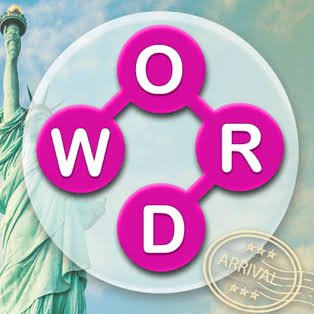
Word City Crossed is a word puzzle game from Unico Studio where you connect groups of letters to form valid words, fill crossword-style grids, collect coins, and gradually move from one city to the next.
I found the easiest-looking letters were not always the best place to start. Making every short word immediately can leave the longer answer harder to notice. My better approach was to study all the letters first, identify likely endings or common combinations, and then use the shorter words to confirm what remained.
| Game Detail | Information |
|---|---|
| Game | Word City Crossed |
| Developer | Unico Studio |
| Genre | Educational / Word Puzzle |
| Gameplay Style | Letter connecting and crossword completion |
| Main Objective | Form valid words and complete each puzzle grid |
| Progression | Complete puzzles to travel to new cities |
| Main Resource | Coins |
| Helpful Features | Hints and power-ups |
| Controls | Click or tap a letter, then drag across other letters |
| Supported Devices | Desktop, Phone, Tablet |
| Browser Release | December 2020 |
| Latest Verified Update | July 2024 |
| Current Rating | About 4.2 |
| Current Votes | 141K+ |
| Multiplayer | Single-player |
Build Words From The Letters You Are Given
Every puzzle gives you a small group of letters.
Your job is to connect them in an order that produces valid words.
Correct answers fill spaces in the crossword grid and move you closer to completing the current level. Once the puzzles for a city are finished, the game moves you onward to another destination.
The basic loop is:
study letters → connect a word → fill the grid → find remaining answers → complete the city
There is no complicated movement system or character control.
Most of the challenge comes from noticing combinations that are easy to overlook.
Word City Crossed Controls
The controls are simple.
Desktop
Click a letter, hold the mouse button, and drag across the other letters needed to make a word.
Phone And Tablet
Touch the first letter and drag your finger across the remaining letters.
The current browser edition officially supports desktop, phone, and tablet.
The MDN Pointer Events documentation explains how browsers can handle mouse and touchscreen input through a shared event model.
Look For Longer Words First
One habit that helped me was checking whether the available letters could form a longer word before entering every short combination I noticed.
Longer words often reveal more of the crossword grid.
Once several letters are fixed in place, shorter answers become easier to identify.
That gives a useful order:
- Inspect all available letters.
- Look for the longest obvious combination.
- Check the grid.
- Use revealed letters as clues.
- Fill shorter words afterward.
You do not need to follow this every time, but it works well when you feel stuck.
Use The Crossword Grid As A Clue
The circular letter group is only half of the puzzle.
The crossword spaces tell you how long each missing word should be and where it crosses other answers.
That means a partially completed grid can rule out many possibilities.
If you know the answer needs five letters and one crossing already gives you the third letter, you have much more information than you had at the beginning.
I found it useful to stop staring at the letter wheel and check the grid whenever I could not see another word.
Common Word Endings Can Help
English words often share recognizable endings and beginnings.
For example, a group of letters may suggest a familiar suffix or compound pattern.
Cambridge Dictionary’s guide to word formation explains common ways English creates words through prefixes, suffixes, compounds, and other structures.
You do not need formal grammar knowledge to play.
The practical point is that familiar letter patterns can make difficult words easier to spot.
Do Not Keep Swiping Random Combinations
Randomly connecting every possible sequence can occasionally uncover an answer.
It also makes the puzzle less satisfying and can distract you from useful patterns.
I prefer taking a few seconds to consider:
- likely word length
- common letter pairings
- letters already revealed in the grid
- repeated endings
- whether a shorter word may sit inside a longer one
That usually leads to cleaner solutions.
Coins Give Correct Answers More Value
Completing puzzles earns coins.
Those coins can be used for hints and other helpful power-ups when a word becomes difficult to identify.
I would not spend them the moment a puzzle slows down.
First try rearranging the letters mentally and checking the crossword intersections.
A hint becomes much more useful when you have already narrowed the possibilities.
Save Hints For Genuine Sticking Points
It is easy to use a hint because one word does not appear immediately.
I usually wait.
Try:
checking the word length → reading revealed letters → testing common endings → returning to the letter group
If none of those helps, then a hint has more value.
Saving coins also gives you more help available when the later puzzles become less obvious.
Short Words Can Unlock Longer Ones
Although I often check longer words first, short words still matter.
A three-letter answer may reveal one crossing letter inside a much larger word.
That one letter can be enough to make the longer answer obvious.
This is why the puzzle should be treated as one connected grid rather than several unrelated word questions.
Every solved answer can help with another.
Travel Gives The Levels A Clear Structure
Word City Crossed wraps its crossword puzzles around a travel theme.
You solve the puzzles associated with one city and move to another after completing the set.
That progression does not change the basic letter-connecting mechanic, but it gives the levels a stronger sense of movement than a simple endless list of grids.
Instead of thinking only about the next puzzle, you are also working toward the next destination.
Vocabulary Matters More Than Speed
Word City Crossed is categorized as an educational game, and its central mechanic relies on recognizing valid words.
I would not rush.
There is more value in spending a few seconds considering how the letters can combine than swiping repeatedly.
For players learning English, a learner’s dictionary can also help explain unfamiliar words after they appear. The Cambridge Learner’s Dictionary provides simple definitions and usage examples based on its English corpus.
That is useful outside the game when you want to know what a newly encountered word actually means.
Rearrange The Letters Mentally
Sometimes the same letter arrangement becomes visually familiar and your brain stops noticing alternatives.
When that happens, I stop looking at the current order and imagine the letters rearranged.
For example, check:
- which letters could begin a word
- which are likely endings
- whether two consonants commonly sit together
- whether one vowel can connect several possibilities
This small reset often helps more than repeatedly tracing the same unsuccessful word.
Check For Words Inside Other Words
Longer words may contain shorter valid combinations.
If you identify a six-letter word, look at its letters again.
There may also be a four-letter or three-letter answer hiding inside the same group.
That means finding one strong word can sometimes produce several answers rather than only one.
Phone Play Fits The Drag Mechanic Well
Word City Crossed officially supports phones.
The swipe-style word creation feels natural on a touchscreen.
You simply touch the first letter and move across the sequence you want.
The main thing I would avoid is moving too quickly when two letters sit close together.
A slower swipe gives you more control over the exact sequence.
Tablet Gives The Grid More Space
Tablet play uses the same touch controls but gives the crossword and letter wheel more room.
That can be useful on later puzzles where several answers intersect.
A larger view makes it easier to compare missing word lengths and revealed letters without shifting your attention constantly.
Desktop Makes The Crossword Easy To Inspect
Desktop play uses the mouse.
The larger display can make it easier to study both the available letters and the whole crossword grid at once.
The rules do not change.
The difference is mainly visual comfort and pointer precision.
Who Created Word City Crossed?
Word City Crossed was created by Unico Studio.
Unico Studio began operating in 2018 and has built a large catalogue of puzzle, word, simulation, and casual games. Its official site lists word-focused titles including Word City: Connect Word Game, Word City Classic: Word Search, Word Pearls, Word Tower, Word Voyage, and several other puzzle games.
The same developer is also behind well-known browser puzzle games such as Brain Test: Tricky Puzzles, Brain Test 2, Brain Test: Tricky Words, and 4 Pics 1 Word.
Release And Latest Update
The current verified browser timeline is:
Release: December 2020
Latest Update: July 2024
For Mopoga, I would keep both fields separate.
The December 2020 date records the browser release, while July 2024 represents the latest currently listed update.
Current Word City Crossed Rating
The current browser listing shows:
4.2 from 141,569 votes.
That vote total can continue changing as more players rate the game.
For an evergreen Mopoga table, 141K+ votes is cleaner than treating one exact number as permanent.
Is Word City Crossed Multiplayer?
Word City Crossed is best described as a single-player word puzzle game.
The current listing focuses on solving crossword levels, earning coins, using hints, and travelling between cities rather than competitive or cooperative multiplayer.
That makes it suitable for short individual puzzle sessions where you can work at your own pace.
Common Word City Crossed Mistakes
The first mistake is entering every short word before studying the full set of letters.
The second is ignoring the crossword grid when you get stuck.
Another problem is spending coins on hints too early.
I also found random swiping less useful than deliberately looking for word patterns.
Finally, do not assume an unfamiliar valid word is wrong simply because you have not seen it before. If the game accepts it, checking a reputable dictionary afterward can turn that puzzle into a useful vocabulary lesson.
A Better Word-Solving Routine
This approach worked well for me:
- Read all the available letters.
- Check the missing word lengths.
- Find one long or obvious word.
- Use the new crossword letters as clues.
- Search for shorter words inside larger combinations.
- Rearrange the letters mentally when stuck.
- Save coins until a puzzle genuinely needs a hint.
- Finish every crossword in the city.
- Move on to the next destination.
The main idea is using each solved word to make the remaining answers easier.
More Puzzle Games On Mopoga
If you want puzzles based on unusual wording rather than vocabulary, The Impossible Quiz 2 asks you to read questions carefully, notice visual tricks, and think beyond normal multiple-choice logic.
For a spatial puzzle instead of a word game, Big Tall Small has three differently sized characters who need to cooperate around crates, gaps, switches, doors, and other level obstacles.
You can also try Mine Line when you want a puzzle with more movement, resource collection, rock combinations, fuel management, and upgrades.
Word City Crossed Compared With Traditional Crosswords
A traditional crossword normally gives you written clues.
Word City Crossed gives you letters instead.
You need to work backward from the available characters and the empty grid.
That changes the skill being tested.
Instead of answering a definition directly, you are combining:
- letter recognition
- vocabulary
- word length
- crossing letters
- pattern recognition
That makes it closer to a word-connect game blended with crossword structure.
What Makes Word City Crossed Different?
Word City Crossed combines three simple ideas:
connect letters
complete crosswords
move between cities
The controls are easy, but the puzzles gradually ask you to recognize less obvious combinations.
For me, the biggest improvement came from using the crossword itself as a clue instead of staring only at the available letters.
Every completed word gives information about the ones that remain.
Related Categories
Word City Crossed fits naturally into:
- Word Games
- Crossword Games
- Educational Games
- Brain Games
- Puzzle Games
- Vocabulary Games
- Mobile Games
- Single-Player Games
Its current primary browser classification is Educational Games.
About Word City Crossed
Word City Crossed is an educational word puzzle game by Unico Studio where you connect letters to build words and complete crossword-style grids.
Solve every puzzle in a city to continue your journey, collect coins along the way, and use hints or power-ups when a difficult word slows you down.
The browser edition supports desktop, phone, and tablet with simple drag controls.
Its strongest feature is how each correct answer helps reveal the next one, turning a small group of letters into a connected vocabulary puzzle.

Reviews
There are no reviews yet.