

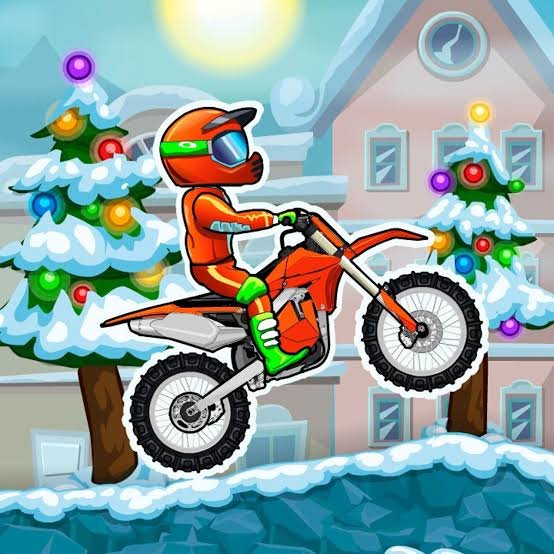
Moto X3M Winter is a winter-themed motorcycle racing game from MadPuffers where you guide an arcade bike through snowy courses filled with moving platforms, ramps, holiday scenery, and timing-based obstacles. It is also known as Moto X3M 4: Winter because it is the fourth main entry in the Moto X3M series.
The controls are easy to understand, but the game became much easier for me once I stopped holding accelerate through every section. Some parts reward speed, while others are really small physics puzzles where entering at the wrong angle can cost more time than slowing down for a moment.
| Game Detail | Information |
|---|---|
| Game | Moto X3M Winter |
| Alternative Name | Moto X3M 4: Winter |
| Developer | MadPuffers |
| Genre | Driving, Racing |
| Gameplay Style | Timed motorcycle courses, physics obstacles, stars |
| Accelerate | W or Up Arrow |
| Brake | S or Down Arrow |
| Bike Position | A/D or Left/Right Arrow |
| Supported Devices | Desktop, Phone, Tablet |
| Original Release | December 2017 |
| HTML5 Version | November 2018 |
| Current Platform Release | March 2019 |
| Latest Platform Update | May 2025 |
| Current Rating | 4.3 |
| Current Votes | 1.29M+ |
| Multiplayer | Single-player |
GameFAQs records December 2017 as the original release and credits MadPuffers as both developer and publisher.
How Moto X3M Winter Works
Every level asks you to reach the finish as efficiently as possible.
The bike moves through a side-scrolling course while the environment constantly changes around it. One section may give you a long clear run, while the next introduces moving surfaces or an obstacle that changes when you approach it.
Your final time matters because the game awards stars based on performance.
That creates an interesting balance.
Moving quickly matters, but recovering from repeated mistakes costs more time than taking one controlled approach.
Moto X3M Winter Controls
The browser version uses four basic movement inputs:
- W or Up Arrow: Accelerate
- S or Down Arrow: Brake
- A or Left Arrow: Adjust the bike backward
- D or Right Arrow: Adjust the bike forward
The current browser edition also supports phone and tablet play through on-screen controls.
The MDN keyboard-event documentation explains how web applications recognize keyboard input, which is useful background for understanding why browser games can use familiar WASD and arrow-key controls.
The Winter Courses Change The Feel
Moto X3M Winter keeps the core structure of the earlier games but moves everything into a seasonal environment.
Courses include snowy mountains, winter decorations, candy-cane structures, Christmas trees, snowmen, and other holiday-themed scenery.
The visual theme is not the only change.
Track layouts introduce their own moving objects and unusual surfaces, so familiarity with another Moto X3M game does not mean you already know where every challenge appears.
That gives this version its own identity rather than making it simply a visual reskin.
Your Finish Time Determines Stars
Stars are tied to how efficiently you complete each level.
A clean run normally earns more than a run filled with restarts and mistakes.
Those stars also matter outside the individual stage because they contribute toward unlocking additional bike options.
I found it better to treat the first successful run as practice.
Once you know which sections slow you down, replaying the course makes much more sense because you already know where the difficult moments appear.
Learn The Course Before Chasing Three Stars
Trying to earn the maximum result immediately can make a new track feel harder than necessary.
My approach would be:
First, finish the level.
Second, remember where you lost time.
Third, replay it with those sections already in mind.
This separates learning from optimization.
It is much easier to improve a route you understand than to chase a perfect time on a course you have never seen.
Checkpoints Reduce Repetition
Moto X3M Winter uses checkpoints during its courses.
That means one failed section does not necessarily force you to replay the entire level from the beginning.
The checkpoint system is important because many stages introduce their more difficult obstacles after you have already completed several sections successfully.
Without checkpoints, learning those later parts would involve repeating too much of the track.
The wider Moto X3M mobile release also advertises checkpoint-based course progression as part of the series. Apple’s official Moto X3M listing provides first-party platform information for the mobile version of the series.
Bike Balance Matters More Than Constant Speed
The game may look like a simple race, but positioning the bike correctly is a major part of reaching the finish consistently.
Holding accelerate all the time can put the bike into awkward positions when a ramp or moving surface appears unexpectedly.
What helped me was separating open sections from technical ones.
On a clear path, maintaining momentum makes sense.
When the track changes shape, it is usually better to pay attention to the bike’s position before worrying about maximum speed.
That makes the game feel more controlled.
Obstacles Behave Like Small Physics Puzzles
Many parts of Moto X3M Winter are less about traditional racing and more about understanding what the course is about to do.
A platform might move.
A surface may change position.
A section may become easier when approached with a different amount of speed.
This is why immediately repeating the exact same attempt after failing does not always help.
If the same part keeps causing trouble, change one thing.
Maybe the issue is entering too quickly.
Maybe you need a more level position.
Maybe you reacted too late to the course changing.
Thinking about the reason for the mistake is more useful than simply restarting faster.
Stars Unlock More Ride Options
Stars collected from completed levels can be used toward additional ride choices.
The winter edition is especially known for its festive unlocks, including Santa-themed content.
These rewards give replaying earlier stages a purpose beyond improving a personal time.
The broader official Moto X3M mobile version similarly uses stars to unlock additional motorcycles and vehicles. Apple’s Moto X3M product page confirms star-based vehicle unlocks across the series.
Mobile And Desktop Play
Moto X3M Winter currently supports:
- Desktop
- Phone
- Tablet
Desktop players use keyboard controls.
Mobile players use on-screen controls designed around the same basic actions.
The W3C Pointer Events standard explains how web applications can handle input from different devices such as touchscreens and mice through a common event system.
The game itself remains the same.
The main difference is whether you prefer physical keys or touchscreen buttons.
Moto X3M Winter Is Part Of A Larger Series
Moto X3M Winter is the fourth numbered entry in the main series.
The broader sequence includes:
- Moto X3M
- Moto X3M 2
- Moto X3M 3
- Moto X3M Winter
- Moto X3M Pool Party
- Moto X3M Spooky Land
GameFAQs records Moto X3M Winter as the 2017 entry, following Moto X3M 3 from 2016.
Later games keep the same basic physics-racing idea while replacing the setting and track designs.
Moto X3M Winter Vs Moto X3M
The original Moto X3M establishes the core formula: timed motorcycle stages, physics-based obstacles, checkpoints, and performance ratings.
Moto X3M Winter keeps that structure but gives it a much stronger seasonal identity.
The snowy environment also means the courses look quite different from the original game’s more general stunt-racing presentation.
If you already understand Moto X3M, the controls should feel familiar immediately.
The main learning curve comes from recognizing the new track layouts.
Moto X3M Winter Vs Pool Party
Moto X3M 5 Pool Party came after Winter and moved the series into a bright summer setting.
The main mechanics remain recognizable, but the environmental designs change.
Winter uses snow, holiday scenery, and seasonal structures.
Pool Party uses water-themed environments and summer-style courses.
This means choosing between them is mostly about which set of levels and visual theme you prefer rather than learning an entirely different game system.
Who Created Moto X3M Winter?
Moto X3M Winter was created by MadPuffers.
GameFAQs identifies MadPuffers as the developer behind the 2017 release.
The studio is also associated with:
- Moto X3M
- Moto X3M Pool Party
- Moto X3M Spooky Land
- Basketball Stars
- Basketball Legends
- Football Masters
- Tennis Masters
The Moto X3M series is one of MadPuffers’ best-known browser-game projects.
Release History Explained
There are several dates associated with Moto X3M Winter because the game has existed across different browser technologies and platforms.
The clearest timeline is:
Original Flash release: December 2017
HTML5 conversion: November 2018
Current major browser-platform listing: March 2019
Latest listed platform update: May 2025
GameFAQs independently confirms the original December 2017 release.
The current browser listing records March 2019 for that platform and May 2025 as its latest update.
Keeping these dates separate avoids incorrectly presenting the 2019 platform release as the first appearance of the game.
Is Moto X3M Winter Multiplayer?
Moto X3M Winter is a single-player game.
The challenge comes from completing courses efficiently, collecting stars, and improving your previous results rather than competing against another connected player in real time.
That works well with the level structure because you can immediately replay a stage after learning something new about it.
Current Moto X3M Winter Rating
The current browser listing shows approximately:
4.3 from more than 1.29 million votes.
That is a particularly large vote count for a browser racing game.
Ratings can continue to change as more players vote, so the figure should be treated as a current snapshot rather than a permanent specification.
Common Mistakes In The Game
The most common mistake is treating every section as a full-speed section.
Some track layouts simply need more control.
Another mistake is making too many adjustments after the bike is already positioned correctly.
Players can also spend too much time worrying about a perfect star result before they understand the level.
A better order is:
learn the course, finish it consistently, then improve the time.
That makes progress much easier to measure.
A Better Way To Improve Your Runs
Start by concentrating on clean completions.
Once you can reach the finish reliably, notice which sections repeatedly slow you down.
Then work on those sections individually.
You do not need to change the entire run because one part is inefficient.
Improving one problem area at a time usually produces a better overall result than trying to play the entire course faster.
Related Categories
Moto X3M Winter fits naturally into:
- Motorcycle Games
- Racing Games
- Driving Games
- Physics Games
- Winter Games
- Skill Games
- Single-Player Games
Its current browser listing places it primarily under Driving Games.
More Games From MadPuffers
Players who enjoy Moto X3M Winter may also recognize several other MadPuffers games.
The most closely related are:
Moto X3M for the original style.
Moto X3M Pool Party for a summer-themed variation.
Moto X3M Spooky Land for a Halloween-themed version.
MadPuffers has also worked on sports titles including Basketball Stars, Football Masters, and Tennis Masters.
What Makes Moto X3M Winter Different?
Moto X3M Winter works because it mixes a very small control system with tracks that constantly change what those controls are being used for.
Sometimes you are simply moving toward the finish.
A few seconds later, you may need to slow down and read how the next piece of the course behaves.
The winter theme also gives this entry a much stronger visual identity than a standard racing game.
For me, the game becomes much better once it stops feeling like a race where maximum speed is always correct.
It is really a sequence of short physics challenges connected by a timer.



Reviews
There are no reviews yet.