

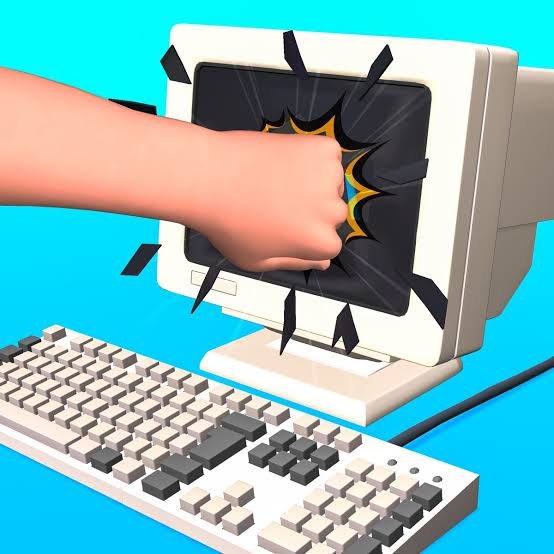
Smash It is a casual clicker and simulation game from OSA Studio where the goal is to break different virtual objects as quickly as possible. You begin with ordinary items such as computer equipment and gradually move on to larger objects, while combos and glove upgrades help increase your in-game damage and score.
The controls could hardly be simpler, but that is also what makes the progression noticeable. I found that random clicking works at the beginning, yet the game becomes more satisfying once you start watching which objects still need attention and build longer combos instead of spreading clicks everywhere.
| Game Detail | Information |
|---|---|
| Game | Smash It |
| Developer | OSA Studio |
| Genre | Simulation, Clicker |
| Gameplay Style | Object smashing, combos, upgrades, level progression |
| Controls | Mouse click or touchscreen tap |
| Supported Devices | Desktop, Phone, Tablet |
| Browser Release | July 2024 |
| Latest Browser Update | July 2024 |
| Latest Android Update | April 21, 2026 |
| Current Browser Rating | 4.4 |
| Current Browser Votes | 349K+ |
| Multiplayer | Single-player |
The current browser listing identifies OSA Studio as the developer and records both its browser release and latest listed browser update as July 2024.
How Smash It Works
Smash It gives you an object and asks you to keep interacting with it until it is completely broken.
You may start with a computer setup and gradually move through different objects such as furniture, vehicles, electronics, and other in-game items.
The important point is that these are entirely virtual game objects.
Once an item has been fully cleared, you progress to another challenge.
The Android edition follows the same basic structure and describes progression through increasingly varied virtual objects.
Smash It Controls
The browser version uses one main action:
- Desktop: Mouse click
- Phone: Tap the screen
- Tablet: Tap the screen
The current Poki listing specifically describes the control as clicking to hit the objects.
The MDN Pointer Events documentation explains how browser applications can recognize mouse and touchscreen input through a shared interaction model.
There are no complicated movement keys to learn.
The game is mostly about repetition, progression, and improving how efficiently you clear each stage.
Start With The Weakest Parts
When an object is made from several separate sections, clicking randomly can make progress harder to read.
I found it easier to focus on one section at a time.
Finish one visible part.
Then move to the next.
That makes it much clearer which areas still need attention.
It also reduces the feeling that nothing is changing even though you have already clicked many times.
Faster Clicking Can Improve Your Score
The browser description says faster smashing can produce a better score.
That gives the game a light speed challenge.
However, fast clicking only helps if your inputs are actually being registered where they matter.
A more controlled rhythm can sometimes feel better than moving the pointer around constantly.
Once you know which part of the object still needs work, concentrating your inputs there is usually more efficient.
Combos Reward Consistent Play
Smash It includes a combo system.
Combos encourage you to keep actions flowing without long interruptions.
That adds a small skill element to what would otherwise be a pure clicker.
Instead of thinking only about one hit at a time, you start paying attention to whether you can maintain a continuous sequence.
The current browser listing specifically highlights combo creation as one of the main progression features.
Glove Upgrades Increase Progression
You can improve your in-game gloves as you progress.
These upgrades increase how effective each action becomes.
The browser version describes glove upgrades as a way to cause more damage to virtual objects and progress more efficiently.
I would treat upgrades as a way to reduce repetition rather than as something to buy without thinking.
If your current stage already clears quickly, saving for a stronger improvement may feel more useful than spending immediately.
Bigger Objects Take More Work
The game gradually moves beyond small desktop items.
Larger objects naturally take longer to clear.
That gives the upgrade system more purpose.
Without increasing your in-game power, later stages could feel unnecessarily repetitive.
The Android edition lists objects such as phones, glass items, tables, cars, televisions, laptops, and other virtual targets.
The variety helps prevent every stage from looking identical.
Levels Give The Clicking A Purpose
Smash It is not simply an endless blank screen where you tap forever.
Each object acts as a small stage.
Finish one and the game moves you toward another.
That creates a clear progression rhythm:
Click → clear the object → earn progress → improve → move on
I found that this works better when you think about completing one level efficiently instead of chasing clicks for their own sake.
Watch What Is Still Intact
A surprisingly easy mistake is continuing to click an area that has already been cleared.
Large objects can contain several visible parts.
Once one section is finished, move your attention elsewhere.
This sounds obvious, but quick clicking makes it easy to stop checking the object itself.
Looking at what changed after a short burst of inputs is more useful than staring only at the score.
Do Not Confuse Speed With Randomness
The game rewards faster action, but that does not mean the pointer should move randomly.
There is still a difference between:
fast focused clicking
and
fast unfocused clicking
The first helps clear a specific part.
The second can make it harder to understand what remains.
I found the first approach more consistent, particularly on objects with several sections.
Browser And Android Versions Are Updated Separately
The browser and Android editions have different update histories.
The Poki browser version currently lists:
Release: July 2024
Latest browser update: July 2024
Google Play currently lists:
Latest Android update: April 21, 2026
These dates should not be mixed together.
An Android update does not automatically mean that the browser build received the same changes.
Keeping the two platforms separate gives readers a more accurate picture.
Playing Smash It On Mobile
Smash It currently supports:
- Desktop
- Phone
- Tablet
The browser listing confirms all three.
Touch controls suit the game naturally because there is no need for a virtual directional pad.
You simply tap the part of the object you want to interact with.
The W3C Pointer Events specification explains the standard used by web applications to handle inputs from touchscreens, mice, and other pointing devices.
The basic progression does not change between desktop and mobile.
Desktop Play
Desktop players use the mouse.
This can make it easier to target smaller sections of an object precisely.
I would keep the pointer near the area you are currently working on instead of moving across the entire screen after every click.
That reduces unnecessary motion and makes repeated inputs feel more controlled.
Because there is no keyboard movement, the desktop version is also easy to start even if you rarely play browser games.
Who Created Smash It?
Smash It was created by OSA Studio.
Poki identifies OSA Studio as the developer and notes that Smash It was the studio’s first title released on that platform.
Google Play independently lists OSA Studio as the developer of the Android version, confirming the attribution across platforms.
OSA Studio is also associated with games including:
- Marble Run 3D
- Color Pencil Run
- Draw Wire
- Zombroad
- Ragdoll Chaos
That makes Smash It part of a broader catalogue rather than an isolated browser upload.
Smash It And Marble Run 3D
Both games come from OSA Studio, but their gameplay is very different.
Smash It focuses on:
- Clicking
- Object progression
- Combos
- Upgrades
Marble Run 3D focuses on:
- Racing
- Steering
- Obstacle courses
- Momentum
- Competing for position
If you prefer a relaxed clicker-style progression loop, Smash It is the more suitable choice.
If you prefer movement and racing, Marble Run 3D offers much more active control.
Android Version Has More Recent Maintenance
The Android edition remains actively listed on Google Play.
It currently shows:
- 100K+ downloads
- 3.6-star rating
- April 21, 2026 update
This is useful because it confirms that OSA Studio has maintained the mobile edition beyond the original 2024 browser launch.
However, those mobile ratings and downloads should not be mixed with Poki’s browser votes.
They come from different audiences and platforms.
Current Smash It Browser Rating
The current browser listing shows approximately:
4.4 from more than 349,000 votes.
Ratings can change as additional users vote.
That means 4.4 should be treated as a current platform snapshot rather than a permanent game statistic.
Is Smash It Multiplayer?
Smash It is best described as a single-player game.
The documented browser and Android versions focus on personal level progression, upgrades, combos, and scores rather than real-time matches against other connected players.
There is no need to enter a multiplayer lobby before starting a stage.
That makes it easy to play in short sessions.
Common Smash It Mistakes
The first mistake is clicking randomly across the object.
The second is ignoring which parts have already been cleared.
Another mistake is focusing so heavily on clicking faster that you stop checking what is actually changing on screen.
It is also easy to overlook upgrades and continue repeating stages with weaker equipment.
The better approach is simple:
focus on one area, maintain the combo, check progress, then move to the next section.
A Better Way To Progress
Start by learning how quickly the first few objects react to your clicks.
Next, practice maintaining a steady combo.
Once upgrades become available, pay attention to whether they noticeably reduce the work required for later stages.
After that, concentrate on improving completion speed.
This order makes more sense than chasing a high score immediately.
First understand the progression system.
Then optimize it.
Related Categories
Smash It fits naturally into:
- Clicker Games
- Simulation Games
- Casual Games
- Upgrade Games
- Mobile Games
- Single-Player Games
The current platform places it under both Clicker Games and Simulation Games.
What Makes Smash It Different?
Smash It keeps almost every control out of the way.
There is no complicated movement system.
There are no long combinations to memorize.
You click.
The interesting part comes from what happens around that one action.
Objects become larger.
Combos matter.
Gloves improve.
Stages change.
Progress becomes faster.
That makes Smash It a better fit for players who enjoy simple progression and short sessions than for someone looking for a complex action game.


Reviews
There are no reviews yet.