

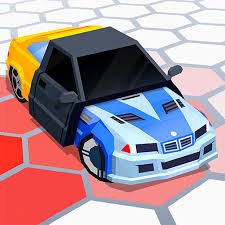
3D Arena Racing is a 3D arcade racing game credited by Poki to Brain Software. You compete against computer-controlled rivals, earn money from races, unlock better vehicles, and can also enter a large Free Roam arena or play against another person on the same computer.
What stood out to me is that it is not limited to one type of vehicle. The garage includes everything from racing cars and karts to monster trucks and SUVs, so unlocking another vehicle can noticeably change how the next race feels.
| Game Detail | Information |
|---|---|
| Game | 3D Arena Racing |
| Developer | Brain Software |
| Genre | Racing |
| Gameplay | Circuit racing, vehicle unlocking, Free Roam |
| Main Controls | Arrow Keys or WASD |
| Supported Devices | Desktop |
| Poki Release | March 11, 2019 |
| Latest Poki Update | June 2, 2022 |
| Earlier Hosted Versions | Available by November 2017 |
| Current Rating | 4.4 |
| Current Votes | 502K+ |
| Racing Tracks | 8 commonly documented |
| Vehicles | 9 commonly documented |
| Multiplayer | Local 2-player split-screen |
| Free Roam | Yes |
Poki currently credits Brain Software, while current two-player and racing-game records consistently describe eight racing levels, a large stunt or Free Roam arena, nine vehicles, single-player races, and local two-player play.
How 3D Arena Racing Works
The game starts you with a limited vehicle selection.
You enter races against computer-controlled drivers and try to finish well enough to earn money.
That money can be used to improve your options in the garage.
The general progression is:
race → earn money → unlock or improve vehicle → enter harder race → continue
Y8 confirms that strong finishes earn money that can be spent on vehicle upgrades or better vehicles.
3D Arena Racing Controls
The two-player browser records consistently use two separate keyboard layouts.
Player 1
- W: Move forward
- S: Move backward
- A: Steer left
- D: Steer right
Player 2
- Up Arrow: Move forward
- Down Arrow: Move backward
- Left Arrow: Steer left
- Right Arrow: Steer right
Some hosted versions reverse which player receives WASD and which receives the Arrow Keys, but the important point is that the game uses these two keyboard groups for local split-screen play.
These controls refer only to the game and are not real-world driving guidance.
Start With Single Player
Single-player is the easiest place to learn the game.
You race against computer-controlled opponents and begin earning money for better vehicles.
This is useful because the early races also help you understand how different surfaces and vehicle sizes affect the arcade handling.
Y8 describes the main progression around racing computer opponents, earning money, and improving the vehicle between competitions.
There Are Eight Racing Levels
Multiple current browser records describe eight racing levels or circuits.
TwoPlayerGames specifically says the game contains eight different racing levels plus a large stunt arena, while Snokido also lists eight circuits.
That gives the main racing mode a clear progression path instead of relying on one repeated track.
Different Tracks Need Different Approaches
The circuits are not identical.
Some contain tighter sections.
Others leave more room.
Because the vehicles also handle differently, the same car may feel better on one course than another.
I found it useful to learn the shape of a track before worrying about getting the best possible result.
Nine Vehicles Are Commonly Documented
Several current browser records describe nine unlockable vehicles.
The available types include examples such as:
- Racing cars
- Karts
- Muscle cars
- SUVs
- Monster trucks
- Formula-style cars
Poki specifically mentions muscle cars, monster trucks, SUVs, Formula 1-style cars, and go-karts in the current description.
You Start With One Vehicle
You do not receive everything immediately.
TwoPlayerGames says the game begins with one car and lets you unlock the rest using money earned from single-player races.
That makes the garage part of the progression system.
Winning races is useful because it gradually expands what you can drive.
The Garage Matters
The garage is where the game turns race rewards into progression.
Poki says you can buy a better vehicle there.
Instead of treating the garage as a cosmetic menu, think of it as part of the main game loop.
Race results lead to more vehicle choices.
Those choices can make later events feel different.
Free Roam Changes The Pace
3D Arena Racing also includes a Free Roam mode.
Poki specifically highlights the open Free Roam area as a place to use unlocked vehicles outside normal competition.
This mode removes the pressure of finishing ahead of other racers.
It is useful when you simply want to test a vehicle or move around the large arena.
The Free Roam Arena Includes Stunt Features
Other current game records describe the Free Roam location as a large stunt arena with ramps and open areas.
These are fictional game environments.
They are designed for arcade experimentation and should not be treated as examples for real driving.
Local Two-Player Is One Of The Main Features
3D Arena Racing supports local two-player split-screen.
That means two people can share one computer.
One uses the WASD keys.
The other uses the Arrow Keys.
Y8 and TwoPlayerGames both identify the title as a local multiplayer game.
Two-Player Is Not Online Matchmaking
The word “multiplayer” can be confusing here.
The main documented multiplayer feature is local split-screen, not remote internet matchmaking.
You and another player use the same computer and keyboard.
That is different from joining an online lobby with distant players.
Free Roam Can Also Be Shared
Some hosted versions also describe Free Roam as playable in two-player split-screen.
That gives local multiplayer another option besides direct racing.
Instead of competing for finishing position, both players can use the open arena.
Computer Opponents Fill Single-Player Races
When playing alone, your rivals are controlled by the game.
Snokido describes racing against opponents across eight circuits and also confirms the same-computer two-player option.
This means the game works well even when no second player is available.
Finishing Position Affects Progress
Y8 says players should finish among the top three to earn money that can be spent between competitions.
That gives each race a progression purpose.
You are not only trying to complete the track.
A stronger result can help move the garage progression forward.
Stay Focused On The Track
In the game, leaving the main racing surface can slow the vehicle.
Snokido notes that sand or grass reduces speed compared with staying on the main course.
This is strictly an in-game physics rule.
For better game results, the simple goal is to keep your virtual vehicle on the intended racing route.
Avoid Unnecessary Collisions In The Game
Walls can interrupt your momentum and make it easier for computer-controlled rivals to pass.
That is one reason learning the course layout helps.
After a few attempts, corners and track boundaries become easier to recognize.
Again, this applies only to the arcade game.
Vehicle Choice Changes The Feel
A monster truck does not look or feel the same as a smaller racing vehicle.
Likewise, Formula-style cars and karts give the garage more variety.
Poki explicitly highlights the different vehicle classes as part of the game’s appeal.
That variety gives you a reason to keep unlocking vehicles even after you already understand the tracks.
The Game Uses 3D Low-Poly Graphics
3D Arena Racing uses a colorful 3D presentation.
Several long-running host records describe it as a low-poly or voxel-style WebGL racing game.
The simple geometry keeps vehicles and track edges easy to read during fast races.
Desktop Is The Verified Device
Poki currently lists:
Desktop
as the supported device.
Y8 also says the game is designed for desktop and is not a mobile title on its current hosted version.
Some newer third-party pages claim mobile support, but those claims conflict with the main established versions.
For Mopoga, Desktop is the safest supported-device field.
Who Created 3D Arena Racing?
The current Poki edition credits:
Brain Software.
Poki also connects Brain Software with games such as:
- 18 Wheeler Cargo Simulator 2
- Parking Fury 3D
- Car Simulator Arena
- Cartoon Mini Racing
- Extreme Off Road Cars
- 2 Player City Racing
- Moto Trial Racing 2
This places 3D Arena Racing within a much larger browser-driving catalogue.
Older Developer Credits Conflict
Older host records create a small attribution problem.
BrightestGames and some sites based on its older listing credit versions of 3D Arena Racing: 2 Player to BrightestGames.com and date them to November 2017.
Poki, however, currently credits the game to Brain Software.
For a Mopoga page based on the current Poki version, Brain Software is the safer developer field.
The older credit should be treated as a separate hosting or publishing record rather than silently replacing the current attribution.
Earlier Versions Appeared In 2017
GameFlare lists a hosted release from November 16, 2017.
BrightestGames gives November 7, 2017 for its own listing.
Y8 later added its version in December 2018.
That means Poki’s March 2019 date is clearly a platform release rather than the first appearance of the game anywhere online.
Poki Release And Update History
Poki gives the more precise current dates:
Release: March 11, 2019
Latest update: June 2, 2022.
The clean timeline is therefore:
Earlier hosted versions: November 2017
Y8 listing: December 2018
Poki release: March 11, 2019
Latest Poki update: June 2, 2022
Current 3D Arena Racing Rating
Poki currently shows approximately:
4.4 from more than 502,000 votes.
The exact vote count changes over time.
It should therefore be treated as a current platform snapshot rather than a permanent statistic.
Common 3D Arena Racing Mistakes
One mistake is focusing only on unlocking the fastest-looking vehicle.
Another is entering a new course without learning its layout first.
Players can also ignore Free Roam even though it provides a simple place to become familiar with newly unlocked vehicles.
In local two-player mode, mixing up the WASD and Arrow-key layouts can also cause confusion during the first race.
A Better Way To Progress
Start with single-player.
Learn the first track.
Finish strongly enough to earn money.
Use those rewards in the garage.
Try newly unlocked vehicles.
Continue through the remaining racing levels.
Then use Free Roam if you want a less structured session.
Once both players know their controls, try the local split-screen mode.
The basic game progression is:
race → earn → unlock → test → continue
Related Categories
3D Arena Racing fits naturally into:
- Racing Games
- Car Games
- Driving Games
- 3D Games
- Two-Player Games
- Local Multiplayer Games
- Free Roam Games
- Desktop Games
Poki currently connects it with Racing, Multiplayer, Car, Two Player, Driving, and Drift categories.
What Makes 3D Arena Racing Different?
3D Arena Racing combines three ideas in one relatively small browser game.
You have structured races against computer-controlled rivals.
You have a garage where race earnings unlock more vehicles.
And you have a large Free Roam area where those vehicles can be used without the normal race objective.
Local split-screen adds another reason to return because two people can compete from the same computer.
With eight commonly documented racing levels, nine vehicles, multiple vehicle types, Free Roam, and local multiplayer, the game offers more variety than its simple keyboard controls initially suggest.

Reviews
There are no reviews yet.