

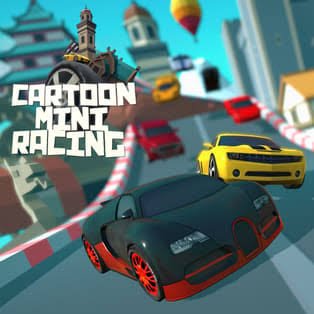
Cartoon Mini Racing is a colourful arcade racing game from Brain Software where small cartoon cars compete across tracks filled with roads, bridges, hills, sharp bends and other obstacles. Your goal is to finish ahead of the other racers, collect coins, unlock additional tracks and buy faster vehicles as you progress.
The steering feels simple at first, but the small cars can turn quickly. I found that constantly tapping left and right made the vehicle harder to control. Small corrections before a corner worked much better than trying to fix the direction after I had already entered the turn.
| Game Detail | Information |
|---|---|
| Game | Cartoon Mini Racing |
| Developer | Brain Software |
| Genre | Racing |
| Gameplay Style | Arcade racing, track progression and vehicle upgrades |
| Controls | Arrow Keys, H |
| Supported Browser Device | Desktop |
| Browser Release | March 2019 |
| Latest Verified Update | June 2022 |
| Current Rating | 4.5 |
| Current Votes | 367K+ |
| Multiplayer | Single-player and local 2-player |
| Main Progression | Win races, unlock tracks and buy vehicles |
The current browser listing identifies Brain Software as the developer, dates the release to March 2019, and lists the latest update as June 2022. Its current rating is about 4.5 from more than 367,000 votes.
Racing Comes First
Cartoon Mini Racing does not bury the racing behind a complicated management system.
Choose a car, enter a race and try to reach the finish ahead of your opponents.
The tracks take you across different environments with:
- Roads
- Bridges
- Hills
- Tight corners
- Changes in elevation
- Other racers competing for position
Winning matters because first-place finishes help open additional racing content.
That gives each race a clear purpose beyond simply reaching the end.
Cartoon Mini Racing Controls
The browser version uses a small control set:
- Up Arrow: Accelerate and move forward
- Down Arrow: Reverse
- Left Arrow: Steer left
- Right Arrow: Steer right
- H: Reset the car
The current version is listed for desktop browsers.
These controls are easy to remember, which means most of the difficulty comes from judging corners and positioning the car correctly.
The MDN KeyboardEvent reference explains how browsers can recognize individual keyboard inputs such as arrow keys.
Do Not Turn Too Hard Into Every Corner
The first thing I noticed was how easy it is to oversteer.
A sharp bend can tempt you to hold the direction key for too long.
That often points the car too far toward the inside or outside edge of the track.
A more reliable approach is:
- Line the car up before the bend.
- Make a small steering adjustment.
- Watch where the front of the car is pointing.
- Correct again only when necessary.
It feels slower than constantly steering, but it usually produces a cleaner exit.
Winning Unlocks More Tracks
Progression is tied to your performance.
Finishing races in first place can unlock additional tracks, giving you more environments and layouts to race through.
That makes learning the earlier courses worthwhile.
Instead of every track being available immediately, the game gives you a reason to improve your results before moving forward.
I would learn where the difficult corners appear before concentrating entirely on speed.
Once the route is familiar, it becomes much easier to decide where you can accelerate confidently.
Coins And New Cars
Coins provide another progression system.
You can collect them and use them toward additional vehicles.
The available cars are not there only to change the appearance of the race. The current game description specifically connects vehicle purchases with improving your speed.
I would still avoid assuming that a faster car fixes poor steering.
Extra speed can actually make a difficult corner less forgiving.
Learning a track with a controllable vehicle first makes it easier to understand whether a later mistake came from the car or from your approach.
Tracks Change More Than The Background
Cartoon Mini Racing sends you across roads, bridges, mountains and other environments rather than repeating one flat circuit.
Changes in track shape matter because they affect how early you should prepare for the next turn.
A long open road gives you room to build speed.
A narrow bridge gives you less space for correction.
A sequence of tight bends rewards patience more than simply holding the accelerator and hoping the car stays on course.
For another Mopoga racing game built around precise corner timing, Sling Drift replaces normal steering with a single swing-and-release mechanic.
Resetting The Car
Pressing H resets your vehicle.
That is useful when a bad turn leaves the car stuck or badly positioned.
I would use reset when recovery is clearly going to take longer than restarting from a workable position.
However, pressing it after every small mistake can become a habit.
Sometimes recovering from a poor corner teaches you more about the controls than immediately resetting.
Local Two-Player Racing
Cartoon Mini Racing also includes a two-player racing mode, letting two people compete locally.
This is different from online matchmaking.
The appeal is immediate local competition rather than entering a remote lobby.
Short racing rounds work particularly well for this because both players can quickly try another race after a close finish.
If you like local multiplayer but want something very different from traditional racing, Bump Battle Royale uses small bumper-style vehicles and supports up to four local players with one-button controls.
Learning A Track Before Chasing First Place
I found that racing aggressively from the first attempt usually caused more mistakes.
A better first run is about learning:
- Where the sharpest bends appear
- Which sections are narrow
- Where the road changes direction suddenly
- When you have room to accelerate
- Where other racers tend to bunch together
Then use the next attempt to improve speed.
That separates two problems.
First you learn where to go.
Then you learn how quickly you can go there.
Trying to solve both at once makes the early races feel harder than they really are.
Position Matters Around Other Racers
Other cars can affect how cleanly you enter a corner.
Driving directly alongside another racer when the road narrows can leave little space for correction.
If possible, I prefer either moving ahead before the bend or leaving enough room to turn without depending on what the other vehicle does.
The goal is not merely to be fast for one second.
It is to leave yourself a usable line through the next part of the track.
Arcade Racing Rather Than Realistic Driving
Cartoon Mini Racing is designed as an arcade game.
The small cartoon cars, exaggerated tracks and quick races are built around accessible browser play rather than realistic vehicle simulation.
That distinction helps set expectations.
You are learning the rules of the game, not real-world driving techniques.
For technical background on browser game controls, the MDN guide to desktop game input explains how keyboard and mouse controls can be handled in web games.
Browser Support
The current listing supports desktop browsers rather than phone and tablet play.
That matches the game’s reliance on arrow keys and the H key.
HTML browser games depend on standards supported by modern browsers. The WHATWG HTML Living Standard documents the underlying web platform used by browser-based applications and games.
Players should therefore expect the desktop version to work best with a physical keyboard.
Who Created Cartoon Mini Racing?
Cartoon Mini Racing was created by Brain Software.
The current browser listing continues to credit Brain Software as the developer.
The game was released in March 2019 and its latest verified browser update is June 2022.
Those dates refer to the currently documented browser edition.
Cartoon Mini Racing Rating
The current listing shows a rating of approximately:
4.5 from more than 367,000 votes.
That figure should be treated as a current platform snapshot.
Vote totals can continue changing as more players rate the game.
What Makes Cartoon Mini Racing Different?
The game combines several simple systems:
- Compact cartoon cars
- Arcade racing
- Unlockable tracks
- Coin collecting
- Purchasable vehicles
- Increasing vehicle speed
- Local two-player racing
- Desktop keyboard controls
None of these systems is difficult to understand by itself.
The challenge comes from putting them together while trying to race cleanly.
The game rewards speed, but it also punishes unnecessary steering.
That balance is what kept me from treating every straight road as an excuse to rush into the next bend.
Common Cartoon Mini Racing Mistakes
Holding the steering key too long
Small corrections are usually easier to recover from.
Watching opponents instead of the road
Another racer matters, but the upcoming corner matters more.
Trying to win immediately on an unfamiliar track
Learning the route first makes later attempts much easier.
Assuming a faster car solves everything
Higher speed can make poor steering more noticeable.
Resetting after every imperfect turn
Sometimes recovering naturally is better practice.
Games To Try After Cartoon Mini Racing
Players who enjoy compact racing mechanics can try Sling Drift, which focuses almost entirely on timing corners rather than conventional steering.
For a multiplayer vehicle game with a more chaotic arena format, Bump Battle Royale changes the objective from finishing laps to controlling position against other local players.
These games use vehicles in very different ways, which makes them useful alternatives rather than near-identical copies.
Related Categories
Cartoon Mini Racing fits naturally into:
- Racing Games
- Car Games
- Driving Games
- Arcade Games
- Two-Player Games
- Skill Games
Mopoga also maintains broader Car, Driving, and Racing sections for browser games built around different styles of vehicle control.
About Cartoon Mini Racing
Cartoon Mini Racing is straightforward enough to understand within the first race but has enough progression to keep later runs meaningful.
You race small cars, learn increasingly varied tracks, collect coins, buy vehicles and try to finish first so additional courses become available.
The part that took me longest was not understanding the controls.
It was learning not to overuse them.
Once I started steering earlier and making smaller corrections, the cars felt much easier to place through tight sections.


Reviews
There are no reviews yet.