

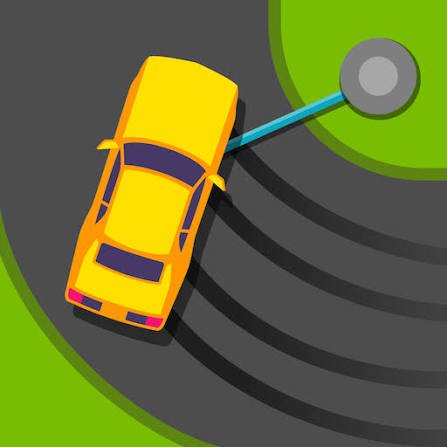
Sling Drift is a simple arcade racing game where you guide a car around a winding track by attaching it to anchor points at each corner. Instead of steering left and right normally, you hold the control to swing around a bend and release at the right moment so the car continues along the road.
The idea is easy to understand, but the timing takes practice. I found that holding the drift for too long was my most common mistake. A slightly early release usually gave me more room to recover than swinging too far around a corner.
| Game Detail | Information |
|---|---|
| Game | Sling Drift |
| Original Developer | tastypill |
| Current Mobile Publisher | CASUAL AZUR GAMES |
| Genre | Skill, Arcade Racing |
| Gameplay | One-button corner swinging and endless progression |
| Browser Controls | Spacebar |
| Supported Browser Device | Desktop |
| Original iOS Release | April 30, 2018 |
| Original Android Release | May 21, 2018 |
| Poki Release | March 28, 2019 |
| Latest Poki Update | June 2022 |
| Current Poki Rating | 4.5 |
| Current Poki Votes | 623K+ |
| Multiplayer | Browser version is single-player |
The current Poki listing credits tastypill as the creator and describes Sling Drift as a top-down racing game built around grabbing hooks at corners and releasing them at the correct time.
How Sling Drift Works
The car moves forward automatically.
When you approach a corner, an anchor point appears beside the track.
Hold the control and the car connects to that point.
The connection pulls the car around the bend.
Release the control when the car is pointing toward the next part of the track.
Then repeat the process at the next corner.
The basic loop is:
approach → hold → swing → release → straighten
You do not need to manage acceleration or normal steering.
Almost the entire challenge comes from timing.
Sling Drift Controls
The current Poki browser version uses one main control:
Spacebar: Hold to swing around a corner, then release to continue forward.
Poki currently lists desktop as the supported browser device.
The mobile versions use the same basic one-touch idea through taps and holds rather than a keyboard. Google Play describes the current mobile mechanic as holding to swing around a turn and releasing to straighten the car.
Watch The Car Angle Before Releasing
The most important thing to watch is the direction of the car.
If you release too early, the car may leave the corner before it has turned far enough.
If you hold too long, it can swing past the road.
I found it easier to concentrate on where the front of the car was pointing rather than staring only at the anchor point.
The anchor creates the turn.
The car angle tells you when to let go.
You Do Not Steer Normally
Sling Drift is different from most racing games because there are no left and right steering controls in the Poki version.
The track is followed automatically between corners.
Your input only matters when the car needs to turn.
That is why the game feels closer to a timing challenge than a traditional driving simulator.
It should also be treated entirely as an arcade mechanic, not as real-world driving guidance.
Each Corner Is A Timing Puzzle
A corner may look simple, but small changes in timing produce very different results.
A short hold creates one path.
A longer hold pulls the car farther around the anchor.
The correct release point depends on the shape of the bend and the direction of the next road section.
That means every corner is effectively a small timing puzzle.
Release Slightly Before You Think You Need To
One mistake I kept making was waiting until the car visually looked perfectly aligned.
By that point, its movement could already carry it too far.
A slightly earlier release often felt more controlled.
You can then let the forward motion finish the turn naturally.
This is an in-game timing observation only, not advice for real vehicles.
The Run Ends When You Leave The Track
The browser version is based around seeing how far you can continue without leaving the course.
If your car misses the road during a corner, the run ends.
That gives each attempt a simple goal:
reach one more corner than before.
There is no long setup before trying again.
Longer Runs Become Harder
Early bends help you understand the timing.
As the run continues, staying consistent becomes more difficult.
Google Play describes the current mobile game as increasing in challenge as progress continues.
The hard part is not learning a large set of controls.
It is repeating the same simple action accurately over and over.
Consistency Matters More Than Fast Reactions
It is tempting to think Sling Drift is mainly about reacting quickly.
I found consistency more important.
You normally have enough time to see the next anchor.
The real problem is holding the control for the correct length of time.
One poor release can end a run that had otherwise gone well.
That makes controlled timing more useful than rushing.
Do Not Hold The Spacebar Between Corners
The drift control is for the corner itself.
Holding it unnecessarily can interfere with the next turn.
I prefer to release fully once the car is safely pointing down the next road section.
Then I wait for the next anchor before pressing again.
This gives every turn a clear beginning and end.
Coins Add Progression
The Poki version includes coins that can be earned while playing.
These coins are used to unlock additional cars.
That gives repeated runs another purpose besides improving distance.
Even when a run ends earlier than expected, collected currency can still contribute toward another vehicle.
Unlockable Cars
Sling Drift includes multiple cars that can be unlocked through progression.
Google Play’s current description also confirms unlockable vehicles and notes that different cars are part of the game’s reward system.
The browser experience keeps the main focus on the same one-button mechanic regardless of which vehicle is selected.
The visual variety helps repeated attempts feel less identical.
Race Mode Adds Another Option
The current Poki description also mentions a race mode in addition to the normal distance-focused play.
That gives players another way to use the same corner-swinging mechanic.
The core control does not change.
You still need to connect to each corner and release at the right angle.
Browser And Mobile Versions Should Be Kept Separate
Sling Drift has existed on mobile longer than it has on Poki.
The verified timeline is:
iOS release: April 30, 2018
Android release: May 21, 2018
Poki browser release: March 28, 2019
Latest Poki browser update: June 2022
That means March 2019 is not the original creation date of Sling Drift.
It is the release date of the Poki browser edition.
The Mobile Version Is Still Being Updated
The current Android version was updated on June 30, 2026.
Google Play now lists it under CASUAL AZUR GAMES, with more than 50 million downloads.
The Apple App Store similarly lists the current developer account as AI Games FZ.
This creates an important distinction.
The original game is historically credited to tastypill, while its current mobile publishing records are now associated with AI Games and Azur Games.
For the browser game page, tastypill remains the correct developer credit because that is how the current Poki version is listed.
Who Created Sling Drift?
Sling Drift was originally developed by tastypill.
Historical release records identify Tastypill LLC as both developer and publisher of the 2018 iOS and Android releases.
Poki continues to credit tastypill and also connects the studio with browser titles such as:
- Slime Road
- Pick Me Up
- Spill It
Original Release Explained
GameFAQs records the first verified iOS release on April 30, 2018.
The Android version followed on May 21, 2018.
Poki added its browser version on March 28, 2019.
So for historical accuracy:
Original release: April 30, 2018
Browser release: March 28, 2019
Keeping both dates prevents the browser upload date from being mistaken for the game’s original launch.
Is Sling Drift Multiplayer?
The current Poki browser version is best described as single-player.
You control one car and work through the course while trying to extend your run and unlock additional vehicles.
Historical records for the original mobile release also identify one local player and no online multiplayer.
The current mobile store description mentions newer multiplayer functionality, so that feature should not automatically be applied to the older Poki browser edition.
Desktop Is The Main Browser Device
Poki currently lists only:
Desktop
as the supported browser device.
The browser control is therefore presented around the spacebar.
Phones and tablets have separate app versions, but that does not mean the Poki browser edition should be labelled as officially supporting those devices.
Current Sling Drift Rating
The current English Poki page shows approximately:
4.5 from more than 623,000 votes.
Ratings change as more players vote.
That figure should therefore be treated as a current platform snapshot rather than a permanent value.
Common Sling Drift Mistakes
The first mistake is holding the drift for too long.
Another is releasing before checking where the car is pointing.
Players may also press the spacebar too early before reaching the corner.
Another common problem is concentrating so much on the current anchor that the direction of the next road section gets ignored.
Finally, trying to make every turn look perfect can cause overcorrection.
The goal is staying on the road, not creating the most dramatic swing.
A Better Way To Improve
Start by concentrating only on surviving corners.
Ignore long-distance goals during the first few attempts.
As you approach a bend, watch the car.
Hold the spacebar.
Release once its direction lines up with the next road section.
Then fully reset your input before the next anchor.
Once that feels consistent, start paying more attention to coins, unlocked cars, and longer runs.
The simple rhythm is:
approach → hold → watch → release → reset
Related Categories
Sling Drift fits naturally into:
- Skill Games
- Racing Games
- Car Games
- Arcade Games
- Timing Games
- Endless Games
- One-Button Games
- Single-Player Games
Poki currently places it primarily within Skill Games.
What Makes Sling Drift Different?
Sling Drift removes almost everything normally associated with racing controls.
You do not control acceleration.
You do not turn left or right.
You do not manage several buttons.
One action controls the entire run.
Hold to swing.
Release to continue.
That simplicity is what makes the game difficult. There is very little to memorize, so every mistake comes back to timing.
Coins, unlockable cars, race mode, and increasingly difficult turns give you reasons to keep playing, but the central challenge never changes.
You are always trying to make one clean release before the next corner arrives.




Reviews
There are no reviews yet.