

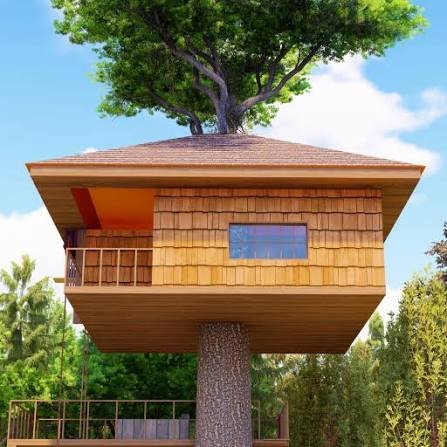
Tree Hous Maker is a relaxing decoration game by Rising Pixel where you build and furnish a treehouse one floor at a time. Open mystery boxes to receive furniture and color choices, arrange each item around the room, rotate pieces into better positions, and gradually turn an empty treetop space into your own design.
What I like about the game is that there is no single correct layout. I can place a chair somewhere, decide it feels too crowded, move it again, change the color, or remove it completely. The game works better when you treat each floor as a small design project rather than trying to fill every empty space immediately.
| Game Detail | Information |
|---|---|
| Game | Tree House Maker |
| Developer | Rising Pixel |
| Genre | Decoration |
| Gameplay Style | Treehouse building, furnishing and customization |
| Guide Character | Leaflette |
| Main Objective | Design and expand a personalized treehouse |
| Controls | Click or tap, drag, rotate and delete |
| Supported Devices | Desktop, Phone, Tablet |
| Browser Release | July 2024 |
| Latest Verified Update | September 2025 |
| Current Rating | About 4.3 |
| Current Votes | 88K+ |
| Multiplayer | Single-player |
| Photo Feature | Yes |
Start With An Empty Treetop Space
Tree House Maker begins with a simple treehouse environment and gives you furniture gradually.
You do not receive a huge catalogue all at once.
Instead, boxes reveal new objects and colors that can be added to the current design.
The basic loop is:
open box → choose item → place it → adjust it → decorate → expand
That slow progression works well because every new item gives you another reason to reconsider the room.
The current game description confirms that players open boxes for furniture, select colors, arrange objects, and expand the treehouse floor by floor.
Leaflette Guides The Building Process
Tree House Maker introduces a friendly leaf spirit called Leaflette.
Leaflette acts as the character guiding you through the forest setting and the early decoration process.
I think this helps because the game otherwise has almost no traditional story.
The focus is still on decorating, but Leaflette gives the treehouse a little more personality than a completely empty design screen.
Tree House Maker Controls
The controls are built around clicking, tapping, and dragging.
Desktop
- Click a box to open it.
- Click an item or color to select or deselect it.
- Drag furniture into the position you want.
- Use the rotate button to change its direction.
- Use the delete button to remove an item.
Phone And Tablet
The same system works through touchscreen input:
- Tap boxes and menu choices.
- Drag furniture with your finger.
- Tap rotate when an object faces the wrong direction.
- Use delete when you no longer want an item.
The current browser edition officially supports desktop, phone, and tablet.
Modern browsers can handle mouse, touchscreen, and pen interaction through a shared input model. MDN Pointer Events documentation explains this browser system, while W3C Pointer Events Level 3 documents the wider web standard.
Open Boxes For New Furniture
Mystery boxes are central to progression.
Opening one can reveal another decorative item or color option.
That means your room develops gradually rather than being designed from one enormous menu.
I found it useful to look at the item before immediately placing it.
Ask:
Does it fit the current floor?
Is there already something similar nearby?
Would it work better on another side of the room?
A few seconds of planning can keep the treehouse from becoming visually crowded.
Do Not Fill Every Empty Space
An empty corner is not necessarily unfinished.
One of the easiest mistakes in decoration games is placing something everywhere simply because the game gives you another object.
I prefer leaving some open space between larger pieces.
That makes individual furniture easier to see and gives future items somewhere useful to go.
If the room already looks balanced, saving visual space can be better than adding one more object.
Arrange The Large Items First
Large furniture controls the room more than small decorations.
I usually place the biggest objects first.
For example:
- Put down the major furniture.
- Check how much walking or open space remains.
- Add medium pieces.
- Finish with smaller decorative objects.
This creates a clearer structure than placing tiny objects everywhere and later trying to squeeze large furniture between them.
Colors Can Change The Whole Floor
Tree House Maker also lets you choose colors for parts of the design.
That means the same furniture arrangement can look noticeably different after a color change.
I found it easier to choose two or three main colors for a floor instead of making every object completely unrelated.
There is no required palette, though.
The game does not judge whether your choices follow real interior-design rules.
You can make each floor as coordinated or unusual as you want.
Rotate Furniture Before Moving Everything Else
Some objects look awkward only because they are facing the wrong direction.
Before moving several surrounding items, try the rotate button.
A chair that looks crowded may fit perfectly once turned.
The same applies to tables, storage pieces, and decorative objects that have a clear front and back.
I found rotation especially useful near walls and corners.
Delete Is Part Of Designing
Removing an object does not mean the design failed.
Tree House Maker includes a delete function specifically so you can change your mind.
I use it whenever a room begins feeling too busy.
A simple process is:
place → inspect → move → rotate → remove if needed
That makes experimentation much easier because no early choice has to stay permanent.
Expand The Treehouse Floor By Floor
The game does not limit you to one small room.
As you continue, the treehouse expands upward with additional floors.
That lets you give different sections their own look.
You could make one floor feel simple and natural while another uses brighter colors and more decorative objects.
I prefer treating each new floor as a separate project rather than copying the exact arrangement from the previous level.
Give Each Floor Its Own Purpose
The game does not force real-world room labels, which leaves plenty of freedom.
You can mentally treat a floor as:
- a relaxing sitting area
- a bedroom-style space
- a reading corner
- a colorful playroom
- a display floor
- a mixed cozy room
Having a simple idea before placing furniture makes decisions easier.
It does not need to be complicated.
Even something like “green and wood colors” can give the floor enough direction.
Take Pictures Of Finished Designs
Tree House Maker includes a photo feature that lets you capture your completed layouts.
This is useful because decoration games are often more satisfying when you can keep a record of a design before changing it.
I would take a picture once a floor feels finished.
Then you can continue experimenting without losing the visual memory of the earlier version.
Build Slowly Instead Of Rearranging Everything
Once several pieces are on screen, moving everything at once can make the layout harder to judge.
I prefer changing one area at a time.
For example:
left corner → center → right side → small decorations
That makes it easier to tell whether each change actually improved the room.
Phone Play Works Naturally
Tree House Maker officially supports phones.
The drag-and-drop design is a good fit for touch controls because there are no virtual movement buttons or complicated key combinations.
You tap a choice and directly move furniture with your finger.
The main limitation is screen size.
A crowded floor can be easier to inspect on a larger display.
Tablet Is A Strong Fit For Decoration
Tablet play uses the same touch controls but provides more space for positioning furniture.
For this kind of game, that combination works particularly well.
You get direct finger input while still being able to see much of the treehouse at once.
Small differences in item placement can also be easier to judge than on a phone.
Desktop Gives Precise Dragging
Desktop players use the mouse.
That makes it easy to move an item a small distance without your finger covering part of the object.
The larger screen also gives you a better overview when a floor contains several pieces of furniture.
The actual design system remains identical across devices.
Who Created Tree House Maker?
Tree House Maker was created by Rising Pixel.
The current game listing says Tree House Maker was Rising Pixel’s first game on that platform.
Rising Pixel’s official company page says the studio has more than 10 years of experience, has shipped 150+ games and interactive experiences, and operates from Las Palmas de Gran Canaria in Spain’s Canary Islands.
You can read more about the studio through Rising Pixel’s official website.
Rising Pixel Has A Long HTML5 Background
Rising Pixel’s official material says the studio has worked with interactive and HTML5 experiences for more than a decade.
That background fits Tree House Maker well.
The game uses a lightweight browser-friendly structure:
- click or touch interaction
- drag-and-drop movement
- no complicated installation
- cross-device support
- short creative sessions
The studio’s official portfolio also includes browser-based entertainment and interactive projects in other genres.
Tree House Maker Is Listed As A Canary Islands Game
ACADEVI, the Canary Islands video-game association, lists Tree House Maker, Rising Pixel, and 2024 in its directory of games developed in the region.
That independently supports the game’s developer and original year.
It also provides useful context about where Rising Pixel fits within the Canary Islands game-development scene.
Release And Latest Update
The current verified browser timeline is:
Release: July 2024
Latest Update: September 2025
For Mopoga, I would keep both dates separately.
July 2024 records when the current browser listing says the game launched.
September 2025 represents the latest presently listed update.
Current Tree House Maker Rating
The current browser listing shows approximately:
4.3 from 88,558 votes.
That number can continue changing.
For an evergreen Mopoga table, 88K+ votes is cleaner than treating one exact vote total as permanent.
Is Tree House Maker Multiplayer?
Tree House Maker is best described as a single-player decoration game.
There is no current online multiplayer or local competitive mode listed.
The social element instead comes from being able to capture your design and share the result with friends.
You therefore create the treehouse by yourself without waiting for another player.
There Is No Score Pressure
Tree House Maker is different from fashion games where the game evaluates your choices.
There is no need to reach a specific decoration score.
There is also no opponent trying to finish faster.
That makes experimentation much easier.
If you prefer one color while another player prefers something completely different, both designs can work because the goal is personal customization.
Common Tree House Maker Mistakes
The first mistake is placing every new item immediately.
The second is forgetting to rotate furniture before deciding it does not fit.
Another problem is filling all available space with decorations.
I also found it helpful not to use too many unrelated colors on one floor unless that busy look is intentional.
Finally, remember that deleting and rearranging are normal parts of the game.
You do not need to keep the first layout you create.
A Better Treehouse Decorating Routine
This approach worked well for me:
- Open the available boxes.
- Look at the larger furniture first.
- Choose a general color idea.
- Place the biggest pieces.
- Rotate them until they fit naturally.
- Add medium and smaller objects.
- Leave some open space.
- Remove anything that feels unnecessary.
- Check the whole floor.
- Take a picture when you like the result.
- Move on to the next floor.
The important part is designing in layers rather than placing everything at once.
More Creative Games On Mopoga
If you want another game where visual choices are the main attraction, Mermaid Dress Up on Mopoga lets you customize hair, facial features, clothing, tails, colors, crowns, and ocean-themed accessories.
For a very different kind of building progression, Idle Digging Tycoon on Mopoga focuses on workers, excavation, construction, income, and upgrades rather than interior decoration.
You can also try Eugene’s Life on Mopoga if you want a more active puzzle game with handmade environments and unusual physics-based character movement.
Tree House Maker Compared With Mermaid Dress Up
Both games focus on creativity rather than winning a race or defeating an opponent.
But the creative target is different.
Tree House Maker focuses on:
- rooms
- furniture
- colors
- positioning
- rotation
- floor expansion
Mermaid Dress Up focuses on:
- character appearance
- hair
- facial features
- clothes
- tails
- accessories
Tree House Maker is therefore closer to a small interior-design sandbox, while Mermaid Dress Up works as a character creator.
What Makes Tree House Maker Different?
Tree House Maker keeps decoration simple enough that almost anyone can start immediately.
Open a box.
Choose an item.
Place it.
Rotate it.
Move it again.
Delete it if it does not fit.
Then repeat the process as the treehouse expands upward.
For me, the best part is that the game does not pressure you to prove that one layout is better than another.
The fun comes from looking at an empty treetop space and gradually making it feel like your own.
Related Categories
Tree House Maker fits naturally into:
- Decoration Games
- Building Games
- Simulation Games
- Cozy Games
- Creative Games
- Relaxing Games
- Mobile Games
- Single-Player Games
The current browser listing primarily classifies it under Decoration Games and also associates it with building, simulation, idle, relaxing, and easy-game categories.
About Tree House Maker
Tree House Maker is a cozy decoration game by Rising Pixel where you build and personalize a treetop home in a peaceful forest.
Open mystery boxes to receive furniture and colors, drag items into place, rotate them, remove anything you do not want, and gradually expand the treehouse with additional floors.
Leaflette, a friendly leaf spirit, accompanies the experience while the photo feature lets you keep pictures of finished layouts.
The current browser version supports desktop, phone, and tablet and uses simple mouse or touchscreen controls.
Its strongest feature is freedom. There is no required furniture arrangement or fixed visual answer. You can keep changing each floor until the treehouse feels finished to you.




Reviews
There are no reviews yet.