

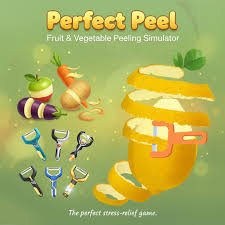
Perfect Peel is a relaxing simulation game where you remove the outer layer from fruits, vegetables and some deliberately unusual objects using one simple hold action. Clean peeling earns progress toward new items and tools, while special rewards give you another reason to complete each object carefully. My first mistake was moving through every peel as quickly as possible. Once I concentrated on maintaining one smoother pass instead of constantly interrupting the motion, the results felt much more controlled.
| Game Detail | Information |
|---|---|
| Game | Perfect Peel |
| Developer | FOMO Games |
| Genre | Simulation, Skill |
| Gameplay Style | Peeling, collecting and tool progression |
| Controls | Hold Left Mouse Button |
| Supported Browser Device | Desktop |
| Original Mobile Release | September 2019 |
| Browser Release | July 2020 |
| Latest Verified Browser Update | November 2020 |
| Current Browser Rating | 4.5 |
| Current Browser Votes | 467K+ |
| Peelable Items | Hundreds |
| Progression | Points, coins, keys and new tools |
| Multiplayer | Single-player |
Start With A Simple Peel
Perfect Peel does not spend much time teaching complicated controls.
An object appears in front of you and the main interaction is immediately understandable: hold the mouse button and remove its outer layer.
The difficulty is not memorizing buttons.
It is keeping the action controlled enough to finish the item cleanly.
I found the first few objects useful for learning how long to hold before releasing rather than trying to rush immediately toward the end of the level.
How To Play Perfect Peel
The browser controls use one main action.
Controls
- Hold Left Mouse Button: Continue peeling
- Release Mouse Button: Stop the peeling action
- Complete the item: Progress toward rewards and additional objects
There are no movement keys or large control combinations.
Modern browsers detect mouse button actions through standardized web input. The MDN MouseEvent documentation explains how browser applications can respond to mouse interactions such as clicks, button presses and releases.
Hundreds Of Things To Peel
Perfect Peel does not limit the experience to one type of fruit.
The game includes hundreds of:
- fruits,
- vegetables,
- and special novelty objects.
That variety matters because the central interaction remains almost unchanged.
A new shape gives the same peeling action a slightly different visual rhythm.
Some items are rounded and predictable.
Others have less familiar shapes, which makes maintaining a smooth pass more interesting.
Fruit And Vegetables Are Only The Beginning
The early theme makes Perfect Peel look like a straightforward food game.
It becomes stranger as more objects appear.
Special items can include things that obviously would not be peeled in a normal kitchen, such as sports-themed objects.
That tells you something important about the game’s design.
Perfect Peel is not trying to simulate real food preparation accurately.
It takes the visual satisfaction of removing a continuous outer layer and applies it to increasingly playful objects.
Smooth Movement Feels Better Than Constant Stops
I initially kept releasing and restarting the peel whenever the line looked slightly uneven.
That created a much more broken rhythm.
A steadier hold usually made the action easier to judge.
My approach became:
- Start the peel deliberately.
- Watch how the tool moves across the surface.
- Keep the motion steady.
- Release only when there is a clear reason.
- Continue until the object is complete.
This is less about speed and more about maintaining control.
Coins And Points Give Peeling A Purpose
Completing items rewards progression currency and points.
Those rewards can then contribute toward unlocking additional tools and moving further through the collection.
This is what turns Perfect Peel from one repeated interaction into a progression game.
You are not simply peeling another object because the previous one disappeared.
Each completed level moves you toward something else.
I found it more motivating to think about the next tool unlock rather than simply counting how many objects I had already finished.
New Tools Change The Look Of Progress
Perfect Peel lets you unlock additional cutting or peeling tools as you continue.
The basic control remains familiar.
What changes is the equipment shown during the interaction.
That gives the game a visible reward system without forcing you to learn a completely new mechanic every few levels.
FOMO Games describes itself as a casual-game studio focused on accessible experiences for broad audiences. The developer’s official company site provides useful background on the studio and its current games.
Keys Add Another Collectible Goal
Perfect Peel also uses special keys as part of progression.
These give you another objective beyond finishing the current object.
A level can therefore contribute toward:
- completing the item,
- earning points,
- collecting currency,
- opening additional tools,
- and gaining special rewards.
I prefer this kind of progression because the underlying interaction can remain simple without making every completed level feel identical.
Why The Game Is Desktop-Focused
The current verified browser listing identifies desktop as the supported browser device.
The control scheme fits that presentation because everything revolves around holding the left mouse button.
The game originally existed on mobile before the later browser release, but those versions have their own platform histories.
For a Mopoga browser page, it is better to describe the current browser edition as desktop-focused instead of assuming that every mobile feature is present in the web version.
The Mobile Version Came First
Perfect Peel existed before its July 2020 browser listing.
A World Intellectual Property Organization decision documenting FOMO Games’ history states that the company published its first game, Perfect Peel, on the Apple App Store on September 22, 2019.
That makes the game’s release history clearer.
The timeline is roughly:
Mobile publication: September 2019
Browser release: July 2020
Latest verified browser update: November 2020
The WIPO record on FOMO Games provides an unusually useful independent source for the company’s early history.
One Continuous Peel Is The Main Challenge
The original mobile description emphasizes trying to peel in one continuous movement.
That gives you a simple optional standard beyond merely finishing the object.
The game does not need a complex ranking system to make one attempt feel better than another.
A smooth, uninterrupted peel simply looks and feels cleaner.
This is where I found most of the replay value.
Once finishing the object itself becomes easy, the next personal challenge is making the motion more consistent.
Why Precision Matters More Than Speed
There is very little reason to race through an unfamiliar object.
A faster hold does not automatically produce a better-looking result.
I found that the more useful approach was to learn the shape first.
Once I understood how the surface behaved, the next attempt naturally became faster without sacrificing control.
That is a better progression than intentionally rushing from the beginning.
Browser Input Is Very Simple
Perfect Peel’s interaction is a good example of how little input a browser game actually needs.
A mouse button can create:
- a press,
- a continued hold,
- movement while held,
- and a release.
Those events are enough to build the complete peeling interaction.
The W3C UI Events specification documents many of the standardized user-interface events modern web applications rely on for mouse and keyboard interaction.
For Perfect Peel, the technical complexity stays behind the scenes while the player sees only one simple action.
HTML And Modern Browser Games
Perfect Peel’s browser edition runs through modern web technology rather than requiring the old Flash plugin.
Modern browser games can combine HTML, scripting, graphics and event APIs to create interactive experiences directly inside a webpage.
The WHATWG HTML Living Standard documents the modern HTML platform and the APIs browsers implement around interactive web content.
The practical advantage for players is simple: supported games can run directly in a modern browser without installing an obsolete browser plugin.
Do Not Treat It As Real Food Preparation
Perfect Peel borrows the appearance of peeling fruits and vegetables, but its mechanics are entertainment.
Real food preparation involves hygiene, appropriate kitchen tools and safe handling practices that the game does not simulate.
The game even includes novelty objects that make its fictional nature obvious.
That means the best way to understand Perfect Peel is as a satisfying visual simulation rather than as a tutorial for preparing food.
Why Repetition Works Here
Perfect Peel repeats essentially the same action many times.
Normally that could become dull quickly.
The game avoids some of that repetition by changing:
- object shapes,
- colors,
- fruits and vegetables,
- novelty items,
- tools,
- rewards,
- and collection progress.
The input remains familiar while the visual result changes.
That makes it easy to stop and return later without needing to remember complicated systems.
Common Perfect Peel Mistakes
The first mistake is trying to move as quickly as possible.
Another is repeatedly stopping and restarting when the peel becomes slightly uneven.
I also found that concentrating entirely on the reward meter made the actual peeling less controlled.
A better approach is simple:
start steadily, watch the surface, maintain the action and finish the object before worrying about the next unlock.
Because the controls are so limited, most improvement comes from consistency rather than learning another button.
A Better Progression Routine
I would approach new items like this:
- Look at the object’s shape.
- Begin with a controlled hold.
- Watch how the peel follows the surface.
- Avoid unnecessary interruptions.
- Finish the object.
- Collect the available reward.
- Check whether a new tool or item has become available.
- Use the next level to improve smoothness rather than simply increasing speed.
That routine keeps the game relaxing instead of turning every level into a race.
Who Created Perfect Peel?
Perfect Peel was created by FOMO Games.
FOMO Games is a casual-game developer based in Istanbul.
The studio’s current portfolio includes titles such as:
- Traffic Escape!
- Seat Jam 3D
- Color Blocks 3D
- Event Twins
- Twisted Ropes
Perfect Peel is particularly important in the company’s history because independent WIPO records identify it as the studio’s first published game.
FOMO Games’ official site describes the company as a mobile-game developer built around designers, technology specialists, data teams and business staff.
Perfect Peel And Other FOMO Games
Players familiar with FOMO Games may notice the same preference for simple interactions in several of its titles.
Perfect Peel uses one continuous hold.
Other games from the studio use similarly approachable systems built around arranging, moving or manipulating objects.
That does not mean the games are mechanically identical.
The common feature is a low control barrier.
You can usually understand the basic action quickly and spend more time on progression than on memorizing a large control scheme.
Release And Latest Browser Update
The verified browser dates are:
Browser Release: July 2020
Latest Verified Browser Update: November 2020
The current browser listing shows a rating of approximately 4.5 from more than 467,000 votes.
The original mobile release came earlier, in September 2019.
Keeping these dates separate prevents a common mistake where a mobile-store release is incorrectly presented as the browser launch.
What Makes Perfect Peel Different?
Perfect Peel combines:
- one-button controls,
- hundreds of peelable items,
- fruits and vegetables,
- novelty objects,
- points and coins,
- collectible keys,
- unlockable tools,
- and short simulation levels.
There is almost no learning curve.
The appeal comes from completing familiar actions smoothly and watching the collection gradually expand.
That makes it better suited to players looking for a low-pressure casual simulation than someone wanting a complicated puzzle or competitive challenge.
Related Game Categories
Perfect Peel fits naturally into:
- Simulation Games
- Skill Games
- Food Games
- Casual Games
- Satisfying Games
- 3D Games
- Mouse Games
- Relaxing Games
Its strongest identity is a simple peeling simulation built around smooth mouse input and collection-based progression.
About Perfect Peel
Perfect Peel takes one simple idea and builds an entire casual progression system around it.
You hold the mouse button to remove outer layers from hundreds of fruits, vegetables and novelty objects, collect rewards and gradually unlock additional tools.
The browser edition is easy to understand because there are no movement keys or complicated instructions.
The biggest improvement in my own approach came from slowing down slightly. Once I stopped restarting the peel every time the line looked imperfect and concentrated on one smoother movement, each object became much easier to finish cleanly.



Reviews
There are no reviews yet.