

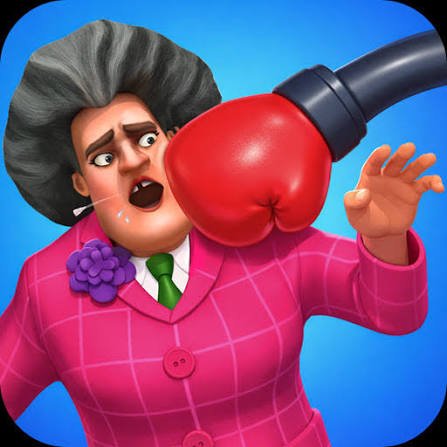
Annoying Teacher Punch Game is a light cartoon action game from ZnK Games built around short levels, simple click-or-tap controls, exaggerated ragdoll reactions, and upgradeable punches. You face Miss-T and Francis across a long sequence of stages where the main challenge is choosing the right on-screen action and progressing through increasingly varied situations.
The game does not ask you to learn complicated movement controls. Most of the interaction comes from clicking or tapping at the right moment, which makes it much easier to understand than a traditional fighting game.
| Game Detail | Information |
|---|---|
| Game | Annoying Teacher Punch Game |
| Developer | ZnK Games |
| Genre | Action / Fighting |
| Gameplay Style | Cartoon action, choices, upgrades and ragdoll reactions |
| Controls | Click or Tap |
| Supported Devices | Desktop, Phone and Tablet |
| Browser Release | May 2026 |
| Browser Latest Update | May 2026 |
| Separate Android Update | June 22, 2026 |
| Current Rating | 4.3 |
| Current Votes | 17.3K+ |
| Multiplayer | Single-player |
| Main Characters | Miss-T and Francis |
The browser version currently identifies ZnK Games as the developer and lists the title under fighting games.
What You Actually Do In Each Level
Annoying Teacher Punch Game keeps the basic interaction very small.
You normally:
- Look at the current situation.
- Choose the available action.
- Click or tap.
- Watch the cartoon reaction.
- Continue to the next part of the stage.
That means the challenge is less about remembering controls and more about understanding what the current screen expects from you.
I found it easier once I stopped tapping immediately.
A short look at the available choices usually makes the intended action much clearer.
Miss-T And Francis
Miss-T is the main recurring character.
The game also features Francis, who appears alongside her across the larger set of levels.
Players familiar with other ZnK Games titles may recognize Miss-T from the developer’s wider Scary Teacher series.
The current game listing describes the game as spanning hundreds of levels, so the characters appear across many short situations rather than one continuous fight.
Annoying Teacher Punch Game Controls
The controls are extremely simple:
- Desktop: Click with the mouse
- Phone: Tap the screen
- Tablet: Tap the screen
There are no WASD movement keys or long button combinations to learn in the current browser version.
Web games can process both mouse and touch interaction through pointer input. The MDN Pointer Events guide explains how one input model can support mice, touchscreens, and other pointing devices.
That helps explain why the same basic control idea works across computers and mobile devices.
Choices Matter More Than Speed
The game’s description encourages quick tapping, but I found that speed is not the only thing that matters.
When a level presents different choices, selecting the correct one is usually more useful than tapping repeatedly.
A simple habit helps:
look first → choose → tap
That prevents many unnecessary restarts.
It also makes the game easier to follow on smaller phone screens where different interactive objects may be close together.
Upgradeable Punches
Progression includes punch upgrades.
These give players something to improve as they continue through the levels rather than making every stage feel completely separate.
The upgrade system fits the game’s arcade style.
You are not managing a detailed character build or complicated equipment screen.
Instead, upgrades provide a simple sense of progression alongside completing stages.
The separate Android listing also confirms punch upgrades as one of the game’s main progression features.
Ragdoll Physics And Cartoon Reactions
A large part of the game’s visual style comes from exaggerated ragdoll movement.
Characters react in intentionally unrealistic ways when actions happen.
That keeps the presentation closer to slapstick cartoon action than realistic combat.
If you like physics-based browser action but want a different setting, Gladihoppers uses ragdoll-style movement inside gladiator arena matches.
The two games use physics differently.
Gladihoppers asks you to control movement and timing during fights.
Annoying Teacher Punch Game keeps interaction much simpler and centers most levels around clicking or tapping.
Mobile Play Feels Different From Desktop
The game supports:
- Desktop
- Phone
- Tablet
That is confirmed by the current browser listing.
On desktop, a mouse gives you a visible pointer.
On phones and tablets, your finger becomes the input.
That difference sounds small, but it matters when several interactive choices appear close together.
The W3C guidance on target size explains why adequately sized and spaced touch controls help reduce accidental inputs.
I would therefore avoid tapping rapidly around the whole screen.
One deliberate tap is usually easier to control.
Hundreds Of Short Levels
One of the more important details about Annoying Teacher Punch Game is its level count.
The current listing describes hundreds of levels built around Miss-T, Francis, simple choices, and exaggerated physics.
This gives the game a different rhythm from an endless arcade mode.
You complete one short situation and then move on to another.
That works well for quick sessions because you do not need to remember a large map or a long story sequence between plays.
Single-Player Focus
Annoying Teacher Punch Game is built around single-player progression.
The available browser information does not describe online matchmaking or local competitive multiplayer.
That makes it better suited to short solo sessions where you want to move through individual stages at your own pace.
For players looking for a more traditional action game with staged arenas and character progression, Stickman Archero Fight uses movement, items, coins, and equipment across single-player levels.
Browser Version And Android Version Are Not Identical Records
There are two useful release records to keep separate.
The browser listing currently gives:
- Release: May 2026
- Latest Browser Update: May 2026
The Android store page shows a later app update on:
- June 22, 2026
These do not necessarily represent the same build.
Browser games and downloadable apps can be maintained on different schedules.
For that reason, I would use May 2026 when describing the current browser edition and mention June 22 only when specifically discussing the Android app.
The Game Can Also Run Offline In Its App Version
The game description highlights offline play as one of its features.
That detail is most relevant to the downloadable edition rather than something I would automatically assume about every browser session.
This distinction matters because browser games can depend on previously loaded resources, caching, or an active connection.
The browser version should therefore be treated as an online web game unless the platform specifically confirms offline browser support.
Who Created Annoying Teacher Punch Game?
Annoying Teacher Punch Game was created by ZnK Games.
The developer is also associated with several related titles, including:
- Scary Teacher 3D
- Prankster 3D
- School Escape
- Hide and Seek
- Pull the String
- Scary Little Prankster
- School’s Out
The current browser listing directly credits ZnK Games and connects the game with this wider group of titles.
Current Rating
The current browser rating is approximately:
4.3 from more than 17,300 votes.
That number is a live platform snapshot rather than a permanent score.
Vote totals can continue increasing as more players rate the game.
Common Mistakes I Would Avoid
Tapping before reading the screen
A second spent checking the available choices can save a restart.
Repeatedly tapping the same area
Many levels are about choosing rather than raw tapping speed.
Ignoring upgrade progression
Upgrades are part of the game’s longer progression loop.
Assuming the browser and app versions have the same update date
The currently listed browser update is May 2026, while the Android edition has a later June 22 update.
Expecting traditional fighting controls
This is much closer to a click-and-tap cartoon action game than a complex fighting game.
How It Compares With Other Action Games
Annoying Teacher Punch Game is unusually simple to control.
Gladihoppers gives you physics-based arena fights where movement and timing play a much larger role.
Stickman Archero Fight adds movement, pickups, equipment, coins, and arena progression.
Annoying Teacher Punch Game instead reduces most interactions to clicking or tapping.
That makes it more suitable when you want short levels and very little control learning rather than a deeper action system.
About Annoying Teacher Punch Game
Annoying Teacher Punch Game is a simple cartoon action game built around Miss-T, Francis, short levels, upgrades, and exaggerated ragdoll reactions.
Its biggest strength is accessibility.
You can understand the controls almost immediately because nearly every important action comes from one click or tap.
What took me longer was learning not to rush.
The game became easier once I started looking at each situation before choosing an action instead of treating every screen like a test of tapping speed.
Related Categories
Annoying Teacher Punch Game fits naturally into:
- Action Games
- Fighting Games
- Funny Games
- Casual Games
- Physics Games
- Mobile Games
- Single-Player Games



Reviews
There are no reviews yet.