


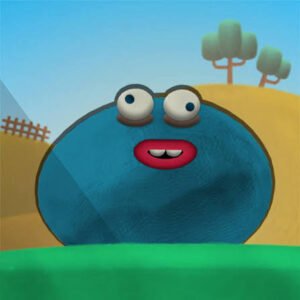
Blob Drop is a physics-based merge puzzle where you release colorful blobs into a container and try to combine matching ones into progressively larger blobs. The basic rule takes only seconds to understand, but the bouncing physics means a good drop can still land somewhere you did not quite expect.
My first mistake was aiming only at the matching blob I wanted to hit. That worked while the container was mostly empty, but later drops bounced into neighboring pieces and created awkward gaps. I had better results once I started looking at the whole landing area instead of focusing on one blob.
| Game Detail | Information |
|---|---|
| Game | Blob Drop |
| Developer | Eray Zesen |
| Genre | Puzzle / Merge |
| Gameplay Style | Physics-based blob merging |
| Controls | Move with mouse, click to drop |
| Mobile Controls | Touch / tap |
| Supported Devices | Desktop, Phone and Tablet |
| Browser Release | May 2024 |
| Latest Verified Browser Update | December 2024 |
| Current Browser Rating | 4.2 |
| Current Browser Votes | 16K+ |
| Multiplayer | Single-player |
The current browser listing identifies Eray Zesen as the developer, gives May 2024 as the release period and December 2024 as the latest verified update, and lists desktop, phone, and tablet support.
Drop First, Merge Second
Every turn begins with a blob positioned above the container.
You choose where it should fall, release it, and let gravity handle the rest.
When two matching blobs touch, they combine into a larger blob.
That new blob can then merge with another matching one later.
The basic progression looks like this:
drop → collide → merge → create a larger blob → repeat
What makes Blob Drop more interesting than a simple matching board is that the pieces do not stay exactly where you place them.
They bounce, roll, and settle according to the surrounding blobs.
Blob Drop Controls
The browser controls are very simple.
- Mouse movement: Position the blob
- Left click: Drop it into the container
- Touchscreen: Position and release through touch controls
The current browser version confirms mouse-based dropping and support for phone and tablet play.
For some technical background, the MDN Pointer Events guide explains how modern web interfaces can work with mouse, touch, and pen input through a common browser model.
The W3C Pointer Events specification provides the underlying web standard for hardware-independent pointer input.
Matching Blobs Grow Into Bigger Ones
The main objective is to keep combining identical blobs.
Two matching blobs touching each other create the next larger type.
That sounds simple, but each merge also changes the available space inside the container.
Sometimes a successful merge is useful because it frees room.
Other times it produces a large blob in an inconvenient position that blocks several smaller pieces.
That difference becomes important once the container starts filling.
Why Physics Changes The Puzzle
Blob Drop uses bouncing pieces rather than fixed grid squares.
A blob can:
- bounce after landing
- roll into a nearby gap
- push another blob
- settle at an angle
- trigger an unexpected merge
This means the exact final position is not always obvious before you release it.
I found that dropping directly on top of a target could sometimes be less reliable than placing the blob slightly to one side and letting it roll into contact.
The safest move depends on how crowded the container already is.
Keep Large Blobs Low
Large blobs take up much more room than the early pieces.
Because of that, I try to keep the biggest ones toward the bottom whenever possible.
A large blob sitting high in the container can create two problems.
First, it raises the overall stack.
Second, it can block smaller matching blobs from reaching one another.
Keeping larger pieces low leaves more usable space above them.
It also creates a clearer area for incoming drops.
Empty Space Is A Resource
The container’s free space matters almost as much as your score.
A move can produce a larger blob and still make the board worse if it leaves many small gaps that future pieces cannot use.
That was one of the less obvious lessons for me.
I originally thought every merge was automatically good.
Later I started asking:
What will the container look like after this merge?
That question made much more difference than simply chasing the largest available pair.
When The Game Ends
The run ends when the container becomes too full and a blob spills beyond the allowed area.
The current game description specifically identifies overflow as the loss condition.
That gives every drop a small risk.
A crowded container may still have several possible merges, but reaching those matches becomes harder when there is not enough safe landing room.
This is why controlling height is so important.
Building Toward The Biggest Blob
The long-term objective is to create increasingly large blobs.
Each larger blob represents several earlier successful merges, so producing one feels more valuable than clearing a normal matching group.
I usually avoid isolating my biggest pieces.
If two large matching blobs appear on opposite sides of the container, bringing them together later can be difficult.
Building related sizes in roughly the same area makes future merges easier.
Do Not Rush Every Obvious Pair
Two identical blobs touching each other may seem like an automatic opportunity.
Usually it is.
But sometimes dropping another matching blob nearby first can produce a better chain.
For example, one merge may create a larger blob directly beside another matching large piece.
That can lead to an immediate second merge and free much more space.
Those chain reactions are some of the most satisfying moments in Blob Drop.
They also show why planning one step ahead helps.
Watch The Next Blob
A strong move is not only about the piece currently being dropped.
If the game shows or suggests what is coming next, use that information when deciding where to create space.
Even when you cannot fully predict future pieces, leaving several flexible landing areas is better than filling the container with narrow isolated gaps.
I learned this after repeatedly building neat stacks that looked organized but had nowhere useful for the next blob to land.
The Suika-Style Merge Formula
Blob Drop belongs to the broader physics-merging style often associated with Suika-inspired games.
The important characteristics are:
- pieces fall under gravity
- matching types combine
- merged pieces become larger
- available space becomes progressively tighter
- overflow ends the run
Blob Drop uses colorful blob characters rather than fruit, but the underlying puzzle idea remains similar.
Players who like predictable grid puzzles may find the bouncing slightly chaotic.
Players who enjoy solving a board while reacting to physics may find that unpredictability more interesting.
Who Created Blob Drop?
Blob Drop was created by Eray Zesen.
The current browser listing also credits Eray Zesen with another browser game called Light the Lamp.
I would keep this developer information separate from several unrelated mobile games that also use the name “Blob Drop.”
For example, current app stores contain different Blob Drop titles from other developers, but those should not be treated as the same browser game.
Release And Latest Update
The verified browser release is May 2024.
The latest verified browser update is December 2024.
I would use those dates for this particular Eray Zesen browser edition.
There are newer mobile apps with similar names, but their 2025 or 2026 update dates belong to different games and different developers.
Mixing those records would give readers the wrong release history.
Desktop, Phone And Tablet
Blob Drop currently supports:
- Desktop
- Phone
- Tablet
The controls suit multiple devices because the game relies primarily on positioning and dropping rather than a large keyboard layout.
I prefer desktop when the container becomes crowded because mouse positioning gives me a very clear idea of where the next blob will start falling.
Touch controls feel natural for shorter sessions because the basic interaction is simple.
Neither device type changes the core physics puzzle.
Browser Graphics And Performance
Physics-based puzzle games still depend on smooth visual updates even when the controls themselves are simple.
Modern browser games can use technologies such as the HTML Canvas API for animated graphics. The MDN Canvas API reference explains that canvas can be used for animation and game graphics directly inside the browser.
MDN also provides a separate canvas performance guide covering ways browser graphics can be rendered efficiently.
If Blob Drop suddenly feels less smooth, I would first close unusually heavy tabs and reload the game before assuming the physics themselves have changed.
Three Mistakes That Filled My Container Too Quickly
The first was always dropping directly onto a matching blob.
Sometimes the bounce pushed both pieces into a worse position.
The second was letting large blobs remain near the top.
That reduced my usable space very quickly.
The third was ignoring small isolated pieces.
A single low-value blob may not seem important, but several separated pieces can prevent the larger merges you need later.
Managing those small leftovers helped my runs last noticeably longer.
A Simple Way To Plan Each Drop
Before releasing a blob, I check three things:
- Where is the nearest matching blob?
- Where will the merged piece probably settle?
- Will that position help or block my larger blobs?
This only takes a moment.
It also makes the game feel much less random.
You cannot control every bounce, but you can choose a landing zone that gives the physics a better chance of helping you.
What Makes Blob Drop Different?
Blob Drop uses very few rules but creates plenty of variation through physics.
Its main features include:
- colorful blobs
- drop-based controls
- matching pairs
- larger merged blobs
- bouncing physics
- chain reactions
- limited container space
- high-score progression
- desktop and touchscreen support
The interesting part is not understanding the rules.
It is managing the consequences of each drop after the container becomes crowded.
Related Puzzle Games On Mopoga
Blob Drop fits naturally beside Mopoga games built around merging, numbers, and puzzle planning.
Impossible 13 is a useful comparison because it also asks you to combine matching values into progressively higher ones, although it uses a more structured board instead of falling physics.
Gem 11 focuses on number-based merging, while Doodle God takes the idea of combinations in a completely different direction by asking you to create new elements and concepts.
I checked Mopoga’s two sitemap endpoints before writing, but the current web reader cannot parse their text/xml response. Because of that, I have not guessed individual product URLs.
The canonical Mopoga sources remain:
https://imopoga.com/product-sitemap.xml
https://imopoga.com/product_cat-sitemap.xml
Exact product links should be taken from those sitemaps once their URLs are directly readable rather than constructing slugs that may be wrong.
About Blob Drop
Blob Drop is easy to start because the only immediate decision is where to release the next piece.
The difficulty appears gradually.
As the container fills, every landing position becomes more important, large blobs take up valuable room, and poorly placed pieces can block future merges.
For me, the biggest improvement came from thinking about where the new merged blob would end up instead of only trying to connect the two pieces in front of me.

Reviews
There are no reviews yet.