

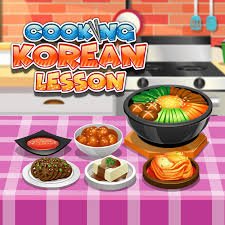
Cooking Korean Lesson is a cooking simulation game by Go Panda Games Studio where you follow on-screen instructions to prepare Korean-inspired dishes such as kimchi and bibimbap. You select ingredients, use different kitchen tools, prepare vegetables, combine ingredients, and work through each cooking stage until the dish is ready to serve.
What makes the game easy to start is its simple point-and-click format. You do not need keyboard movement or complicated controls. Each stage shows what to do next, making the experience closer to an interactive cooking activity than a traditional action game. The game should be treated as casual entertainment rather than a substitute for real cooking instruction or food-safety guidance.
| Game Detail | Information |
|---|---|
| Game | Cooking Korean Lesson |
| Developer | Go Panda Games Studio |
| Genre | Cooking, Simulation, Food |
| Gameplay | Follow guided cooking steps and prepare dishes |
| Controls | Mouse click or tap |
| Supported Devices | Desktop, Phone, Tablet |
| Earlier Browser Record | March 3, 2020 |
| Poki Release | August 2020 |
| Latest Poki Update | March 2023 |
| Current Poki Rating | 4.3 |
| Current Poki Votes | 419K+ |
| Confirmed Dishes | Kimchi, Bibimbap |
| Achievements | Yes |
| Multiplayer | Single-player |
Poki directly credits Go Panda Games Studio, while Y8’s earlier listing also credits Go Panda Games and confirms that the title was already available by March 2020.
How Cooking Korean Lesson Works
The game guides you through a series of cooking tasks.
A typical sequence can involve:
- Selecting ingredients
- Preparing vegetables
- Using kitchen tools
- Combining ingredients
- Following the on-screen order
- Finishing the dish
- Serving the completed meal
The game tells you what to do next, so you rarely need to guess which interaction comes first.
Cooking Korean Lesson Controls
The controls are very simple:
- Desktop: Click with the mouse
- Phone: Tap the screen
- Tablet: Tap the screen
- Some actions: Click, tap, hold, or drag when prompted
Poki describes the main control as clicking or tapping to use tools and ingredients.
Start By Following The On-Screen Instructions
Cooking Korean Lesson is designed around guided steps.
You do not need to memorize the whole cooking sequence before starting.
Watch what the game highlights and complete that task first.
Once it is finished, the next stage becomes available.
Kimchi Is One Of The Main Dishes
Kimchi is directly named by Poki and Y8 as one of the main foods featured in the game.
The game turns the preparation into a sequence of simple interactive tasks rather than presenting it as a detailed real-world recipe.
That distinction is useful because the goal is entertainment and basic food-themed gameplay.
Bibimbap Is Also Confirmed
Bibimbap is the other strongly confirmed dish.
Y8 specifically says players can prepare and serve both kimchi and bibimbap.
This gives the game more variety than repeating one recipe from beginning to end.
Poki Also Mentions Tteokbokki
Poki’s current description asks players about familiar Korean dishes including kimchi, bibimbap, and tteokbokki.
However, the clearest gameplay documentation consistently confirms kimchi and bibimbap.
For Mopoga, I would therefore keep those two as the main verified playable dishes rather than claiming a larger recipe list without stronger evidence.
Ingredients Are Selected Directly
Instead of managing a large inventory menu, you interact with ingredients as the game asks for them.
Click or tap the correct item.
Then move to the next preparation step.
This keeps the game accessible even for someone who has never played a cooking simulation before.
Kitchen Tools Are Part Of The Gameplay
Poki says Cooking Korean Lesson introduces different tools and kitchen equipment during the guided activities.
The game may ask you to select or use a particular tool as part of a task.
These are simplified game interactions, not detailed instructions for handling real kitchen equipment.
Vegetable Preparation Appears In The Game
Y8 and other current browser records describe ingredient preparation as part of the game, including working with vegetables.
The actions are controlled through simple clicks, taps, or dragging.
You are following an animation rather than performing realistic kitchen tasks.
The Game Uses Step-By-Step Progression
You normally cannot skip directly to the finished dish.
Each stage has to be completed before the next one becomes relevant.
That creates a clear loop:
read prompt → interact → complete task → move to next step
This is one of the reasons Cooking Korean Lesson works well as a casual game.
Do Not Click Randomly
Although the controls are simple, random clicking can make it harder to understand what the game currently wants.
A better approach is to look at the highlighted ingredient, tool, or prompt first.
Then complete only that action.
Ingredients Come Before The Finished Dish
Early tasks usually focus on gathering and preparing what is needed.
Later stages move toward combining and serving.
That gives the game a natural beginning-to-end structure rather than a collection of unrelated mini-games.
Serving Completes The Activity
Once preparation is finished, the dish can be presented or served.
Some browser descriptions also mention choosing accompanying items or decorative finishing touches.
The exact presentation can vary slightly by hosted version.
The Game Includes Achievements
Poki specifically mentions an achievement system that rewards repeated task completion.
Y8 also lists achievements for its hosted edition.
This gives you an additional goal beyond preparing each dish once.
Achievements Add Replay Value
Without achievements, there would be less reason to repeat a completed cooking sequence.
The achievement system gives returning players small goals to work toward.
That makes the game more replayable despite its simple controls.
The Game Is Single-Player
Current Y8 and POG records identify Cooking Korean Lesson as a single-player game.
There is no verified local or online multiplayer mode.
The experience is built around completing the guided cooking activities by yourself.
There Is No Competitive Opponent
You are not racing another player.
There is no online ranking match.
The challenge comes from correctly following the sequence of actions shown by the game.
That gives Cooking Korean Lesson a calmer pace than many restaurant-management games.
It Is Not A Restaurant Management Game
Although Poki places the title near Restaurant and Food categories, Cooking Korean Lesson does not mainly focus on managing staff, customers, tables, or a growing business.
Its main activity is preparing individual dishes through guided interactions.
Simple Controls Work Well On Mobile
Cooking games often fit touchscreen devices well because selecting ingredients already feels natural with taps.
You do not need to recreate a keyboard layout on the screen.
That makes phone and tablet play straightforward.
Desktop Play
Poki officially supports desktop computers.
Use the mouse to:
- Select ingredients
- Choose tools
- Follow prompts
- Perform interactive cooking steps
Some stages may also use dragging.
Phone Play
Poki officially supports phones.
Tap directly on the highlighted ingredient or object.
The game adapts naturally because almost every interaction is selection-based.
Tablet Play
Tablets are supported as well.
The larger touchscreen can make ingredients and small interface elements easier to see while keeping the convenience of touch input.
Cooking Korean Lesson Uses HTML5
Y8 identifies the game as HTML5.
That means the browser version does not depend on the old Flash plugin and can work across modern supported browsers.
Earlier Browser Availability Was In March 2020
Y8 records Cooking Korean Lesson as added on:
March 3, 2020.
This predates the later Poki publication.
For historical accuracy, the game should not be described as first existing in August 2020.
Poki Release Came In August 2020
Poki currently lists:
Release: August 2020.
This is best understood as the Poki platform release date.
The clean timeline is:
Earlier verified browser availability: March 3, 2020
Poki release: August 2020
Latest Poki Update
Poki currently lists:
Latest update: March 2023.
That is the safest current browser update date to use for a Mopoga page based on Poki.
Current Cooking Korean Lesson Rating
Poki currently shows:
4.3 from 419,772 votes.
Because the vote count continues changing, the cleaner publishing format is:
4.3 from 419K+ votes
Who Created Cooking Korean Lesson?
Cooking Korean Lesson was created by Go Panda Games Studio, also written as Go Panda Games or GoPanda Games across different host pages.
For the Mopoga details table, Go Panda Games Studio is the best current name because that is Poki’s structured developer credit.
Some Sites Use A Different Developer Credit
A few third-party game portals credit iclickgames instead of Go Panda Games.
However, both Poki and the earlier Y8 listing credit Go Panda Games.
For a Poki-focused Mopoga page, Go Panda Games Studio is therefore the stronger developer field.
Other Go Panda Games Titles
Poki currently connects the studio with games including:
- Funny Nose Surgery
- Funny Rescue Zookeeper
- Funny Pet Rescue
- Hipster vs Rockers
These games use different themes, but they share the same developer.
Funny Nose Surgery Comes From The Same Studio
Poki directly names Funny Nose Surgery as another Go Panda Games title.
Its gameplay is very different from Cooking Korean Lesson, so the developer is the main connection.
Funny Pet Rescue Is Another Related Developer Game
Funny Pet Rescue is also listed by Poki under Go Panda Games.
Players familiar with the studio may recognize the same simple click-and-follow interaction style.
Common Cooking Korean Lesson Mistakes
One common mistake is clicking several objects before checking the current instruction.
Another is trying to skip ahead when the game expects the steps in a particular order.
Players may also assume every version contains exactly the same recipe list, even though different host descriptions vary.
The safest approach is to follow the current on-screen prompt and treat kimchi and bibimbap as the two most clearly confirmed dishes.
A Better Way To Play
Start by reading the first prompt.
Select the requested ingredients.
Use the highlighted tool.
Complete each preparation action before moving on.
Follow the sequence until the dish is finished.
Then replay the activity if you want to work toward achievements.
A useful game rhythm is:
read → select → prepare → combine → finish → serve
Related Categories
Cooking Korean Lesson fits naturally into:
- Cooking Games
- Food Games
- Simulation Games
- Restaurant Games
- Casual Games
- Educational Games
- Mobile Games
- Single-Player Games
Poki currently connects it with Cooking, Simulation, Restaurant, Food, Cozy, and related casual categories.
What Makes Cooking Korean Lesson Different?
Cooking Korean Lesson turns food preparation into a guided point-and-click activity.
You select ingredients.
Use simplified kitchen tools.
Prepare vegetables.
Work through ordered steps.
Finish dishes such as kimchi and bibimbap.
Then earn achievements by repeating tasks.
There is no complicated movement system or restaurant-management layer. The game stays focused on guided cooking interactions, which makes it easy to start on desktop, phone, or tablet.



Reviews
There are no reviews yet.