

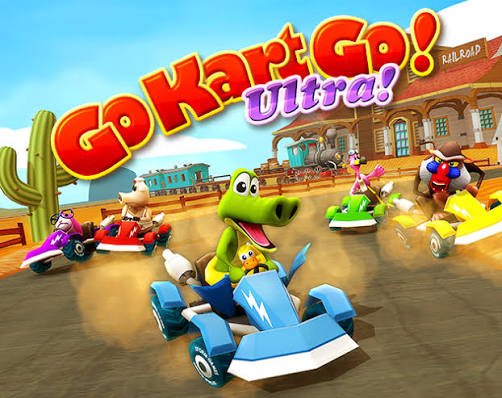
Go Kart Go Ultra is a colorful 3D kart racing game from Xform Games where nine unusual animal drivers compete across tracks filled with collectible stars, items, jumps, drifting sections, and unlockable content. It can be played alone against computer-controlled racers or with a second player using the same computer.
What makes the game enjoyable for me is how quickly a race can change. Being in first place does not guarantee a win because another racer can use an item or catch you during the final section. Learning the tracks and collecting stars matters almost as much as simply staying ahead.
| Game Detail | Information |
|---|---|
| Game | Go Kart Go! Ultra! |
| Developer | Xform Games |
| Genre | Kart Racing |
| Gameplay | 3D racing, items, collectibles, unlocks |
| Controls | Keyboard |
| Supported Devices | Desktop |
| Current Browser Release | March 2019 |
| Latest Verified Browser Update | June 2022 |
| Current Rating | 4.4 |
| Current Votes | 680K+ |
| Characters | 9 animal racers |
| Tracks | 9 |
| Multiplayer | Local two-player split-screen |
The current Poki listing identifies Xform Games as the developer, lists desktop as the supported device, and gives March 2019 and June 2022 as its current platform release and update dates.
How Go Kart Go Ultra Works
Go Kart Go Ultra follows a familiar arcade-kart structure.
Choose a character.
Select an available track.
Race against the other drivers.
Collect items and stars.
Finish as high as possible.
Successful races gradually open additional tracks and characters.
Unlike a realistic driving game, the focus is not vehicle simulation. It is a playful arcade competition where unusual items, jumps, drifting, collectibles, and unpredictable opponents can change the order during a race.
Xform Games describes the game around nine animal racers and a deliberately lighthearted kart-racing experience.
Go Kart Go Ultra Controls
Player 1
- Arrow keys: Drive and steer
- Spacebar: Use an item
- Shift: Jump and drift
- Z: Look behind
Player 2
- W, A, S, D: Drive and steer
- Q: Use an item
- Tab: Jump and drift
- E: Look behind
Additional controls include:
- Esc or P: Pause
- M: Mute sound
These are the controls listed by the current browser version.
Nine Animal Racers
One of the game’s most recognizable features is its cast of animal drivers.
Xform Games confirms that there are nine characters.
Examples include:
- Rhino Bert
- Freddy Flamingo
- Monkeyboy
- Albert Von Schwein
- Sonny Crocker
- Eugene
- Elton the Dog
- Jimmy Cats
- Bruno
Some characters are available earlier than others, while additional racers can be opened through progression and collecting stars.
The unusual cast gives the game more personality than a racing game built around identical drivers.
Collect Stars To Unlock Characters
Stars are an important part of progression.
You can collect them while playing and use them to open additional racers.
That gives you a reason to pay attention to more than your finishing position.
During my first few races, I found it tempting to focus entirely on reaching first place. Later, collecting stars became more useful because those stars contribute to unlocking more of the game’s content.
You therefore have two goals running at once:
Finish well and collect what you can along the way.
The current Poki description specifically confirms that stars are used for unlocking characters.
Tracks Open As You Progress
The first major course is Old Station.
Winning there allows additional tracks to become available.
Current platform information names courses including:
- Old Station
- Central Park
- Candy Mountains
- Fireland
Older descriptions also confirm that the complete game contains nine tracks, made up of three newer courses and six returning tracks from earlier Go Kart Go games.
This progression gives individual races a purpose.
You are not simply replaying the same course for a higher score.
Winning helps open the next part of the game.
Old Station Is Your Starting Point
Old Station works as the first major introduction to the racing system.
You learn:
- Basic steering
- Item collection
- Jumping
- Drifting
- How opponents behave
- How quickly the race order can change
The Xform Games community documentation identifies Old Station as an Ultra track and shows that completing it unlocks Central Park.
I would use the first few attempts mainly to understand how the kart responds rather than worrying about a perfect result immediately.
Items Can Change A Race Quickly
Go Kart Go Ultra includes collectible items that can affect other racers or help your own position.
That means raw speed is not the only factor.
A player who is slightly behind can still return to the front if the race changes at the right moment.
Likewise, being first does not make you completely safe.
This uncertainty is a large part of the game’s arcade feel.
The official game description specifically highlights using unusual items against opponents as one of the main features.
Do Not Use Every Item Immediately
A common early mistake is activating an item the moment it appears.
Sometimes that works.
Other times, holding it briefly gives you a more useful opportunity later in the race.
I found it better to first understand what the item does and then decide whether using it immediately actually helps my position.
The important point is timing within the game rather than pressing the item button automatically.
Drifting Helps With Tight Sections
The game includes a dedicated drift control.
For Player 1, it is Shift.
For Player 2, it is Tab.
Drifting is particularly noticeable around tighter parts of a course where simply holding the steering key may not feel as smooth.
It takes a few races to understand how each track is shaped, so I would learn the route first and then become more comfortable with the drift mechanic.
This is strictly an arcade-game mechanic and should not be treated as real-world driving guidance.
Jumping Shares The Drift Control
The same control also handles jumping in relevant sections.
That gives the keyboard layout a useful simplicity.
You do not need several different action keys.
Most of the game revolves around:
- Driving
- Using an item
- Jumping or drifting
- Looking behind
That makes it fairly easy to understand even before you know the individual tracks.
Looking Behind Can Be Useful
Player 1 can press Z to look back.
Player 2 can use E.
This gives you a quick idea of where nearby rivals are positioned.
I would not keep the rear view active for too long because the track ahead is still more important.
A quick check is usually enough to understand how close another racer is.
Collectibles Give You Another Reason To Replay
Go Kart Go Ultra includes collectible and hidden-object elements in addition to normal racing.
Xform’s original description says that finding collectibles helps unlock new tracks and characters.
This gives completed courses some replay value.
Even after you have won a race, you may still have something left to collect.
That means progression is not based solely on finishing first once and immediately forgetting the track.
There Are Ten Achievements
The original feature list includes 10 achievements.
Achievements provide optional goals beyond normal race victories.
Players who simply want to finish the tracks can concentrate on racing.
Players who prefer completing everything have additional challenges to work toward.
This helps the game support both short casual sessions and longer completion-focused play.
Local Two-Player Racing
Go Kart Go Ultra includes a two-player local mode.
Both players use the same computer and keyboard.
One player uses the arrow-key control layout.
The other uses WASD.
The current Poki description specifically encourages trying the two-player racing mode with a friend, and current platform metadata describes the action as split-screen.
This is important because it is not the same thing as online multiplayer.
You do not join a remote matchmaking lobby.
Both players are at the same device.
Single Player Vs Two Player
Single-player mode is useful for learning the tracks.
You race against computer-controlled opponents and can concentrate on unlocking characters, tracks, stars, and achievements.
Two-player mode changes the experience because another person is competing on the same screen.
For new players, I would learn the basic controls in single-player first.
Once both players know the key layout, the local mode becomes much easier to follow.
Desktop Is The Main Supported Platform
The current official Poki listing identifies desktop as the supported device.
That makes sense because the game relies on several keyboard controls and supports two people sharing one keyboard.
Some third-party websites claim mobile compatibility, but those claims conflict with the current primary platform listing.
For accuracy, I would therefore describe the present browser version as:
Supported device: Desktop
rather than promising phone or tablet support.
Nine Tracks In Total
The game includes nine tracks.
An older platform description from Miniplay specifies:
3 new tracks + 6 classic tracks.
That connection with older Go Kart Go titles is worth noting.
Ultra is not simply an isolated kart game.
It draws from an existing series and combines returning course ideas with newer content.
Go Kart Go Ultra Is Part Of A Series
Xform Games has produced several Go Kart Go titles over the years.
The series includes names such as:
- Go Kart Go! Turbo!
- Go Kart Go! Nitro!
- Go Kart Go! Ultra!
- Go Kart Go! Air!
Historical community records place the earlier Turbo game in 2009, Nitro around 2012, and Ultra around the mid-2010s.
The important point for the current page is that Ultra existed before its 2019 Poki browser listing.
Release Date Explained
Different sites show different dates for Go Kart Go Ultra because the game has existed in several forms and has been republished as browser technology changed.
Historical records place the original Ultra release around 2014, while the current Poki listing records:
Poki browser release: March 2019
Latest Poki update: June 2022
Xform Games now says GoKartGo! Ultra is back and directs players to its browser version, confirming that the current release is a returning version of an older game rather than a completely new 2019 title.
For a game details table, March 2019 is the safest current browser date.
For historical context, the game itself is older.
Who Created Go Kart Go Ultra?
Go Kart Go Ultra was developed by Xform Games.
This is confirmed both by the current game listing and by Xform Games’ official website, where GoKartGo! Ultra remains part of the studio’s catalogue.
Xform Games is also known for browser racing and action titles such as Rally Point and Burnin’ Rubber.
The studio’s official catalogue currently includes several Rally Point games alongside GoKartGo! Ultra.
Other Games From Xform Games
Players familiar with Go Kart Go Ultra may recognize other Xform Games titles including:
- Rally Point
- Rally Point 2
- Rally Point 3
- Rally Point 4
- Rally Point 5
- Rally Point 6
- Police Pursuit 2
- Burnin’ Rubber 5 HD
- Super Man Or Monster
- Cartapult
These titles appear on the official Xform Games catalogue.
Current Go Kart Go Ultra Rating
The current Poki listing gives Go Kart Go Ultra a rating of approximately:
4.4 from more than 680,000 votes.
This is a live platform statistic.
The exact vote count can rise as more people rate the game, so it should be treated as a current snapshot rather than a permanent number.
Common Go Kart Go Ultra Mistakes
One mistake is concentrating only on accelerating and forgetting about items.
Another is trying to collect every star even when doing so badly disrupts your race position.
Players also sometimes use an item immediately without checking whether it is actually useful at that moment.
Another common problem is learning the controls but not learning the track.
Knowing where a course changes direction is often more useful than simply reacting at the last second.
In two-player mode, mixing up the two keyboard layouts is another easy mistake.
A Better Way To Progress
Start with single-player mode.
Use the opening races to learn the control layout and basic course shapes.
Then begin paying more attention to stars and collectibles.
Win Old Station to open Central Park and continue working through the available tracks.
Once you know how jumping, drifting, items, and the main routes work, try local two-player mode.
That progression felt more natural to me than immediately trying to master every mechanic at once.
Related Categories
Go Kart Go Ultra fits naturally into:
- Racing Games
- Kart Games
- 3D Games
- Two-Player Games
- Local Multiplayer Games
- Animal Games
- Arcade Games
- Driving Games
Its current primary category is Racing Games.
What Makes Go Kart Go Ultra Different?
Go Kart Go Ultra does not try to make kart racing realistic.
Its identity comes from nine unusual animal drivers, colorful tracks, items that can change the order of a race, collectible stars, unlockable characters, hidden objects, achievements, and a local two-player mode.
That mixture gives you several things to think about during a race.
Winning matters.
Collecting matters.
Unlocking the next track matters.
And another racer can still change the result late in the round.
That unpredictability is what keeps the same courses entertaining after more than one attempt.

Reviews
There are no reviews yet.