

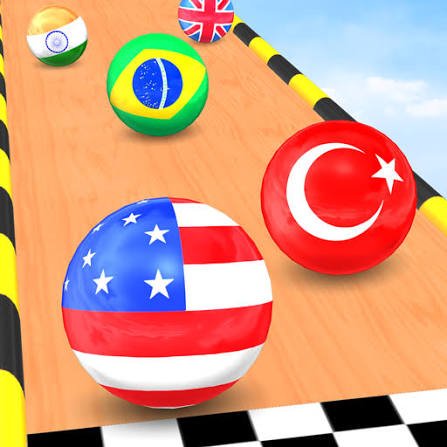
Marble Run 3D is a 3D marble racing game where you choose a country-themed marble and try to reach the finish before the rest of the field. Staying on the track is only part of the challenge. You can bump rival marbles away from useful lines, collect coins and loot boxes, deal with narrow platforms, and decide when chasing an item is worth risking your position.
The game looked straightforward to me at first because there is very little to learn about the controls. The harder lesson is momentum. A late correction on a wide section may be harmless, while the same movement near a narrow edge can send the marble completely off course.
| Game Detail | Information |
|---|---|
| Game | Marble Run 3D |
| Developer | OSA Studio |
| Genre | Racing |
| Gameplay Style | 3D marble racing, obstacles and collecting |
| Desktop Controls | A/D or Left/Right Arrow Keys |
| Alternative Control | Mouse movement |
| Mobile Controls | Finger movement on screen |
| Supported Devices | Desktop, Phone, Tablet |
| Browser Release | January 2025 |
| Latest Browser Update | November 2025 |
| Android App Update | April 30, 2026 |
| Browser Rating | 4.2 |
| Browser Votes | 437K+ |
| Game Modes | Race and Challenge |
The current browser edition identifies OSA Studio as the developer and lists January 2025 as its release date, with the browser build most recently updated in November 2025.
What You Actually Do In Marble Run 3D
The main goal is simple: keep your marble on the course and cross the finish line ahead of the others.
The tracks make that harder through turns, narrow sections, obstacles and opportunities to collide with rival marbles. You are therefore managing two things at once. You need enough speed to stay competitive, but also enough control to avoid throwing away a good race at the next corner.
You can also collect coins and loot boxes during a run.
That creates a useful risk decision. Something sitting directly on your racing line is easy value. Moving across the track for a collectible just before a difficult turn can cost far more than the item is worth.
The game’s official Android listing also describes the central idea as racing country marbles while knocking rivals from the track and trying to finish first. Google Play’s official Marble Run 3D listing provides the developer-maintained description of that version.
Marble Run 3D Controls
The browser controls are deliberately small.
- A: Move left
- D: Move right
- Left Arrow: Move left
- Right Arrow: Move right
- Mouse: Move the cursor to guide the marble
- Touchscreen: Move your finger to steer
The current browser version supports keyboard, mouse and touchscreen input.
Simple controls do not necessarily mean imprecise controls. Browsers can identify physical keyboard positions through systems such as KeyboardEvent.code, which the MDN guide to keyboard input specifically notes is useful for games using WASD-style movement.
For Marble Run 3D, however, the important skill is not pressing more keys. It is learning when to stop steering.
Momentum Is The Real Challenge
A marble does not feel like a car.
When you move sideways, the ball still carries its existing movement into the next section. That is why suddenly holding left or right can produce a wider change than expected.
I found that the safest habit is making the first correction earlier and then reducing input as the marble reaches the position you want.
Constant left-right corrections usually create another problem. Each movement compensates for the previous one, and eventually you are steering against your own mistake rather than following the track.
On broad sections, you have room to recover.
On narrow tracks, small movements become much more important.
Race Mode
Race mode puts your country marble against a field of other marbles.
Reaching the finish first is the obvious objective, but other racers are not merely decoration. Marble Run 3D allows collisions, so positioning relative to the group can matter.
Being directly beside another marble near the edge creates risk for both of you.
Sometimes moving into clear space is more useful than trying to force a collision. I would especially avoid aggressive side movement just before a sharp turn because winning one collision does not help if your own marble leaves the course immediately afterward.
The current game description confirms that rival marbles can be smashed off the track during races.
Challenge Mode Changes The Focus
You do not always need to race against the full field.
Marble Run 3D also includes a Challenge mode, where the emphasis shifts toward improving your ability to handle tracks and obstacles.
This is the better place to pay attention to how quickly the marble changes direction.
Instead of worrying about another racer taking first place, you can learn how much movement is required for different types of turns and narrow sections.
That practice transfers directly into normal races.
The browser edition specifically presents Challenge mode as an option for practicing your skills before returning to racing.
Coins And Loot Boxes
Coins and loot boxes give you something else to watch for while moving toward the finish.
They also create some of the game’s most avoidable mistakes.
A collectible near the centre of your path barely changes the race. One close to an edge may require a large sideways movement followed immediately by another movement to return to safety.
Before chasing one, I would check what comes after it.
If the next section is straight and wide, the extra movement is easier to recover from. If a tight turn begins immediately afterward, maintaining position is usually more valuable.
That makes collecting part of the racing decision rather than a separate activity.
Bumping Other Marbles
Contact between racers is one of the mechanics that gives Marble Run 3D more personality than a simple obstacle course.
A well-positioned collision may move another marble toward an edge.
But there is no reason to chase every opponent.
Trying to cross the entire track just to hit another racer often compromises your own line. The safer opportunities happen when another marble is already beside you and the course gives you enough room to recover afterward.
In other words, use collisions when they naturally fit the race rather than treating every competitor as a target.
Narrow Sections Need A Different Approach
Wide platforms allow bigger corrections.
Narrow platforms punish them.
When the track becomes tight, I would stop thinking about passing other marbles and focus on staying near the safest part of the surface.
That usually means entering the narrow section already aligned rather than trying to fix your position while crossing it.
The mistake is often made several seconds before the fall itself. Enter a difficult section from a poor angle and you may have very little room left to recover.
Look Beyond Your Marble
Watching only the ball makes fast sections harder.
Your marble tells you where you are now. The track ahead tells you where you need to be next.
I find it more useful to keep the marble in peripheral vision while concentrating slightly farther along the course.
This lets you identify an upcoming corner before reaching it and start making a smaller correction sooner.
The same idea becomes useful when collectibles appear. You can decide whether a coin fits naturally into your route instead of reacting to it when you are already beside it.
Mouse, Keyboard Or Touch?
There is no single best control method for everyone.
Keyboard controls provide clear left and right input. If you already play browser racing or platform games with WASD, they will probably feel familiar immediately.
Mouse input can feel smoother because you guide movement with the cursor instead of relying only on two keys.
Touchscreens use finger movement, which makes the game playable on phones and tablets without adding virtual buttons across the display. The W3C Pointer Events standard explains the broader browser model used to support different pointing devices, while MDN’s Pointer Events documentation provides practical information about mouse, pen and touchscreen input on the web.
I would use whichever method lets you make small corrections most consistently.
Can You Play Marble Run 3D On Mobile?
Yes.
The current browser edition supports:
- Desktop
- Phone
- Tablet
Mobile play uses touchscreen movement instead of requiring a keyboard.
OSA Studio also maintains a separate Android edition called Marble Run 3D – Country Balls. Its official Google Play listing shows more than one million installs and records its latest update as April 30, 2026.
It is useful to keep that date separate from the browser version because they are not necessarily updated on the same schedule.
Browser And App Updates Are Different
Marble Run 3D currently has different update histories depending on the version you are checking.
For the browser edition:
Release: January 2025
Latest listed browser update: November 2025
For the Android edition:
Latest Google Play update: April 30, 2026
The April 2026 app update should therefore not be presented as the latest browser update.
This distinction matters when checking whether a feature or change is available in the version you are actually playing.
Who Created Marble Run 3D?
Marble Run 3D was created by OSA Studio.
The studio is also responsible for browser games including:
- Color Pencil Run
- Draw Wire
- Smash It
- Zombroad
- Ragdoll Chaos
The developer’s official Google Play catalogue independently lists Marble Run 3D, Smash It, and Color Pencil Run under OSA Studio. OSA Studio’s official Google Play developer page is useful for confirming which mobile titles are actually associated with the developer.
A Few Mistakes Worth Avoiding
The biggest mistake is treating every part of the track as if it allows the same amount of movement.
It does not.
A long open platform lets you reposition aggressively. A narrow bridge rewards patience.
The second mistake is steering continuously. Once the marble is already heading where you want it, additional movement may simply push it past the safe line.
The third is chasing every collectible.
Coins are useful, but surviving a difficult section and keeping a strong race position can matter more than one risky pickup.
Finally, do not watch only the racers around you. Another marble may be close enough to distract you while the actual danger is the corner just ahead.
How To Get More Consistent Runs
Smooth races usually come from planning one section earlier.
Before entering a turn, move toward the position that will make the turn easier.
Before entering a narrow section, reduce unnecessary sideways movement.
Before chasing a coin, look at what follows it.
Before pushing another marble, make sure the collision will not leave you closer to the edge than your opponent.
None of these decisions requires faster button pressing. They require earlier decisions.
That is why Marble Run 3D can feel easier after several races even though the control schem

Reviews
There are no reviews yet.