

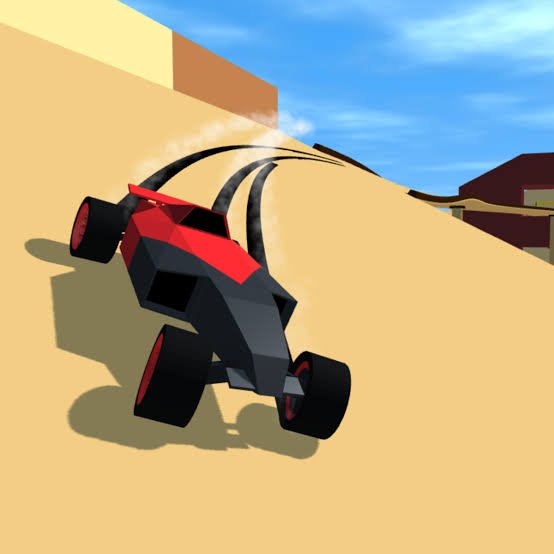
PolyTrack is a low-poly racing game where the main challenge is beating your own best time across carefully designed tracks filled with curves, jumps, loops, and elevation changes. You can race official courses, compare times, follow ghost runs, customize your car, and build completely new tracks with the editor. My first mistake was restarting every time one corner felt imperfect. Finishing the full lap first helped me understand where the real time losses were before trying to improve them.
| Game Detail | Information |
|---|---|
| Game | PolyTrack |
| Developer | Kodub |
| Genre | Racing, Driving, Time Trial |
| Gameplay Style | Precision racing and track building |
| Main Goal | Set faster lap times |
| Controls | WASD or Arrow Keys |
| Restart | R or Enter |
| Camera | C or M |
| Hide Interface | H |
| Release Date | August 2024 |
| Latest Developer Version | 0.6.2 |
| Latest Developer Update | May 31, 2026 |
| Current Platform Update | June 2026 |
| Game Engine | HTML5 |
| Platforms | Desktop, phone and tablet |
| Multiplayer | Experimental multiplayer added in 2026 |
| Main Features | Official tracks, community tracks, ghosts, leaderboards, editor, car customization |
Racing Against The Clock
PolyTrack is primarily built around time trials.
Instead of concentrating on contact with other cars, the main question is how efficiently you can complete the course.
Every fraction of a second can matter.
This creates a useful progression loop:
learn the course → set a time → identify mistakes → restart → improve the lap
The current browser description specifically presents PolyTrack as a game where every millisecond counts.
How To Control The Car
PolyTrack uses a familiar keyboard layout.
Driving Controls
- W or Up Arrow: Accelerate
- S or Down Arrow: Brake or reverse
- A or Left Arrow: Steer left
- D or Right Arrow: Steer right
- R or Enter: Restart the run
- C or M: Change camera view
- H: Hide the interface
These controls are documented across the current browser editions.
The MDN KeyboardEvent documentation explains how browser applications can process keyboard inputs such as WASD and Arrow Keys.
Learn The Track Before Chasing A Record
The restart key makes it tempting to abandon a run after one weak corner.
I did that too often at first.
The problem is that constantly restarting the opening section means you may never properly learn the second half of the course.
A better approach is to finish several complete runs.
That helps you learn:
- where sharp turns appear,
- which jumps change direction,
- where checkpoints sit,
- which sections require less steering,
- and where your biggest time loss actually happens.
Once the entire course is familiar, restarting for small improvements becomes much more useful.
Checkpoints Show Your Progress
PolyTrack uses checkpoints throughout its courses.
Recent updates improved checkpoint information by showing speed differences and other timing feedback. Kodub added checkpoint speed comparison in version 0.5.1 in July 2025.
This turns a lap into several smaller comparisons.
If the overall time is slower, you can often identify which section caused it rather than guessing.
I find this much more useful than looking only at the final result.
Ghost Cars Help Compare Lines
Version 0.5.0 expanded the ghost system so players could race or watch up to 10 ghosts simultaneously.
Ghosts represent previous runs without physically interfering with your car.
That makes them useful visual references.
A ghost may show that you:
- turned too early,
- entered a jump from the wrong side,
- lost speed before a curve,
- or took an unnecessarily wide route.
I prefer using a ghost as a reference rather than trying to copy every movement exactly.
Official Tracks
PolyTrack includes developer-made courses across several environments.
The 0.5.0 update added Winter and Desert environments, while version 0.6.0 later added Winter 5 and Desert 5 as new official tracks.
Official tracks are useful when learning because they give you consistent layouts for comparing times.
You can replay the same course repeatedly and see whether a different route or smoother steering actually helps.
Community Tracks Add Much More Variety
PolyTrack also has an active track-sharing community.
Kodub has repeatedly added curated community tracks through official updates.
Version 0.6.0 alone introduced 20 new community tracks, while version 0.6.1 added more community content shortly afterward.
That means the game can offer much more variety than the official course list alone suggests.
One community track may focus on smooth high-speed corners.
Another may concentrate on jumps, narrow roads, or unusual scenery.
Build Your Own Track
The track editor is one of PolyTrack’s most important features.
You can place track sections and create your own course rather than only racing existing ones.
Common pieces include:
- straights,
- curves,
- ramps,
- bridges,
- elevation changes,
- and other track structures.
After creating a track, you can test it and continue adjusting the design.
This turns PolyTrack into both a racing game and a course-building tool.
Basic Editor Controls
Editor controls use the mouse and keyboard.
Typical controls include:
- Left Mouse Button: Place or interact with track pieces
- Right Mouse Drag: Move the editor view
- Middle Mouse: Rotate the view
- Mouse Wheel: Zoom
- Shift + Mouse Wheel: Adjust height
- R or Space: Rotate selected track pieces
Exact shortcuts can change as the editor receives updates, so the in-game instructions should remain the main reference.
Undo And Redo Improved Building
Version 0.5.1, released July 16, 2025, added editor undo and redo support.
That was an important improvement for track building.
Before an undo system, one mistaken placement could require more manual correction.
With undo and redo available, experimenting with a new section becomes much easier.
You can test an idea without worrying that one bad edit will permanently damage the design.
Copy And Paste Arrived In 2026
The major 0.6.0 update added editor copy-and-paste features.
That helps with repeated structures.
For example, if your custom course uses the same style of section several times, you no longer need to rebuild each one completely from the beginning.
It also makes experimentation easier because existing parts can be duplicated before you modify them.
Car Customization
PolyTrack includes car customization.
Version 0.6.0 expanded this significantly with:
- new paint patterns,
- new wheel rims,
- new exhaust pipes,
- a redesigned garage environment,
- and a car randomization option.
These customization choices mainly affect presentation.
The core goal remains improving race times and learning tracks.
That is useful because players can personalize the car without turning the game into a complicated vehicle-management simulator.
Experimental Multiplayer
PolyTrack originally centered strongly on time trials and ghost comparisons.
That changed in March 2026 when version 0.6.0 introduced experimental multiplayer.
Version 0.6.1 then improved that system by allowing clients as well as hosts to create invites and by improving connection reliability.
Because the developer still labels the feature experimental, it is better to describe multiplayer as a developing feature rather than treating it as the game’s only main mode.
Leaderboards
Leaderboards give fast times a wider comparison point.
Instead of comparing only against your own previous lap, you can see how records compare with other players.
Version 0.5.2 added leaderboard position information when a new personal best is achieved. Version 0.6.1 later added the date when a leaderboard record was set.
These small improvements make progression easier to understand.
Three Different Environment Styles
The game’s updates have expanded its visual settings.
The major environments include:
- Summer
- Winter
- Desert
Winter and Desert were formally introduced through the 0.5.0 update in April 2025.
They do more than change the background.
Different environments allow official and community creators to give tracks distinct visual personalities even when the basic racing physics stay familiar.
Low-Poly Visual Style
PolyTrack uses a deliberately simple low-poly look.
That means environments and vehicles are built from clean geometric shapes rather than attempting highly detailed realism.
The style fits the game because the road layout remains easy to read at speed.
Bright surfaces and clear track edges help keep attention on the route.
The visual design is therefore connected closely to the racing experience rather than being only decorative.
Smooth Steering Matters
One of the biggest differences between an average run and a faster run is often how many unnecessary corrections you make.
My early runs involved constant left-right steering.
That made the car’s route look busy and often caused me to enter the next section poorly.
I had better results once I began steering more deliberately.
The useful goal is not moving the controls constantly.
It is making the smallest correction necessary to stay on a clean line.
A Faster Section Is Not Always A Faster Lap
You can gain speed in one section but create a worse entry into the next.
That means optimizing a lap requires thinking about transitions.
A fast exit from one corner may place the car badly for the following jump.
A slightly slower approach may create a cleaner sequence overall.
This is why comparing complete laps matters.
The best individual moment does not always produce the best final time.
Restarting Is Extremely Useful
Pressing R or Enter restarts the race quickly.
That makes experimentation convenient.
Once I already understand the full track, I use restart aggressively.
If the opening section is clearly slower than my normal pace, restarting saves time.
But I would not recommend doing this while still learning the course.
First learn.
Then optimize.
Camera Options
PolyTrack allows camera switching with C or M.
Different players may prefer different views.
One camera can make the road ahead easier to see, while another may make the car’s exact position more obvious.
I suggest testing each view for several complete laps rather than switching constantly.
The best camera is simply the one that lets you judge the course most consistently.
Hide The Interface With H
The H key can hide the interface.
This creates a cleaner screen for players who already understand the track and do not need every piece of information visible.
It can also make screenshots or clean racing views easier.
For time improvement, however, I usually keep timing information available because split and checkpoint feedback can reveal where a run improved.
Version 0.6.0 Was A Major Update
PolyTrack’s March 10, 2026 update was one of the game’s biggest expansions.
Kodub added:
- experimental multiplayer,
- expanded vehicle customization,
- editor copy and paste,
- two new official tracks,
- 20 community tracks,
- garage improvements,
- and other optimization work.
This substantially expanded PolyTrack beyond its earlier pure time-trial focus.
Version 0.6.1 Improved Multiplayer And Tracks
Version 0.6.1 arrived on May 26, 2026.
Its changes included:
- more community tracks,
- record dates on leaderboards,
- client-created multiplayer invites,
- editor optimization,
- and improved multiplayer connection reliability.
This was more of a refinement update than a complete redesign.
Latest Developer Version: 0.6.2
Kodub released PolyTrack 0.6.2 on May 31, 2026.
This is the newest version listed in the official devlog I could verify.
The update mainly focused on fixes and polish.
Changes included:
- fixing the editor camera’s vertical range,
- correcting touch controls during loading screens,
- fixing a rare early physics-input error,
- adjusting the Natsu community track,
- and other interface and stability improvements.
The current browser platform separately labels the game as last updated in June 2026, likely reflecting platform deployment timing.
Who Created PolyTrack?
PolyTrack was created by Kodub.
Kodub maintains an official development log where version updates, track additions, editor improvements, multiplayer changes, and fixes are documented directly.
This makes the developer’s own devlog the best source for current version history.
Inspired By TrackMania
PolyTrack is openly described as inspired by TrackMania.
The similarity is easiest to see in the focus on:
- time trials,
- repeated restarts,
- precise racing lines,
- unusual track structures,
- leaderboards,
- and track creation.
PolyTrack gives those ideas its own low-poly presentation and browser-friendly editor.
It is therefore better understood as a precision time-trial racer than a traditional circuit racing simulation.
Desktop, Phone And Tablet
The current browser listing supports:
- desktop,
- phone,
- tablet.
Touch support has continued improving, with the official 0.6.2 update specifically fixing a touch-control display issue during loading screens.
The Android edition is also available separately, although app-store update information should not automatically be treated as browser-version history.
HTML5 Browser Technology
The current platform identifies PolyTrack as an HTML5 game.
Modern browser games can combine HTML, JavaScript, graphics APIs, and input systems without relying on discontinued plugins.
The WHATWG HTML Living Standard documents the modern HTML platform used by current browsers.
For players, the practical benefit is that PolyTrack can run directly through supported modern browsers.
Common PolyTrack Mistakes
My first mistake was restarting too often while still learning a track.
Another was making constant steering corrections.
I also found that concentrating only on maximum speed caused poor entries into later sections.
A fourth mistake is ignoring checkpoints and only looking at the final time.
Finally, do not assume one driving line is automatically best just because it feels fastest.
The timer provides the better answer.
A Better PolyTrack Routine
My preferred routine is:
- Finish several complete runs.
- Learn the whole track.
- Identify difficult sections.
- Watch checkpoint differences.
- Use a ghost for comparison.
- Change one section at a time.
- Restart quickly only after the opening is already familiar.
- Compare the final time.
- Keep the change only if it actually improves the result.
This prevents a lot of unnecessary experimentation.
Building A Better Custom Track
When using the editor, I prefer building in small sections.
Start with a simple route.
Test it.
Then add another feature.
Testing frequently makes it easier to identify which new section causes a problem.
Undo, redo, copy, and paste now make this process much easier than in early PolyTrack versions.
The goal of a custom track does not need to be maximum complexity.
A simple course with a good flow can be more enjoyable to replay than one filled with random obstacles.
What Makes PolyTrack Different?
PolyTrack combines:
- precision time trials,
- instant restarts,
- official tracks,
- community-created courses,
- ghost racing,
- leaderboards,
- a full track editor,
- low-poly graphics,
- multiple environments,
- car customization,
- and experimental multiplayer.
The driving controls are easy to learn.
The long-term challenge comes from finding cleaner routes, improving tiny sections, and building tracks that other players can race.
Related Game Categories
PolyTrack fits naturally into:
- Racing Games
- Driving Games
- Car Games
- Time Trial Games
- Track Building Games
- 3D Games
- Skill Games
- Multiplayer Games
Its strongest identity is a low-poly precision racing game built around fast time trials, community tracks, ghost comparisons, and a powerful track editor.
About PolyTrack
PolyTrack combines fast low-poly racing with a surprisingly detailed course-building system.
You race official and community tracks, compare checkpoint times, follow ghost runs, customize your car, compete on leaderboards, and create entirely new courses inside the editor.
The game has expanded significantly since its August 2024 release. Kodub’s 2026 updates added experimental multiplayer, additional customization, new official and community tracks, editor copy and paste, and multiple stability improvements.
The biggest improvement in my own approach came from finishing full laps before restarting. Once I understood the complete course and used checkpoint information to find the actual weak sections, improving my time became much more systematic.


Reviews
There are no reviews yet.