

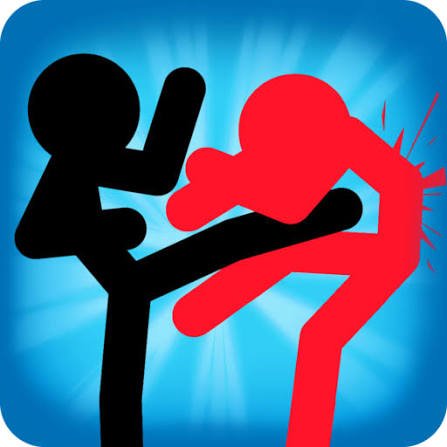
Stick Fighter is a fast stickman fighting game from Entrevero Games where six different characters compete in compact arena matches. Each fighter has a different move set, so changing characters affects more than appearance. You can work through the single-player gauntlet against the other fighters or play a local 1v1 match with someone on the same device.
What surprised me first was how much the game does with only directional inputs. I initially pressed left and right as if they were only movement controls, but different tap combinations also trigger jumps and attacks. The game started making much more sense once I stopped pressing randomly and learned what each sequence actually did.
| Game Detail | Information |
|---|---|
| Game | Stick Fighter |
| Developer | Entrevero Games |
| Genre | Fighting / Action |
| Gameplay Style | Stickman arena battles |
| Playable Fighters | 6 |
| Main Modes | Single-player gauntlet, local 1v1 |
| Controls | A/D or Left/Right Arrow Keys |
| Supported Devices | Desktop, Phone, Tablet |
| Browser Release | November 2022 |
| Latest Verified Update | March 2024 |
| Current Rating | 4.6 |
| Current Votes | 533K+ |
| Multiplayer | Local 2-player |
Six Fighters Give You Different Move Sets
Stick Fighter includes six playable characters.
The important part is that they do not all behave identically.
Each fighter has a different move set, which means learning one character well can feel noticeably different from switching among all six.
I found it easier to stay with one fighter for several matches instead of changing after every round.
That gave me enough time to understand:
- how that character moves
- which directional combinations trigger different actions
- how aerial movement feels
- how much space the fighter needs in the arena
Once one character felt familiar, trying another made the differences much easier to notice.
Stick Fighter Controls
The desktop controls use either A and D or the Left and Right Arrow Keys.
Basic Movement
- A / Left Arrow: Move one direction
- D / Right Arrow: Move the other direction
Ground Actions
- A, A / Left, Left: One attack
- D, D / Right, Right: Another attack
Double Jump
- A then D / Left then Right
- D then A / Right then Left
Air Action
While double jumping, pressing either movement direction performs another character action.
The current browser listing confirms this control system.
Browser games recognize keys such as A, D, ArrowLeft, and ArrowRight through standard keyboard events. The MDN KeyboardEvent key-value reference explains how browsers identify these inputs.
Learn One Input At A Time
My first mistake was trying every combination immediately.
That made the movement look much more chaotic than it really was.
A simpler way to understand the controls is:
movement first → double-tap actions → double jump → aerial action
Once basic movement feels predictable, the other combinations are much easier to remember.
This is especially useful because the game uses the same small group of keys for several purposes.
Single-Player Gauntlet
The single-player mode puts your chosen fighter against the other characters.
That makes it useful for learning how the six fighters differ without needing another person beside you.
I would use this mode first.
It gives you repeated chances to understand your selected character while also seeing what the other fighters can do.
The goal is to progress through the opposing roster and prove your chosen fighter can handle the full gauntlet.
Local 1v1 Mode
Stick Fighter also includes local two-player matches.
Instead of fighting computer-controlled characters, two people can compete directly.
This changes the feel of the game because another player is less predictable than the single-player opponents.
The current browser description specifically identifies local 1v1 play as one of the main modes.
There is no need for an online matchmaking lobby for this mode.
It is designed around direct local play.
Character Choice Matters More Than Appearance
In some stickman games, changing the character mostly changes the visual design.
Stick Fighter goes further.
Different fighters have different moves.
That means a character that feels comfortable for one player may feel awkward for another.
I would not choose only by appearance.
Try the movement first.
Then test the directional combinations.
A character whose timing makes sense to you is usually easier to learn than one you selected only because of how it looks.
Double Taps Are Easy To Misread
The unusual part of Stick Fighter is that repeated directional input can trigger an action instead of simply continuing movement.
That confused me in the first few rounds.
If I pressed the same direction twice quickly, I sometimes performed an action when I expected only to reposition.
The solution was not faster input.
It was cleaner input.
Once I became more deliberate about whether I wanted to move or use a double-tap command, the character felt much easier to control.
Double Jump Uses Opposite Directions
Jumping is also different from games that give you a dedicated jump button.
Stick Fighter uses alternating directional inputs.
Pressing one direction followed by the other produces a double jump.
That design keeps the control list extremely small.
It also means your movement rhythm matters more than memorizing a large keyboard layout.
The W3C UI Events specification provides the technical standard behind keyboard events that browser games can use to recognize sequences of key presses.
Air Movement Adds Another Layer
Once you understand the double jump, the game adds another action while your fighter is in the air.
This is where learning one character before changing fighters helped me most.
Trying to understand ground movement, jumping, and character differences simultaneously made everything feel random.
Working through them in stages made the control system much clearer.
Arena Positioning Matters
The arenas are compact, so there is not endless room to move away from another fighter.
That makes positioning part of the match.
I found it useful to avoid staying at the very edge unless the situation naturally pushed me there.
A more central position leaves room to move either direction.
The same general idea appears in many arena games: space gives you more options.
Do Not Press Every Direction At Once
Because Stick Fighter uses directional combinations for several actions, frantic input can make the character difficult to read.
My early rounds were full of movements I had not intended.
The easiest fix was simply slowing down.
Instead of thinking:
press everything quickly
I started thinking:
choose one action → complete the input → see the result
That small change made it much easier to learn what each fighter was actually doing.
Phone And Tablet Support
The current browser version supports:
- Desktop
- Phone
- Tablet
The game therefore is not limited to keyboard play.
Touchscreen devices need on-screen input rather than physical A/D or arrow keys.
The MDN Pointer Events documentation explains how browsers can handle touch, mouse, and pen input through a shared event model.
The exact interface may look different across devices, but the main game remains centered on directional actions and timing.
Desktop Makes The Input Pattern Easy To See
I found desktop useful while learning because each direction has a clear physical key.
You can choose:
A and D
or
Left and Right Arrow Keys
That makes repeated inputs easier to recognize.
Phone and tablet play can be more convenient, but physical keys gave me a clearer sense of exactly when I had tapped one direction twice or alternated between both.
Who Created Stick Fighter?
Stick Fighter was created by Entrevero Games.
Entrevero is an independent game studio based in Montevideo, Uruguay. Its official studio website lists Stick Fighter among its projects alongside games including Bearsus, Cozy Room Design, Jump Jousts Jam, and others.
You can read more about the studio on the official Entrevero Games website.
Using the developer’s own site is particularly useful here because several unrelated games online share the name “Stick Fighter.” The Entrevero attribution identifies the browser game discussed on this page.
Release And Latest Update
The current browser record gives:
Release: November 2022
Latest Update: March 2024
These dates apply to the Entrevero Games browser version.
That distinction matters because searching the title alone can surface unrelated downloadable games made by other developers.
For Mopoga, Entrevero Games is the correct developer for this version.
Current Stick Fighter Rating
The current browser listing shows approximately:
4.6 from 533,586 votes.
That is a changing platform statistic.
For the main table, 533K+ votes is better than presenting one exact total as though it will remain unchanged.
Single Player Or Multiplayer?
Stick Fighter supports both.
Single Player
Choose one of the six fighters and play through the other characters.
Local Multiplayer
Play a direct 1v1 match with another person.
The multiplayer option is local rather than an online matchmaking system.
That gives the game two noticeably different uses.
Single-player is better for learning the characters.
Local 1v1 is more useful when you want another person controlling the opponent.
Each Fighter Is Worth Testing
Once I understood one character properly, I started testing the others one at a time.
This worked better than switching constantly.
A useful comparison is:
- Play several rounds with one fighter.
- Notice the movement and action timing.
- Change to another fighter.
- Repeat the same basic inputs.
- Compare what feels different.
Because the controls remain compact, character differences become easier to notice when everything else stays consistent.
Why The Small Control Scheme Works
Stick Fighter avoids a large list of separate action buttons.
Instead, it combines:
- direction
- repeated taps
- alternating taps
- aerial input
That makes the controls easy to list but harder to master immediately.
It is a clever trade-off.
You can begin playing with only two directional controls, but there is still enough variation to make learning each fighter worthwhile.
Common Stick Fighter Mistakes
The first mistake is pressing directions randomly.
The second is changing characters before understanding even one of them.
Another is forgetting that double taps trigger different actions from ordinary movement.
I also found that trying advanced aerial inputs immediately made the game harder to understand.
A better progression is:
movement → ground actions → double jump → aerial actions → other fighters
That keeps each new mechanic separate long enough to understand it.
Stick Fighter And Bearsus Share A Developer
Entrevero Games also created Bearsus.
Both games use compact arena-style fighting, but Stick Fighter is built around six stickman characters and directional input combinations.
Knowing the developer connection is useful if you already recognize the feel of Entrevero’s other action games.
It also provides a more meaningful recommendation than linking two games together simply because both contain stick figures.
More Fighting Games On Mopoga
If you want another stickman action game, Stickman Archero Fight uses staged arenas, equipment, coins, chests, and character progression instead of short 1v1 matches.
For physics-based arena matches, Gladihoppers focuses on gladiator-style characters, unusual movement, equipment, and both single-player and local multiplayer modes.
You can also try Fortz when you want another local two-player game. Instead of direct stickman fighting, each player manages movement, fort protection, building, and limited shots on opposite sides of the same arena.
What Makes Stick Fighter Different?
Stick Fighter gets a surprising amount of variety from a tiny input system.
You do not need a long list of keys.
Movement, ground actions, jumping, and aerial actions all come from combinations of left and right inputs.
The six fighters then change how those actions behave.
For me, the game improved once I stopped treating those inputs as ordinary movement buttons. Understanding that timing and sequence matter made the fights much easier to read.
Related Categories
Stick Fighter fits naturally into:
- Fighting Games
- Action Games
- Stickman Games
- Two-Player Games
- Local Multiplayer Games
- Arcade Games
- Mobile Games
- Single-Player Games
Its current primary browser classification is Fighting Games.
About Stick Fighter
Stick Fighter is a browser fighting game by Entrevero Games featuring six characters with different move sets.
Choose a fighter, learn how directional taps trigger movement and different actions, work through the single-player gauntlet, or play a local 1v1 match with another person.
The game supports desktop, phone, and tablet and keeps its control system deliberately small.
Its main challenge is not memorizing lots of buttons. It is learning how different directional sequences behave and how each of the six characters turns those inputs into a different fighting style.



Reviews
There are no reviews yet.