

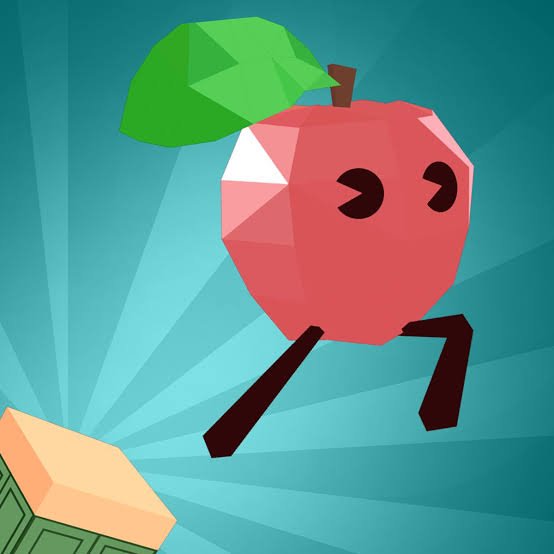
Up Together is a vertical 3D platform game where you guide a colorful food character through floating platforms, walls, moving obstacles, boost blocks, and increasingly difficult climbing sections. Instead of moving from one traditional level to another, the main objective is simply to keep going upward and see how high you can reach.
My first mistake was treating every jump as something that needed maximum speed. That worked on open platforms, but it made narrow landings much harder. I became more consistent once I started separating jumps into two types: distance jumps where momentum helps and precision jumps where a smaller, controlled approach works better.
| Game Detail | Information |
|---|---|
| Game | Up Together |
| Developer | Iron Fox Games |
| Development Division | Second Monitor Games |
| Genre | Platform / Parkour / Skill |
| Gameplay Style | Vertical climbing and obstacle platforming |
| Movement | WASD or Arrow Keys |
| Jump | Spacebar |
| Wall Climbing | Hold Spacebar |
| Supported Devices | Desktop, Phone and Tablet |
| Browser Release | December 2023 |
| Latest Verified Update | January 2025 |
| Current Browser Rating | 4.2 |
| Current Browser Votes | 144K+ |
| Multiplayer | Online multiplayer / shared community |
| Progression | Height, leaderboard position, skins and trails |
The Goal Is Simply To Keep Going Up
Up Together gives you one very easy objective to understand:
climb as high as possible.
The route becomes increasingly awkward as you move through floating platforms, walls and obstacle sections.
A failed jump can send your character much farther down than expected, so progress comes partly from learning how much risk each jump is worth.
That makes the game different from platformers where a failed attempt immediately resets a short stage.
Here, losing height can feel almost as important as losing completely.
Choose A Food Character
Up Together uses playful food-based characters rather than traditional human platforming avatars.
The original developer announcement described the characters as sentient food trying to make their way through the environment, while later versions expanded the selection with additional skins and cosmetic choices.
Iron Fox Games’ official Second Monitor Games page confirms that UpTogether.io includes unlockable skins and trails alongside its climbing and leaderboard systems.
The character choice mainly gives the game personality.
I would choose whichever appearance you like rather than assuming one character will automatically make difficult jumps easier.
Up Together Controls
The desktop controls are straightforward:
- WASD or Arrow Keys: Move
- Spacebar: Jump
- Hold Spacebar: Continue jumping or climb walls
That small control set is one of the game’s strengths.
You do not need to remember separate keys for every climbing action.
The difficulty comes from deciding how to use those simple inputs.
For technical background on keyboard-based browser controls, the MDN UI Events documentation explains how browsers handle keyboard and other user-interface input.
Holding Space Changes How You Move
A quick Spacebar press handles a normal jump.
Holding Space becomes more useful when you need repeated jumps or when climbing suitable walls.
That distinction took me a little time to understand.
At first I pressed Space repeatedly during every difficult section.
Once I realized that holding it could maintain the climbing action, wall sections became much easier to control.
The main thing is knowing when to release it again.
Continuing to hold jump after reaching a small platform can sometimes make the next movement less controlled.
Blue Blocks Give You A Boost
Blue blocks act as helpful movement surfaces.
Stepping on them can increase speed and allow the character to travel farther.
They are especially useful when a normal jump does not provide enough distance to reach the next section.
I originally moved onto every blue block automatically.
That is not always necessary.
A boost is useful only when the extra momentum matches the direction you need to travel.
If the landing platform is narrow, additional speed can sometimes make positioning harder.
Red Blocks Are The Ones To Watch
Red blocks work against your progress and should generally be avoided.
Because the game encourages upward movement, it can be tempting to focus completely on the next platform above you.
I found it more useful to look at the color and shape of the landing area before committing.
That small pause helps distinguish a helpful route from one that may interrupt the climb.
The contrast between blue and red blocks gives the environment a simple visual language that you can read quickly after a few attempts.
Wall Climbing Changes The Route
Not every section is based on jumping from one horizontal platform to another.
Walls can become part of the route.
Holding Space while moving appropriately lets your character keep climbing rather than immediately falling away.
This is where Up Together starts feeling more like a vertical obstacle course than a conventional side-view platform game.
I found wall sections easier when I approached them reasonably straight.
Trying to correct direction heavily after already touching the wall usually made the movement less predictable.
Moving Platforms Need Patience
Moving platforms introduce timing into otherwise straightforward jumps.
The mistake I made repeatedly was aiming for where the platform was rather than where it would be when my character arrived.
A better way to read them is to watch one movement cycle first.
Once you know:
- how far the platform travels
- how quickly it returns
- where its easiest landing point appears
the jump becomes much less uncertain.
That little bit of patience often saves more time than immediately attempting the jump several times.
Falling Is Part Of Learning The Course
Up Together is built around vertical progress, so a mistake can cost significant height.
That can feel frustrating when you have just completed several difficult sections.
I found it easier to treat each fall as information.
If I missed because I jumped too early, I adjusted the timing.
If I reached the platform but slid past it, I reduced my approach speed.
If I never reached it at all, I looked for a blue boost or another route.
That makes repeated attempts feel more like learning than simply restarting.
The Leaderboard Gives Height A Purpose
The higher you climb, the better your position can become on the leaderboard.
That adds a competitive layer even when you are concentrating mainly on your own route.
Iron Fox Games describes Up Together as including global leaderboard competition alongside its multiplayer community.
You can see more about the project on the developer’s official Up Together announcement, where Iron Fox Games first introduced it as a social 3D platformer.
For me, the leaderboard is most useful after I already understand the controls.
During early attempts, learning the course is more valuable than worrying about rank.
Multiplayer Makes The Climb Feel Less Empty
Up Together was built with a social multiplayer component.
Iron Fox Games says players can connect with a multiplayer community while climbing, and its original announcement described playing alongside friends or other people online.
The game also uses an emoji-based chat system rather than requiring complicated communication.
That gives the world more activity without changing the basic objective.
Other players may be climbing around you, but you still need to manage your own movement.
I would treat them more as useful visual references than routes you have to copy exactly.
Watching Another Player Can Help
One interesting part of multiplayer platform games is that another player’s attempt can reveal information.
If someone makes a difficult jump ahead of you, you can see:
- where they started
- how much speed they used
- which platform they aimed toward
That does not guarantee the same movement will work perfectly for you, but it can reveal a route that was not obvious.
I found this especially useful around sections with several platforms at different heights.
Sometimes the safest route is not the most visually obvious one.
Hidden Areas Reward Looking Around
Up Together also includes secrets.
The current game description tells players to keep watching for hidden areas while climbing.
This adds a small reason to look beyond the direct upward route.
I would still prioritize secure platforms when you have already climbed a long distance.
Moving away from a safe route simply because something looks unusual can cost a lot of height.
Earlier in a run, experimenting is much less expensive.
Skins And Trails Add Cosmetic Progress
Up Together includes unlockable skins and trails.
These give players something to collect beyond leaderboard position.
The developer confirms both systems on the official Second Monitor Games page.
I like this kind of cosmetic progression because it does not need to complicate the platforming mechanics.
The controls remain the same while your character can gradually look different.
It also helps players stand out when several characters occupy the same multiplayer area.
How Iron Fox Games Developed Up Together
Up Together was created by Iron Fox Games, with the project associated with the studio’s Second Monitor Games division.
Second Monitor Games is a smaller division focused on web-first games designed for shorter sessions.
Iron Fox announced Up Together in September 2023 as part of a two-game browser partnership.
The developer originally described it as a 3D platformer involving sentient food characters, online players and obstacle-based progression.
Its official studio page now describes UpTogether.io as a third-person platform game focused on running, jumping, climbing, leaderboard records, community interaction, skins and trails.
Release And Latest Update
The current established browser listing gives:
Release: December 2023
Latest verified update: January 2025
The project had already been publicly announced in September 2023, before its full browser launch later that year.
That explains why some references may carry earlier 2023 dates.
Those refer to development announcements rather than the established December browser release.
For Mopoga, I would use December 2023 as the release date and January 2025 as the latest verified game update.
Desktop, Phone And Tablet Support
Up Together currently supports:
- Desktop
- Phone
- Tablet
The desktop version uses keyboard movement, while mobile devices adapt the controls to touchscreen input.
Because the game also requires directional movement in a 3D space, I find desktop controls easier when very precise corrections are needed.
Touch play can still work well for more casual climbing sessions.
The MDN Pointer Events guide explains how modern web applications can recognize touchscreen, mouse and other pointer-based input through a unified browser interface.
Why Small Corrections Work Better
One habit improved my climbing more than anything else: moving less after a jump had already started.
Large corrections can turn a good landing into a miss.
Once I am reasonably aligned with a platform, I try to make only the movement needed to stay centered.
That becomes especially useful higher in the course where platforms may be narrower and falling carries a larger penalty.
The controls are responsive enough that a short input can make a noticeable difference.
There is usually no need to hold a direction continuously.
A Simple Way To Approach Difficult Sections
When I reach something unfamiliar, I break it into four questions:
- Where is the safest starting position?
- Do I need ordinary speed or a blue boost?
- Where should I aim to land?
- Is there another platform below that can save the run if I miss?
That final question is easy to forget.
Sometimes choosing a route with a lower backup platform is better than attempting the shortest path across a large open gap.
The quickest-looking route is not always the fastest if it leads to repeated falls.
Browser Performance Matters Higher Up
Platform games depend on responsive movement, particularly when landing areas become small.
If movement starts feeling delayed or animation becomes uneven, it can become difficult to judge jump timing accurately.
Google’s web.dev performance guide explains how rendering workload, responsiveness and other browser factors can affect interactive web experiences.
If the game suddenly feels inconsistent, I would check browser performance before assuming the platform physics have changed.
Closing unusually heavy tabs can also help on devices with limited resources.
Three Mistakes That Cost Me The Most Height
The first was jumping at maximum speed when a smaller jump was enough.
The second was following another player without checking whether their route suited my position.
The third was holding movement after I had already lined up a good landing.
All three mistakes came from doing too much.
Up Together often rewards a surprisingly calm approach.
The game looks fast because characters are bouncing around everywhere, but many difficult sections become easier when you slow the decision down.
How Up Together Compares With Parkour Race
Up Together and Parkour Race both use parkour-style movement, but they create very different challenges.
Parkour Race is primarily about moving forward through short competitive courses.
Up Together is much more vertical.
You are climbing through a large obstacle structure where losing height can erase a significant amount of progress.
Parkour Race rewards maintaining forward momentum.
Up Together places more emphasis on careful landing, climbing and recovering after mistakes.
How It Compares With Temple Run 2
Temple Run 2 automatically moves the character forward and asks you to react to obstacles.
Up Together gives you direct movement control.
That changes the decision-making completely.
In Temple Run 2, the challenge is reacting to what appears.
In Up Together, you can sometimes stop, reposition and think about the next jump before making it.
Players who like more deliberate platform positioning may prefer that freedom.
What Makes Up Together Different?
Up Together takes a simple set of controls and builds a surprisingly demanding vertical course around them.
Its main features include:
- vertical platform climbing
- food-based characters
- moving platforms
- wall climbing
- blue speed boosts
- red hazard blocks
- hidden secrets
- online multiplayer presence
- global leaderboard competition
- unlockable skins
- character trails
- desktop and touchscreen support
The hardest part is not memorizing the controls.
It is deciding how much movement each obstacle actually requires.
Related Games On Mopoga
Up Together fits naturally beside Mopoga games built around platforming, climbing and obstacle timing.
Parkour Race is a useful comparison for players who prefer competitive forward-running courses.
Temple Run 2 Frozen Shadows shifts toward endless obstacle avoidance, while Dreadhead Parkour focuses more heavily on precise platform movement.
I checked Mopoga’s two source-of-truth XML sitemaps again before preparing these links. The current reader receives them as text/xml and cannot expose their individual URLs, so I have not guessed product slugs.
The canonical internal-link sources remain:
https://imopoga.com/product-sitemap.xml
https://imopoga.com/product_cat-sitemap.xml
Once their exact product URLs can be read reliably, the strongest internal linking would be to place 2–3 verified platform or parkour game links naturally inside the comparison sections above.
About Up Together
Up Together is a vertical platform game that becomes much harder than its small control list suggests.
You can move, jump and climb almost immediately, but learning how much momentum each platform requires takes considerably longer.
For me, the biggest improvement came from trying to make smaller corrections, not faster ones.
Once I stopped treating every platform as a full-speed jump, the climb became much more manageable.


Reviews
There are no reviews yet.