

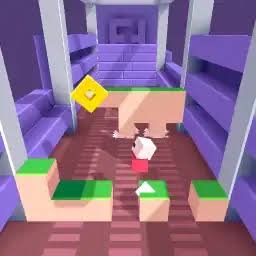
Wall of Doom is a fast arcade survival game from Fancade where you move a small character across a platform and line it up with openings in walls moving toward the play area. Each successful passage keeps the run going, while coins and score boosts give you reasons to move away from the safest position.
The controls are very simple, but the game becomes difficult because you have limited time to read each approaching wall. I found that constantly moving made things harder. It was usually better to identify the opening first, then make one controlled movement toward it.
| Game Detail | Information |
|---|---|
| Game | Wall of Doom |
| Platform Developer | Fancade |
| Original Fancade Creator | Per |
| Genre | Arcade |
| Gameplay | Endless obstacle avoidance, coins, score chasing |
| Controls | Arrow keys, WASD, mouse drag, touch controls |
| Supported Devices | Desktop, Phone, Tablet |
| Poki Release | September 2023 |
| Latest Verified Poki Update | February 2024 |
| Current Rating | 4.2 |
| Current Votes | 23K+ |
| Multiplayer | Single-player gameplay, also featured within Fancade’s competitive Battle system |
The current Poki listing credits Fancade and confirms September 2023 as its platform release and February 2024 as the latest listed update. Fancade’s own page identifies Per as the creator of the individual mini-game.
How Wall of Doom Works
Your character stands in front of a series of approaching walls.
Each wall contains a safe opening.
You need to move the character into the correct position before the wall reaches the play area.
Once you pass through, another wall appears.
The sequence continues as you try to improve your score.
Fancade’s own description summarizes the objective as finding a passage through the Wall of Doom, while its community documentation describes the game as an endless challenge built around positioning the character in front of openings.
Wall of Doom Controls
On desktop, you can move using:
- Arrow keys
- WASD
- Click and drag with the mouse
The current browser version also supports phones and tablets.
The control scheme is deliberately small.
There is no large set of abilities or menus to memorize.
Most of the challenge comes from reading the next wall quickly enough.
Find The Opening Before Moving
One of the easiest mistakes is moving immediately when a new wall appears.
That can place your character on the wrong side of the platform.
I found it better to spend a brief moment identifying the opening first.
Then move toward it.
The basic rhythm becomes:
look → position → pass → reset
Once that rhythm feels natural, the game becomes easier to read.
The Character Moves Across Distinct Positions
Fancade’s documentation describes the playable area as having six distinct positions that the character can occupy.
That is useful because Wall of Doom is not really about unrestricted movement.
You are effectively choosing the position that matches the next opening.
Thinking of the area as several clear lanes can make the approaching wall easier to understand.
Avoid Unnecessary Movement
Constantly sliding from side to side feels active, but it can make the next wall harder.
If you are already near the correct opening, extra movement creates another problem for you to fix.
A calmer approach worked better for me.
Stay roughly centered when possible.
Read the next opening.
Then move only as much as necessary.
This advice applies only to the game’s virtual movement system.
Coins Add A Risk And Reward Choice
Coins appear around the play area.
Collecting them can increase your speed and contribute to higher scores according to the current browser description.
That creates an interesting choice.
A coin may sit away from the position you need for the next wall.
You then have to decide whether the extra movement is worth it.
I would not treat every coin as mandatory.
Surviving the next wall is more important than collecting one extra reward.
Score Boosts Also Appear
Fancade’s own documentation says Wall of Doom includes both coins and score boosts.
These give runs more variety.
Instead of standing still and waiting for openings, you sometimes have a reason to move toward another part of the platform.
That means a high-scoring run involves more than simply surviving.
You are balancing safety with opportunities to increase the score.
Speed Increases The Pressure
Coins can make the character faster, which changes how movement feels as the run continues. The current Poki description specifically says collecting coins increases speed and helps with higher scores.
More speed can help you cross the play area quickly.
It can also make small adjustments feel more sensitive.
Once movement becomes faster, I found short corrections easier to control than sweeping all the way across the platform without a clear reason.
Look At The Wall, Not Just Your Character
Another mistake is watching the character too closely.
Your position matters, but the useful information is coming from the approaching wall.
You need to identify where its opening is.
Then compare that opening with your current position.
Keeping most of your attention on the obstacle gives you more time to react.
The character itself is usually easy to track with peripheral vision.
Return To A Useful Position After Passing
After moving through one wall, your current position becomes the starting point for the next challenge.
That makes the end of one obstacle part of the preparation for the next.
If several positions are equally safe, I prefer ending near the middle.
A central position gives you a shorter distance to either side when the next wall appears.
It is a small advantage, but repeated over a longer run it can make movement easier.
Do Not Chase Every Reward
Coins and boosts are useful, but they can also distract you.
If a reward is positioned far from the next opening, trying to reach both may create unnecessary pressure.
My priority would be:
First, identify the safe opening.
Second, make sure the character can reach it.
Third, collect a nearby reward if there is enough room.
That keeps score chasing from interfering with the main objective.
Short Runs Help You Learn The Timing
Wall of Doom is built around repeated attempts.
Early runs may end quickly while you learn how fast the walls approach and how responsive the movement feels.
That is normal for this type of arcade game.
Instead of treating an early low score as wasted time, use it to understand:
- How quickly walls arrive
- How far one movement input carries you
- How speed changes after collecting coins
- How soon the next opening becomes readable
The controls become easier once those timings feel familiar.
Mouse And Keyboard Feel Different
Keyboard play gives you separate directional inputs through the arrow keys or WASD.
Mouse control works by clicking and dragging.
I prefer keyboard controls when making small left or right adjustments because each direction has a dedicated key.
Mouse control can feel more direct if you prefer pointing toward the position you want.
Neither changes the basic rules of the game.
Phone And Tablet Support
The current browser release supports:
- Desktop
- Phone
- Tablet
Touch controls fit Wall of Doom fairly well because the core mechanic only requires moving a character between positions.
The larger screen of a tablet can make approaching openings easier to see.
On a smaller phone screen, paying attention to the full width of each wall becomes especially useful.
Wall of Doom Is An Endless Game
There is no traditional finish line in the main mini-game.
The goal is to continue passing walls and improve your score.
Fancade’s documentation specifically describes Wall of Doom as an endless game.
That makes each run easy to understand.
Your previous score becomes the target for the next attempt.
Wall Of Doom Inside Fancade
Wall of Doom is also part of the larger Fancade ecosystem.
Fancade is a collection of mini-games that also lets people build and share their own games. The official Fancade site says its mobile app has passed 30 million downloads and describes the platform as a large collection of instant games.
Wall of Doom has an official standalone Fancade web page credited to Per.
This explains why some sites simply list the developer as Fancade while the game’s own page gives a more specific creator name.
Who Created Wall of Doom?
The most accurate attribution needs two pieces of information.
Individual game creator: Per
Platform and current browser credit: Fancade
Fancade’s official page names Per directly, while Poki lists the developer as Fancade.
So for a simple game-details field, using Fancade is reasonable.
For a more complete article, Per should also be credited as the person who created this specific Fancade mini-game.
Fancade Was Created By Martin Magni
The wider Fancade platform was originally created by Swedish developer Martin Magni.
Fancade’s official press information says the app launched on iOS and Android on April 30, 2020 and was designed around playing and creating small games.
Wall of Doom is an example of the platform’s creator-driven model rather than a game that Martin Magni personally designed.
That distinction is important.
Fancade is the platform.
Per is the creator credited for Wall of Doom.
Wall Of Doom And Battle Mode
Wall of Doom is also one of the opening games in Fancade’s Battle system.
Fancade’s documentation lists Wall of Doom by Per alongside Stacktris and Monster Tracks in the first Battle arena.
Battle mode lets Fancade players compare their results against scores from other players.
That does not turn the standalone Wall of Doom browser game into a live head-to-head multiplayer title.
You still control your own run.
The competitive element comes from comparing scores.
Is Wall Of Doom Multiplayer?
The normal Wall of Doom game is best described as single-player.
You control one character and try to survive as long as possible.
Inside the larger Fancade app, its score can also be used in the platform’s Battle system, where players compete against recorded results.
So it should not be described as a traditional live multiplayer game.
Release And Update History
The current Poki browser listing gives:
Release: September 2023
Latest update: February 2024
Wall of Doom also exists inside Fancade itself, so September 2023 should be treated as the current Poki browser release rather than proof that the game concept first existed that month.
Fancade documentation shows that the game was already important enough to receive a specific Wall of Doom control fix in Fancade version 1.8.9, released on March 4, 2022.
That confirms the game existed within Fancade before its 2023 Poki listing.
Current Wall Of Doom Rating
The current English Poki listing shows approximately:
4.2 from more than 23,000 votes.
The exact vote total can change as more players rate the game.
It is best treated as a current platform snapshot rather than a permanent statistic.
Other Games From Fancade
The current Wall of Doom page points players toward several other Fancade games, including:
- Drive Mad
- Stacktris
- Monster Tracks
- Recoil
- Speed King
- Gobble
These games use different mechanics, but they share Fancade’s preference for short, simple-to-understand challenges.
Wall Of Doom And Stacktris
Wall of Doom and Stacktris are both closely associated with Fancade’s Battle mode.
Their gameplay is very different.
Wall of Doom tests quick positioning and reading approaching gaps.
Stacktris focuses on placing and balancing blocks.
Fancade lists both among the opening Battle arena games.
If you like fast reaction-based attempts, Wall of Doom is the closer fit.
If you prefer careful placement, Stacktris offers a different type of challenge.
Common Wall Of Doom Mistakes
The first mistake is moving before identifying the opening.
Another is constantly moving even when the character is already in a useful position.
Chasing every coin can also place you too far from the next safe opening.
Players may spend too much time watching the character rather than reading the wall.
Another common problem is making a large correction when a small movement would have been enough.
The simpler your positioning becomes, the easier it is to prepare for the next wall.
A Better Way To Improve Your Score
Start by ignoring high-score pressure.
Concentrate on recognizing the wall openings.
Once that feels comfortable, begin collecting nearby coins.
Try to finish each wall near a useful central position when possible.
As speed increases, shorten your adjustments instead of moving randomly.
Then gradually add score boosts and more difficult coin pickups when the opportunity is safe within the game.
This creates a clear progression:
read → position → pass → collect → repeat
Related Categories
Wall of Doom fits naturally into:
- Arcade Games
- Endless Games
- Reaction Games
- Skill Games
- High-Score Games
- Mobile Games
- Fancade Games
- Single-Player Games
The current Poki listing places it primarily under Arcade Games.
What Makes Wall Of Doom Different?
Wall of Doom takes one very small idea and keeps increasing the pressure around it.
Find the opening.
Move into position.
Pass the wall.
Then do it again.
Coins and score boosts tempt you away from the easiest path, while increasing speed makes later decisions less forgiving.
There are no complicated upgrades or long tutorials.
The challenge comes from how consistently you can read each wall and make the correct movement before the next one arrives.
That simplicity is exactly what makes it work as a quick Fancade arcade game.




Reviews
There are no reviews yet.