

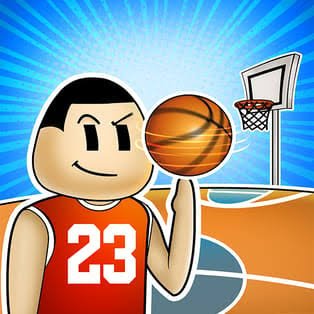
Court Kings 3D is a fast one-on-one basketball game where you try to outscore another player before a three-minute clock expires. You can play against the computer, share the game locally with a friend, or enter Tournament Mode and work through a bracket toward the final.
The controls only ask you to move and use one action button, but that simplicity makes positioning matter more. I initially pressed the action key whenever I got near the ball. Waiting until I had a cleaner shooting position or a realistic chance to intercept made the matches much less chaotic.
| Game Detail | Information |
|---|---|
| Game | Court Kings 3D |
| Developer | Andre Elias |
| Genre | Sports, Basketball |
| Gameplay Style | 1v1 arcade basketball |
| Match Length | 3 minutes |
| Controls | WASD or Arrow Keys, Spacebar |
| Supported Devices | Desktop, Phone and Tablet |
| Listed Release | July 2024 |
| Listed Latest Update | June 2024 |
| Current Rating | 4.0 |
| Current Votes | 9.3K+ |
| Multiplayer | Solo and local 2-player |
| Main Modes | Quick 1v1 matches and Tournament Mode |
The current game listing identifies Andre Elias as the developer and says Court Kings 3D is the developer’s first game released on that platform.
Three Minutes Changes How You Play
Each Court Kings 3D match lasts about three minutes.
That is long enough for the score to change several times, but short enough that wasting possession matters.
I found the clock changes the way I play depending on the score.
When I am behind, I need to create scoring chances rather than simply following the opponent around the court.
When I am ahead, giving away the ball through an unnecessary action can be more damaging than waiting for a safer opportunity.
The short format makes the game easy to start without committing to a long match.
Court Kings 3D Controls
On desktop, you use:
- WASD: Move around the court
- Arrow Keys: Alternative movement controls
- Spacebar: Shoot or intercept the ball
The same action button having two purposes is important.
When you have a useful attacking position, Spacebar becomes your shooting control.
When defending, it is used to try to intercept possession.
Modern browser games can read keys such as WASD, arrows, and Space through keyboard events. The MDN KeyboardEvent documentation gives technical background on how browsers process this type of input.
Shooting Is More About Position Than Button Speed
There is no large combination of shooting keys to memorize.
That does not mean every shot is equally useful.
I get better results when I create a little separation before attempting a basket rather than pressing Spacebar immediately after gaining possession.
A useful sequence is:
get possession → create space → face the basket → take the shot
Trying to shoot while still tangled up with the defender often turns a promising possession into another loose-ball fight.
Court Kings 3D uses simplified arcade basketball rather than recreating every real basketball rule. If you want to understand how the actual sport is structured, the official FIBA basketball rules resources provide the formal rulebooks used for regulated basketball.
Interceptions Can Change A Match Quickly
Spacebar is also used for interceptions.
That means defense is not passive.
You can try to take the ball rather than simply waiting for the opponent to miss.
The mistake I made early was pressing the button repeatedly whenever I stood close to the other player.
It works better to watch their movement and attempt the interception when the ball and player are actually within a useful position.
Otherwise, you can lose your defensive alignment and give them more room.
Movement Matters On Both Sides Of The Ball
The movement controls do more than carry you toward the basket.
On offense, movement helps you:
- Create shooting space
- Move away from the defender
- Recover loose balls
- Find a better angle toward the hoop
On defense, it helps you:
- Stay between the opponent and basket
- Close shooting space
- Move toward loose balls
- Prepare for an interception
That makes positioning one of the most important skills in the game.
You do not need a large moves list if you consistently put your player in the right part of the court.
Tournament Mode
Tournament Mode gives Court Kings 3D more structure than repeated individual matches.
The game’s setup says the town mayor is organizing a basketball tournament, and your objective is to move through the competition and reach the final.
I would play a few normal matches first.
Tournament matches become easier to read once movement, shooting, and interceptions already feel familiar.
The advantage of the mode is that one victory leads into a larger goal instead of simply sending you back to another unrelated game.
Playing Against The Computer
Single-player matches let you face a computer-controlled opponent.
This is the easiest place to become comfortable with the basic rhythm.
I use early matches to work on three things:
- Staying close enough to defend
- Creating room before shooting
- Recovering quickly when possession changes
The third point is easy to overlook.
Basketball switches from attack to defense quickly, even in this simplified version.
Standing still after losing the ball gives the opponent valuable open space.
Local Two-Player Matches
Court Kings 3D also supports local multiplayer, so you can play against another person on the same device.
That changes the feel considerably.
A computer opponent tends to follow programmed behavior.
Another person can notice habits.
If you always move in the same direction before shooting, they may begin anticipating it.
Short three-minute games suit local play well because a rematch does not require much time.
For a deeper Mopoga basketball game with 1v1, 2v2, Tournament, Training, and local two-player options, Basketball Stars gives you a larger set of offensive and defensive controls.
Court Kings 3D On Phone And Tablet
The current version supports:
- Desktop
- Phone
- Tablet
Mobile devices replace the physical keyboard arrangement with touch controls.
Touch play can feel different because fingers are less precise than a mouse pointer or physical keys. The W3C guidance on input modalities notes that touch input is inherently less precise because a finger covers a larger area than a cursor.
That matters in a game where moving in the wrong direction for even a short moment can open space for the other player.
I prefer controlled movements instead of rapidly changing direction when playing on a smaller screen.
Do Not Chase The Ball Everywhere
One habit made defense much harder for me.
I followed the ball constantly.
That sounds logical, but it often pulled my player away from a useful defensive position.
A better question is:
Where will the opponent want to go next?
Sometimes standing between them and the basket is more valuable than being directly beside the ball.
It also gives you a better chance of reacting if they try to move into shooting range.
Recover Immediately After A Miss
A missed shot does not end the possession sequence.
The ball can remain available, and both players need to respond.
I initially watched the shot for too long.
That gave the opponent time to reach the next position first.
Now I treat a miss as another movement problem.
As soon as the attempt fails, I start thinking about:
- Where the ball is going
- Which player is closer
- Whether I need to attack again
- Whether I should immediately defend
That small change makes matches feel much more controlled.
Court Kings 3D Versus Basketball Stars
Both games offer quick browser basketball and local multiplayer, but they approach it differently.
Court Kings 3D keeps the control scheme compact.
You mainly move and use one action button for shooting or interceptions.
Basketball Stars adds separate mechanics for jumping, blocking, stealing, dashing, pump fakes, and super shots.
Court Kings 3D therefore makes more sense when you want a basketball game with fewer controls to learn.
Basketball Stars suits players looking for a broader arcade move set.
Neither approach is automatically better. They simply create different types of short basketball matches.
Simple Controls Do Not Mean Automatic Wins
The entire desktop control scheme can be learned in seconds.
Winning takes longer.
I would concentrate on these basics before worrying about anything else:
- Stay between the opponent and the hoop when defending.
- Avoid shooting immediately after every possession change.
- Move into clear space before attempting a basket.
- Recover quickly after missed shots.
- Attempt interceptions when you are properly positioned.
- Watch the score and remaining time.
Those habits made a bigger difference for me than pressing the controls faster.
A Different Kind Of Short Sports Game
Court Kings 3D is built around direct one-on-one competition.
If you like short sports rounds but want something less conventional, A Small World Cup uses one ragdoll footballer per side and lets you drag and launch the player toward the ball.
Both games are easy to understand quickly.
The difference is how much direct control you have.
Court Kings 3D uses continuous movement around a 3D basketball court, while A Small World Cup turns each movement into a short physics-based launch.
Touch Controls And Small Screens
Because Court Kings 3D works on phones and tablets, control size matters as much as the game’s graphics.
The W3C guidance for minimum target size explains that sufficiently sized or spaced controls help reduce accidental touches on mobile devices.
From a player’s perspective, that is useful context for understanding why mobile controls can feel different from a keyboard even when the underlying game rules stay the same.
A physical keyboard gives each movement direction its own distinct key.
A touch interface has to fit the equivalent controls onto the visible screen.
Who Made Court Kings 3D?
Andre Elias created Court Kings 3D.
The current listing identifies it as the developer’s first game on that platform.
That attribution is clearer than trying to infer a larger studio or publisher that the available records do not name.
Release And Update Dates Need Some Context
The current listing gives:
- Release Date: July 2024
- Latest Update: June 2024
Those dates appear in that order on the current game page even though an update preceding the listed release is unusual.
Rather than silently changing one of them, I would treat them as platform metadata.
The safest statement is that July 2024 is the listed release date and June 2024 is the listed update date.
That avoids presenting an unsupported corrected date as fact.
Current Court Kings 3D Rating
The current platform rating is approximately:
4.0 from 9.3K+ votes.
Ratings and vote counts are live platform figures, so the vote total can change as more people play and rate the game.
Is Court Kings 3D Multiplayer?
Yes, but its multiplayer is local.
You can play against another person rather than being limited to the computer.
The available listing does not describe an online matchmaking system, so I would not call it online multiplayer.
That distinction is useful if you are choosing a game specifically to play remotely with someone else.
What Makes Court Kings 3D Different?
Court Kings 3D reduces basketball to a compact set of decisions.
You move.
You shoot.
You intercept.
You react when possession changes.
Then the three-minute timer forces you to keep making those decisions without much downtime.
The combination of:
- 1v1 basketball
- Three-minute matches
- Tournament Mode
- Computer opponents
- Local multiplayer
- Desktop support
- Phone and tablet support
- A small control set
makes it suitable for short sessions where you want direct sports action without learning a long list of commands.
Related Categories
Court Kings 3D fits naturally into:
- Basketball Games
- Sports Games
- 3D Games
- Two-Player Games
- Local Multiplayer Games
- Arcade Games
- Mobile Games
About Court Kings 3D
Court Kings 3D is a straightforward 1v1 basketball game that gets most of its challenge from positioning rather than complicated controls.
Three-minute matches keep the pace moving, Tournament Mode gives solo play a larger objective, and local multiplayer gives you another reason to replay short matches.
What helped me most was stopping the habit of pressing Spacebar every time I got close to the ball.
Once I started separating movement, positioning, shooting, and interceptions into different decisions, the game became much easier to read.

Reviews
There are no reviews yet.