

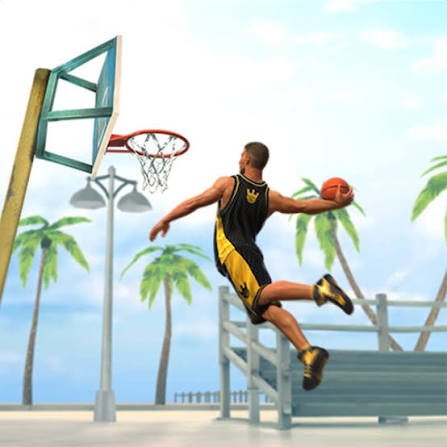
Basketball Stars is a fast arcade basketball game from MadPuffers where you play short one-on-one or two-on-two matches, compete against computer-controlled opponents, enter tournaments, practise in Training Mode, or share the same device with another player.
What I like most about the game is that matches are short enough to replay immediately. A round lasts about one minute, so one missed chance can matter, but you also do not have to wait long before trying again.
| Game Detail | Information |
|---|---|
| Game | Basketball Stars |
| Developer | MadPuffers |
| Genre | Sports, Basketball |
| Gameplay | 1v1 and 2v2 arcade basketball |
| Controls | Keyboard on desktop, touch controls on mobile |
| Supported Devices | Desktop, Phone, Tablet |
| Release | May 2019 |
| Latest Verified Poki Update | October 2025 |
| Current Rating | 4.2 |
| Current Votes | 2.5M+ |
| Modes | Quick Match, Tournament, Training, 2 Player |
| Multiplayer | Local two-player |
| Match Length | About 60 seconds |
Poki currently credits MadPuffers as the developer, while Phaser’s 2019 coverage confirms the game as a MadPuffers basketball title built around single-player and two-player play.
How Basketball Stars Works
The main goal is simple:
Score more points than your opponent before the timer reaches zero.
Matches are short and usually last around one minute.
Depending on the selected mode, you can play:
- One-on-one
- Two-on-two
- Against computer-controlled opponents
- Against another person on the same device
Poki currently describes both 1v1 and 2v2 matches, while GamePix separately confirms local two-player play on the same keyboard.
Basketball Stars Controls
Single Player
- Left and Right Arrows: Move
- Up Arrow: Jump or shoot
- Down Arrow: Pump fake or block
- X: Steal or shoot action
- Z: Super shot
- Double-tap Left or Right: Dash
Two Player Mode
Player 1
- A and D: Move
- W: Jump or shoot
- S: Pump or block
- B: Steal or shoot
- V: Super shot
- Double-tap A or D: Dash
Player 2
- Left and Right Arrows: Move
- Up Arrow: Jump or shoot
- Down Arrow: Pump or block
- L: Steal or shoot
- K: Super shot
- Double-tap Left or Right: Dash
These control layouts are reflected across current Poki and other browser records.
Start With Training Mode
Training Mode is useful if you are new to the controls.
You can practise:
- Moving
- Jumping
- Shooting
- Blocking
- Stealing
- Using the super shot
GamePix specifically lists Training Mode as a single-player option designed for practising basic actions without immediately entering a competitive match.
I would start there before Tournament Mode.
A few minutes of practice makes the main matches easier to follow.
Quick Match
Quick Match is the fastest way to start playing.
You enter a match without working through a longer tournament structure.
This is useful when you only want a short session.
Poki currently lists Quick Match alongside Tournament and Training modes.
Tournament Mode
Tournament Mode gives matches more structure.
Instead of playing one isolated game, you continue through a bracket-style sequence of opponents.
Phaser described Basketball Stars as allowing players to enter a longer tournament in addition to quick matches.
This mode works well when you want something longer than a single one-minute round.
One-On-One Matches
One-on-one is the simplest format.
There is one controlled player on each side.
That makes it easier to understand positioning and timing because fewer characters are moving around the court.
I would learn the basic controls here before moving into two-on-two.
Two-On-Two Matches
Two-on-two adds another player to each side.
This makes the screen busier and creates more opportunities for passes, blocks, rebounds, and open shots.
Poki currently describes Basketball Stars as supporting both one-on-one and two-on-two match formats.
Local Two-Player Mode
Basketball Stars includes a local two-player mode.
Two people can use the same device and keyboard.
One uses the WASD side.
The other uses the Arrow-key side.
GamePix clearly identifies this as local multiplayer rather than remote online matchmaking.
That distinction is important.
You do not need to join an online lobby to play against a friend sitting beside you.
Is Basketball Stars Online Multiplayer?
The current browser version is best described as having local two-player multiplayer.
Some unofficial pages use the word “online” loosely because the game runs online in a browser.
That does not automatically mean remote matchmaking.
The strongest current records describe two people sharing the same device for head-to-head play.
Matches Last About One Minute
Poki currently describes each main match as lasting around 60 seconds.
That short timer changes how the game feels.
You do not have a lot of time to recover from a poor start.
At the same time, restarting is quick.
That makes repeated matches feel natural.
Watch The Clock
It is easy to focus only on the score.
The timer matters just as much.
If you are behind with only a few seconds left, your priorities naturally change.
If you are ahead, avoiding unnecessary mistakes becomes more important.
The short clock gives every possession more weight.
Shooting Is About Timing
Basketball Stars uses an arcade-style shooting system.
You do not need to calculate real-world basketball technique.
Inside the game, timing and position affect how easy a scoring attempt feels.
I found it more useful to wait for a clear opportunity than to press the shoot button immediately every time I got the ball.
This is purely a game mechanic, not real basketball coaching.
Jump Shots
Jump shots are one of the main scoring options.
The Up Arrow or W is used for jumping and shooting depending on the control layout.
They are useful when you have enough room from the defender.
If someone is directly in front of you, a rushed attempt can be easier to block.
Dunks
The game also includes exaggerated arcade-style dunks.
Phaser specifically highlighted slam dunks and three-point shots as part of Basketball Stars’ appeal.
These are part of the game’s cartoon style rather than a realistic simulation.
Three-Point Shots
Longer shots can create quick score changes.
That makes them tempting when you are behind.
However, I found that forcing every possession into a long shot makes matches less consistent.
A closer scoring chance can be more useful when the game gives you one.
Pump Fakes
The Down Arrow or S can act as a pump fake when you are on offense.
This makes the defender react without immediately committing to the shot.
The same input also works as a block in defensive situations.
That dual-purpose control is one of the game’s more useful mechanics.
Blocking
Blocking is the defensive version of the same input.
The important thing is not pressing it constantly.
If you block too early, the opponent may still have time to move or try another action.
Waiting until the shot begins usually makes the control easier to understand.
Stealing
The game also lets you attempt a steal.
In single-player, Poki currently assigns this to X, while the two-player layouts use separate keys for each player.
Repeatedly pressing the steal button is not always useful.
Staying in a good defensive position is often more important.
Dash
Double-tapping a movement direction activates a dash.
That can help close space or create separation quickly.
Because matches are short, a well-timed burst can change a possession.
I would first learn normal movement before depending on dash too often.
Super Shot
Basketball Stars includes a charged super shot.
The game builds a meter during play, and once it is ready, you can use the dedicated super key.
Phaser specifically noted that managing the charge meter can influence close matches.
This gives you another scoring option beyond normal shots.
Do Not Waste The Super Shot
When the meter is ready, it can be tempting to use it immediately.
I prefer waiting until the possession is clear enough that using it actually helps.
The super mechanic is most useful when it changes the score at an important moment rather than simply being activated because the bar is full.
Offense And Defense Feel Different
Basketball Stars gives you controls for both sides of the court.
On offense, you think about:
- Movement
- Shooting
- Pump fakes
- Dashes
- Super shots
On defense, you think about:
- Positioning
- Blocking
- Stealing
- Staying between the opponent and the basket
That balance gives the game more depth than a simple shoot-only basketball title.
Do Not Chase The Ball Constantly
One mistake I made early was following the ball everywhere.
That can leave open space behind you.
Sometimes staying between the opponent and the basket is more useful than immediately moving toward the ball.
Even in an arcade game, positioning matters.
Learn The Opponent’s Timing
Computer-controlled opponents repeat certain movement and shooting patterns.
After several matches, you can begin recognizing when they are likely to jump or attempt a shot.
That makes Tournament Mode easier because you stop reacting only after the action begins.
Basketball Stars Has No Upgrade Grind
Poki’s current description specifically says there are no teams to manage and no upgrade grind in the main browser game.
That means progress depends more on learning the controls and playing through the available modes.
You are not required to spend long sessions improving statistics before a match becomes competitive.
Characters Use A Big-Headed Arcade Style
Basketball Stars uses exaggerated cartoon characters rather than realistic player models.
This style is closely connected to MadPuffers’ earlier Basketball Legends games.
Phaser described the title as a sequel to Basketball Legends and highlighted its old-school arcade presentation.
Basketball Stars Followed Basketball Legends
Basketball Stars is part of MadPuffers’ basketball game history.
Phaser explicitly described it as the sequel to the successful Basketball Legends.
That explains why the game shares the same general big-headed sports style and short-match structure.
Who Created Basketball Stars?
Basketball Stars was created by MadPuffers.
This attribution is consistent across Poki, Phaser, GamePix, and other current browser records.
MadPuffers is also known for other browser titles including Moto X3M.
Poki specifically connects Basketball Stars with the same studio behind Moto X3M.
Release Date
The strongest current records place the browser release in:
May 2019
Poki gives May 2019, while its localized record provides the more specific date May 28, 2019.
Phaser covered the game in June 2019, which fits that timeline.
For the Mopoga details table, May 2019 is the safest simple release date.
Latest Browser Update
Poki currently lists:
Latest update: October 2025.
This is newer than several older browser-host records, which is why different websites may show earlier update dates.
For a current game page, Poki’s October 2025 record is the more useful one.
Supported Devices
The current Poki version supports:
- Desktop
- Phone
- Tablet
Mobile uses touch controls instead of the desktop keyboard layout.
That makes Basketball Stars playable across all three major device categories currently listed by the platform.
Desktop Is Best For Local Two-Player
Although mobile is supported, the shared-keyboard two-player mode naturally fits desktop best.
Each player has their own control area.
One side uses WASD-based controls.
The other uses Arrow-key controls.
This is easier to manage on a physical keyboard.
Mobile Uses Touch Controls
Poki explicitly states that the mobile version uses touch controls.
That keeps the main single-player experience usable on phones and tablets.
The gameplay goal does not change.
You still need to outscore the opponent before time expires.
Current Basketball Stars Rating
The current Poki listing shows approximately:
4.2 from more than 2.5 million votes.
This is a very large platform vote count compared with many browser games.
The exact number continues to change as more users rate the game.
It should therefore be treated as a current snapshot rather than a fixed statistic.
Common Basketball Stars Mistakes
One mistake is shooting immediately every time you get the ball.
Another is jumping too early when defending.
Players also forget about the dash because it requires a double-tap.
Another common mistake is holding the ball too long while the one-minute clock keeps running.
In two-player mode, mixing up the separate keyboard layouts can also cause problems during the first few matches.
A Better Way To Learn Basketball Stars
Start in Training Mode.
Learn movement first.
Then practise shooting and blocking.
After that, try a Quick Match.
Once you understand the timer and defensive controls, move into Tournament Mode.
If another player is available, try local two-player after both people know their own key layout.
A simple learning path is:
training → quick match → tournament → local two-player
Related Categories
Basketball Stars fits naturally into:
- Basketball Games
- Sports Games
- Two-Player Games
- Local Multiplayer Games
- Arcade Games
- Mobile Games
- HTML5 Games
Poki currently classifies it primarily under Sports Games, while other current browser records place it under basketball, two-player, and local multiplayer categories.
What Makes Basketball Stars Different?
Basketball Stars keeps basketball matches very short while still giving you more controls than many casual sports games.
You can move.
Jump.
Shoot.
Pump fake.
Block.
Steal.
Dash.
Use a super shot.
Then the game lets you use those controls across one-on-one, two-on-two, Training, Quick Match, Tournament, and local two-player modes.
There is no large management system or long upgrade grind.
The focus stays on the next one-minute match.
That makes Basketball Stars easy to start but gives you enough control options to keep improving after the first few games.



Reviews
There are no reviews yet.