

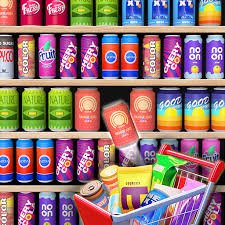
Goods Master is a shelf-sorting puzzle game from Tuki Tuki Games where you reorganize a crowded collection of products until matching goods are placed together. Every move matters because each level gives you limited room and a limited number of moves, so shifting one item without thinking about what it blocks can create trouble later.
My first instinct was to move anything that already had a visible match. That worked on simple shelves, but it became unreliable once more product types appeared. I started getting cleaner solutions when I looked for the shelf with the least spare space first and protected empty positions instead of filling them immediately.
| Game Detail | Information |
|---|---|
| Game | Goods Master |
| Developer | Tuki Tuki Games |
| Genre | Puzzle |
| Gameplay Style | Shelf sorting, matching and limited-move organization |
| Main Objective | Group matching goods and organize every shelf |
| Controls | Click or tap |
| Supported Devices | Desktop, Phone, Tablet |
| Browser Release | August 2026 |
| Listed Update | July 2026 |
| Current Rating | About 4.2 |
| Current Votes | 4.5K+ |
| Multiplayer | Single-player |
Start By Reading The Shelves
Goods Master becomes easier when you resist making the first obvious move.
Look across the whole display first.
You want to identify:
- products that already have nearby matches
- shelves with useful empty spaces
- items blocking products underneath or behind them
- sections that are nearly organized
- moves that could leave you with nowhere useful to place the next item
The game becomes harder as more product varieties appear, so early planning matters more than quick tapping.
I found that an empty position is often more valuable than it looks. Filling every available gap immediately can leave you with nowhere to temporarily place an awkward product later.
How Goods Master Works
The basic goal is to bring order to a messy shelf display.
You select goods and reorganize them so matching products can be grouped together.
Successful sorting creates more useful space and lets you continue working through the remaining items.
The basic loop is:
scan shelves → identify matching goods → move an item → preserve working space → complete groups → clear the level
The important restriction is the move limit.
A move that looks harmless can still hurt if it uses one of your remaining actions without making the shelf easier to solve.
Goods Master Controls
The control scheme is deliberately small.
Desktop
Use your mouse to select and move items.
Phone And Tablet
Tap the goods and available positions using the touchscreen.
The current browser version officially supports desktop computers, phones, and tablets.
Modern browser interfaces can handle mouse, touch, and pen interaction through systems such as Pointer Events. The MDN Pointer Events documentation explains how different pointing devices can be represented through a shared browser input model.
The W3C Pointer Events specification provides the underlying web standard for this type of hardware-independent input.
Empty Shelf Space Is A Resource
It is easy to think that empty shelves exist only to be filled.
I found the opposite more useful.
An empty position gives you flexibility.
You can use it to:
- move a blocking product
- temporarily hold something
- create access to another matching item
- rearrange a nearly complete group
- recover from an awkward layout
Once every space is occupied, your options shrink.
That means a move can technically be valid and still be strategically poor.
Before filling the final open position, check whether you will need somewhere to place another product afterward.
Match With A Purpose
Do not move two matching-looking products together only because the match is visible.
Ask what happens after that move.
Does it:
- complete a useful group?
- uncover another product?
- free a shelf position?
- reduce clutter?
- make another match possible?
If the answer is no, the move may be using limited resources without improving the board.
This is the biggest difference I noticed between early levels and more crowded ones.
Obvious matches stop being automatically good matches.
Move Limits Change The Puzzle
Goods Master does not simply allow endless rearranging.
You need to organize the shelves before the available moves run out.
That makes efficiency important.
Imagine two possible solutions.
One requires repeatedly moving the same product out of the way.
The other places that item somewhere useful the first time.
Both can eventually organize the shelf, but only the second may fit comfortably within the move allowance.
I therefore try to avoid temporary moves unless they create something I genuinely need.
Work On Nearly Complete Groups First
A shelf that is already close to being organized can be a good place to begin.
Completing it may simplify the board and reduce the number of loose products you need to track.
That makes the remaining puzzle easier to read.
However, I would still check whether completing that group consumes an important empty position.
The best move is not always the most visually satisfying one.
It is the one that improves the remaining layout.
Do Not Bury Useful Products
Sometimes a product you will need later is sitting in an accessible position.
Moving another item into that area can make the useful product harder to reach.
Before placing anything, look at what the move will cover or block.
I use a simple question:
Will I need something from this area soon?
If yes, I avoid making the section more crowded until that item has been used.
Variety Makes Later Shelves Harder
As Goods Master progresses, the shelves contain a wider mix of products.
That matters because visual scanning becomes harder.
When only a few item types are present, matching pairs or groups stand out immediately.
With more varieties, you need to remember where matching products are located.
I found it helpful to concentrate on one or two product types at a time instead of trying to remember the position of everything simultaneously.
Protect At Least One Flexible Space
If the current board allows it, I like keeping one usable open position available.
That space becomes a buffer.
When an item needs to move temporarily, you have somewhere to put it without disrupting a completed group.
It works a little like keeping an empty square available in other rearrangement puzzles.
You may not need it immediately, but losing it can make the next decision much harder.
Avoid Moving The Same Item Repeatedly
Repeated movement is one of the easiest ways to waste the move allowance.
If you pick up an item, try to put it somewhere that contributes to the eventual solution.
Temporary placement is sometimes unavoidable.
The problem is moving the same product three or four times simply because you never decided where it should ultimately go.
My better runs usually contained fewer repeat moves.
That was a useful sign that I was planning farther ahead.
Scan Before Every Important Move
A quick visual check is especially useful before:
- filling the last empty space
- completing a nearly finished shelf
- moving a product away from its matching item
- using one of your final remaining moves
You do not need to calculate the entire puzzle in advance.
You only need to avoid creating a position where the next necessary move becomes impossible.
Phone Play Suits The Simple Controls
Goods Master officially supports phones.
That works well because the interaction is based on selecting items rather than entering complicated keyboard commands.
A touchscreen also makes product selection feel direct.
The main challenge on a smaller display is seeing the whole arrangement clearly when shelves become crowded.
I would slow down before selecting similar-looking items on later levels.
Tablet Gives The Board More Room
Tablet play keeps the same touch interaction while providing a larger view.
For this kind of sorting game, that extra space can be useful.
You can see more of the shelf layout without small products feeling crowded together.
The gameplay itself remains the same.
You are still managing matching items, open spaces, and the move limit.
Desktop Makes Small Items Easier To Select
On desktop, a mouse provides precise selection.
I found that useful once several products were packed closely together.
The MDN click event reference provides technical background on how browser interfaces respond to pointer activation such as mouse clicks.
From a player’s perspective, the important point is simpler: Goods Master does not require a special keyboard layout, so switching between mouse and touchscreen does not fundamentally change the puzzle.
Do Not Rush Because A Match Looks Obvious
Goods Master rewards observation more than speed.
There is little value in immediately selecting the first matching products you notice if another move would create much more useful space.
I usually spend a few seconds checking:
What can I complete?
What can I uncover?
What should stay empty?
That short pause often prevents several unnecessary moves afterward.
Treat The Shelf Like A Whole Puzzle
One mistake is solving each shelf independently.
The products and free positions affect each other.
A move made on one shelf can create the space needed to solve another.
That means the whole display should be considered one connected puzzle.
I found this especially important when one shelf looked nearly complete.
Finishing it immediately felt natural, but sometimes leaving it unfinished briefly gave me a useful temporary position for another part of the board.
Who Created Goods Master?
Goods Master was created by Tuki Tuki Games.
The same developer is also associated with browser titles including Tiles Master and Pack a Bag.
Goods Master continues that puzzle-focused approach but places the problem inside crowded shop shelves where matching and space management are closely connected.
Release Date And Update Record
The current browser listing contains an unusual chronology:
Release Date: August 2026
Listed Latest Update: July 2026
Because July comes before August, I would not describe July 2026 as a later post-release update.
The safest Mopoga presentation is exactly what appears in the details table:
Browser Release: August 2026
Listed Update: July 2026
That preserves the available source information without inventing an explanation for the inconsistent dates.
Current Goods Master Rating
The current browser listing shows approximately:
4.2 from more than 4,500 votes
That total can increase as more people play and rate the game.
For an evergreen Mopoga page, 4.5K+ votes is more useful than treating one exact number as permanent.
Is Goods Master Multiplayer?
Goods Master is currently presented as a single-player puzzle game.
There is no listed local multiplayer or online matchmaking system.
Each level is built around solving your own shelf arrangement within the available space and move allowance.
That format suits short individual sessions because you can concentrate entirely on the current layout.
Common Goods Master Mistakes
The first mistake is filling every empty position.
Leave yourself working space when possible.
The second is making a visible match without checking whether the move actually improves the board.
Another common problem is moving one product repeatedly.
If you are touching the same item several times, there may be a more efficient route.
I would also avoid concentrating entirely on one corner of the shelves.
A useful match somewhere else may create the free space needed to solve the section that currently looks stuck.
Finally, watch the move count.
A solution that technically works can still fail if it requires too many unnecessary rearrangements.
A Better Shelf-Sorting Routine
This approach worked well for me:
- Scan the full shelf arrangement.
- Find obvious matching products.
- Identify the most restricted section.
- Protect at least one useful empty position.
- Complete a group when it creates real space.
- Avoid moving the same product repeatedly.
- Check the remaining move count.
- Reassess the board before filling your last flexible position.
- Finish the remaining groups with as few temporary moves as possible.
The important part is not following these steps rigidly.
It is thinking about what each move does to the space that remains.
More Puzzle Games On Mopoga
If you enjoy planning around limited space, Lines to Fill uses a different kind of spatial puzzle. Instead of organizing products, you drag colored paths through shaped boards while making sure every empty space can still be filled.
For a character-based logic challenge, Big Tall Small asks you to switch between three differently sized characters and decide which one can handle crates, gaps, buttons, doors, and other obstacles.
You can also try The Impossible Quiz 2 if you prefer puzzles based on unusual wording, visual clues, hidden interactions, and trick questions rather than shelf organization.
Goods Master Compared With Other Sorting Games
The important part of Goods Master is not simply identifying identical objects.
You also need to manage where those objects can be placed.
That makes it partly a matching puzzle and partly a space-management problem.
If every shelf had unlimited empty positions, most decisions would be straightforward.
Limited room is what makes the order of your moves matter.
That is also why the later levels become harder even though the basic click-or-tap controls never change.
What Makes Goods Master Different?
Goods Master builds its challenge from three simple ideas:
matching goods
limited space
limited moves
None is particularly difficult by itself.
Together, they create situations where an obvious move can make the next move worse.
For me, the most useful change was treating empty shelf positions as part of the solution instead of places that needed to be filled immediately.
Once I started protecting that space and planning where products would end up, the shelves became much easier to organize.
Related Categories
Goods Master fits naturally into:
- Puzzle Games
- Sorting Games
- Matching Games
- Logic Games
- Casual Games
- Mobile Games
- Mouse Games
- Single-Player Games
Its main current browser classification is Puzzle Games.
About Goods Master
Goods Master is a shelf-sorting puzzle game from Tuki Tuki Games where you reorganize mixed products into matching groups before running out of useful space or moves.
The control system is simple enough for desktop, phone, and tablet, but later stages require more planning as the shelves become crowded with a wider variety of items.
Instead of moving every visible match immediately, it helps to protect empty positions, think about what each move uncovers, and avoid repeatedly shifting the same product.
The game works best as a short logic challenge where organization is less about speed and more about choosing the right order.



Reviews
There are no reviews yet.