

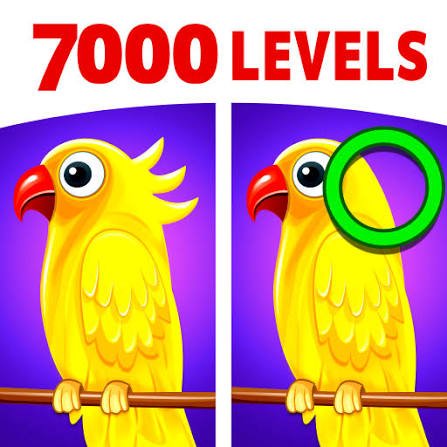
Spot the Differences is an observation puzzle game from Rabbit Mountain where you compare two nearly identical pictures and click the small details that have changed. Each level uses colourful scenes such as food, streets, and fairy-tale-style artwork, while a limited number of lives means random clicking can quickly make a simple-looking puzzle harder.
The habit that helped me most was dividing each picture into smaller sections. When I searched the whole image randomly, I kept checking the same objects again. Moving from one corner to another in a fixed order made hidden changes much easier to notice.
| Game Detail | Information |
|---|---|
| Game | Spot the Differences |
| Developer | Rabbit Mountain |
| Genre | Puzzle, Hidden Object |
| Gameplay Style | Side-by-side image comparison, visual observation |
| Controls | Mouse click or touchscreen tap |
| Supported Devices | Desktop, Phone, Tablet |
| Poki Release | May 2024 |
| Latest Verified Poki Update | June 2024 |
| Lives Per Level | 3 |
| Hint System | Yes |
| Current Poki Rating | 4.3 |
| Current Poki Votes | 107,000+ |
| Multiplayer | Single-player |
The current Poki version identifies Rabbit Mountain as the developer, lists May 2024 as its release and June 2024 as its latest update, and supports desktop, phone, and tablet browsers.
Two Pictures Look The Same Until You Slow Down
Every puzzle places two similar illustrations beside each other.
At first glance, they may appear identical.
Small changes are hidden inside them, such as:
- A missing object
- A changed colour
- A different shape
- An added detail
- A background alteration
- A small object moved or removed
Your job is to identify those differences before using up your available lives.
The challenge is mostly visual rather than mechanical. You do not need complicated controls or long instructions.
How To Play Spot the Differences
A simple approach works best:
- Compare the two pictures.
- Choose one area to inspect.
- Look for something that appears different.
- Click or tap that location.
- Continue until every hidden difference is found.
Correct selections count toward completing the level.
Wrong guesses cost you one of your limited lives.
That penalty makes careful observation more useful than clicking every suspicious-looking object.
Controls
Desktop
Use the mouse to click the location where you see a difference.
Phone And Tablet
Tap the corresponding area with your finger.
The hint button can also be selected when you need help.
Mozilla’s Pointer Events documentation explains how modern browsers can handle mouse and touchscreen interactions through a shared input system.
You Only Get Three Lives Per Level
Each level gives you three lives.
A wrong selection costs one.
That changes the way I approach the puzzle.
At first, I clicked anything that looked slightly unusual.
That worked occasionally, but it also wasted lives on shadows, decorative lines, and similar-looking details.
Now I wait until I can explain exactly what is different before selecting it.
Three lives are enough when you are careful, but not enough for repeated guessing.
Divide The Picture Into Sections
The easiest scanning method I found is to mentally split the pictures into four areas:
- Top left
- Top right
- Bottom left
- Bottom right
Finish one section before moving to the next.
This prevents your eyes from repeatedly jumping between the centre and edges.
A systematic search may feel slower for the first few seconds, but it usually saves time because less of the picture needs to be checked twice.
Check The Main Subject First
Large central objects naturally attract attention.
They are useful starting points because you can compare:
- Shape
- Colour
- Position
- Missing parts
- Added details
Once the obvious subject is checked, move outward toward background elements.
I prefer this order because it clears the visually busy part of the puzzle first.
The Edges Are Easy To Ignore
Some difficult differences can sit close to the border of the picture.
Your eyes naturally focus toward the middle, especially when the main illustration contains characters or large objects.
I now make a separate edge pass.
I check:
Top edge → right edge → bottom edge → left edge.
It takes only a few seconds and regularly catches details I missed during the first scan.
Colours Can Change Without Objects Moving
Not every difference involves something disappearing.
Sometimes the object remains in exactly the same position but changes colour.
That can be surprisingly difficult to notice.
If all shapes appear correct, compare:
- Clothing colours
- Food colours
- Signs
- Decorative objects
- Buildings
- Background items
I find colour differences easier to detect when I stop looking at the whole object and compare one small area at a time.
Small Objects Can Be More Difficult Than Large Ones
A missing large object usually stands out.
Tiny changes can hide inside busy artwork.
For example, the difference may involve:
- One small decoration
- A piece of food
- A window detail
- Part of an outfit
- A distant street object
When only one difference remains, I stop scanning the whole picture and concentrate on the smallest objects.
That is usually where the last one is hiding.
Use The Hint When You Are Actually Stuck
Spot the Differences includes a hint button.
I would not use it as soon as a level becomes difficult.
First try a more structured scan.
If you have already checked:
- The centre
- The edges
- Background objects
- Colours
- Small details
and still cannot find the final change, the hint becomes much more useful.
Using it after a genuine search also teaches you what kind of detail you were overlooking.
Do Not Click Suspicious Shadows Immediately
Illustrated images can contain natural differences in shading simply because of how an object is drawn.
Those areas can look suspicious even when they are identical.
Before clicking, I compare the shape around the shadow.
If everything else lines up perfectly, it is often not the hidden difference.
This is especially important when only one life remains.
Look At Shapes Before Reading The Scene
Your brain naturally tries to understand what a picture represents.
That can actually make comparison harder.
Instead of thinking:
That is a street with a cafe.
I try to see:
red rectangle, blue window, round sign, two chairs.
Breaking the picture into shapes makes small changes easier to notice.
It turns the puzzle from scene recognition into direct visual comparison.
The Artwork Changes From Level To Level
The current browser description mentions scenes inspired by:
- Fairy tales
- Food
- Street views
and other colourful illustrations.
This variety matters because the same scanning habit does not work equally well on every image.
A food scene may have many small objects close together.
A street scene may hide changes in windows or signs.
A character illustration may use clothing or facial details.
The useful skill is adapting the same careful comparison method to different layouts.
Rabbit Mountain Also Publishes A Mobile Version
Rabbit Mountain has a dedicated mobile game called Spot the Differences XXL.
The developer’s official Apple catalogue lists it among its current iPhone and iPad titles.
Google Play also lists Spot the Differences XXL under Rabbit Mountain, where the mobile version currently holds a rating around 4.6 stars.
Those mobile ratings should not be mixed with the browser game’s Poki score because they come from different versions and audiences.
Who Created Spot the Differences?
Spot the Differences was created by Rabbit Mountain.
Rabbit Mountain publishes browser and mobile games across puzzle, simulation, racing, and casual categories.
The company’s official Rabbit Mountain website describes its focus on casual entertainment and large-scale game publishing.
Its current mobile catalogue also includes titles such as:
- Spot the Differences XXL
- Air Traffic Control
- Demolition Derby Life
- Pilot Life
- Bubble Shooter Heroes
- Aqua Thrills
- Roller Coaster Builder
Desktop, Phone And Tablet Support
The current browser edition works on:
- Desktop
- Phone
- Tablet
That broad support fits the game’s controls well.
You only need to select parts of an image.
There are no keyboard combinations or rapid movement controls that would make touchscreen play difficult.
A larger desktop display can make tiny visual changes easier to inspect, while phone and tablet play gives you direct touch selection.
Spot the Differences And The Impossible Quiz 2
Both games reward careful observation, but they use it very differently.
Mopoga’s The Impossible Quiz 2 mixes visual clues with trick questions, unusual interactions, timing challenges, and deliberately misleading answers.
Spot the Differences is much more direct.
You always know the objective: compare two images and find what changed.
The Impossible Quiz 2 often hides what it expects you to do.
If you like visual puzzles without the trick-question element, Spot the Differences is the simpler format.
Wrong Guesses Teach You Very Little
This is why random clicking is rarely useful.
A wrong click removes a life but does not necessarily tell you where the real difference is.
A careful failed search is more useful because you can change your method.
For example:
First pass: Large objects.
Second pass: Background.
Third pass: Borders.
Fourth pass: Colours and tiny objects.
That method gives each attempt a purpose.
Current Rating
Poki currently lists Spot the Differences at approximately 4.3 out of 5, based on more than 107,000 votes.
That total continues changing as players submit new ratings.
It should therefore be treated as a current Poki snapshot rather than a permanent score.
Is Spot the Differences Multiplayer?
Spot the Differences is a single-player puzzle game.
The current browser listing does not identify:
- Online multiplayer
- Local two-player competition
- Cooperative play
The entire challenge is based on your own observation and completing each image before your three lives are gone.
Three Mistakes I Would Avoid
Searching Randomly
Move through the picture in a fixed pattern.
Clicking Before You Are Sure
Three lives disappear quickly if you guess.
Ignoring The Borders
Small changes near the edges are easy to overlook.
For me, simply dividing the image into sections made the biggest difference.
Related Categories
Spot the Differences fits naturally into:
- Puzzle Games
- Brain Games
- Hidden Object Games
- Observation Games
- Picture Games
- Casual Games
- Mobile Games
- Single-Player Games
Poki currently places it primarily under Puzzle Games and also associates it with Brain, Hidden Object, and Mouse Games.
More Games From Rabbit Mountain
Rabbit Mountain is also associated with:
- Aqua Thrills
- Bubble Shooter Heroes
- Roller Coaster Builder 2
- Flag Paint: World Tour
- Treasure Island
Poki’s current developer listing names several of these titles alongside Spot the Differences.
The developer’s official mobile catalogues contain a much larger collection across several genres.
What Makes Spot the Differences Work?
The game asks you to do only one thing, but it constantly challenges how carefully you do it.
Two pictures can look identical in a quick glance.
Then you slow down and notice that:
- One colour changed
- One item disappeared
- One shape is different
- One small detail has moved
For me, the improvement came from treating the pictures like a grid rather than one large illustration.
Once I stopped searching randomly, the differences became easier to find and I wasted far fewer lives on guesses.
About Spot the Differences
Spot the Differences is an observation puzzle from Rabbit Mountain where you compare colourful pictures and identify small visual changes before using all three lives.
The controls are simple enough for desktop, phone, and tablet, while the challenge comes from careful scanning rather than fast reactions.
Hints help when a detail becomes difficult to find, but the most reliable approach is to work systematically through the image and check the centre, borders, colours, and small background objects separately.



Reviews
There are no reviews yet.