

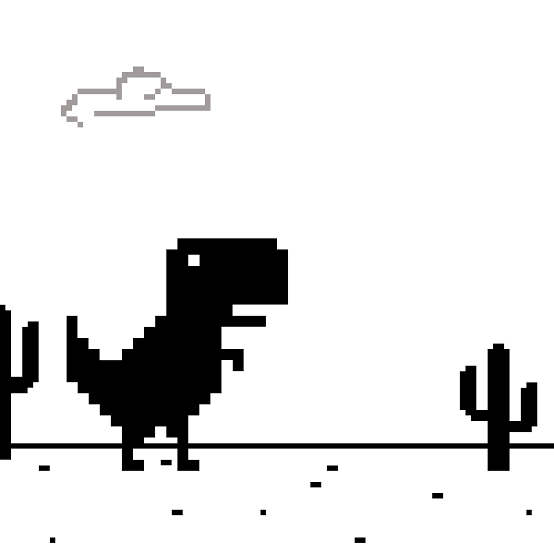
Dino Game is the classic endless runner built around Google’s pixel-style T-Rex. The dinosaur runs automatically through a side-scrolling desert while you time jumps to clear cacti and survive as the game gradually becomes faster.
It looks almost too simple at first. There is no steering, upgrade tree, or complicated level system to learn. What changed my runs most was stopping the habit of jumping as soon as an obstacle appeared. At higher speeds, judging distance and controlling the length of each jump matters much more than pressing the button quickly.
| Game Detail | Information |
|---|---|
| Game | Dino Game |
| Also Known As | Chrome Dino, Dinosaur Game, T-Rex Game |
| Original Developer | Google Chrome UX Team |
| Original Creators | Edward Jung, Sebastien Gabriel, Alan Bettes |
| Genre | Endless Runner, Arcade |
| Gameplay Style | Automatic running, obstacle avoidance, high-score play |
| Desktop Controls | Spacebar or Up Arrow |
| Mobile Controls | Tap the screen |
| Supported Devices | Desktop, Phone, Tablet |
| Original Release | 2014 |
| Current Browser Platform Release | February 2020 |
| Latest Listed Platform Update | February 2026 |
| Current Platform Rating | 4.2 |
| Current Platform Votes | 1.5M+ |
| Multiplayer | Single-player |
Google confirms that the original Chrome Dino debuted in 2014 as an offline game that appears when Chrome cannot reach the internet.
Why The Dino Starts Running Automatically
You do not control forward movement in Dino Game.
Once the run begins, the T-Rex continues across the desert automatically. Your job is deciding when to leave the ground and when to stay down.
That makes every obstacle a timing problem rather than a movement problem.
The first few cacti arrive slowly enough that this feels easy. As the pace increases, however, the amount of time available to make that same decision becomes smaller.
The controls never become more complicated.
The situation around those controls does.
Dino Game Controls
The main browser controls are:
- Spacebar: Start or jump
- Up Arrow: Jump
- Touchscreen: Tap to jump
The current browser edition also distinguishes between short and longer jumps depending on how the input is used.
The MDN guide to keyboard events explains how web pages can identify keys such as Space and the arrow keys.
Because Dino Game uses so few inputs, learning the buttons takes seconds. Learning when to use them takes much longer.
Short Jumps And Long Jumps
Not every cactus needs the same jump.
A quick input creates a shorter movement that can be useful when obstacles sit relatively close together.
Holding the jump longer gives you more height and distance.
This becomes important because an unnecessarily long jump can leave you airborne when you would rather be preparing for the next obstacle.
I found it useful to stop treating every cactus as if it required the biggest possible jump.
Use only as much jump as the obstacle actually needs.
That gives you more control over where the dinosaur lands.
Watch The Ground Ahead
Staring directly at the T-Rex makes the game feel faster than it really is.
The more useful area is slightly ahead of the character.
That is where the next obstacle first becomes visible.
Watching farther forward gives you a little extra time to decide:
Is the cactus close?
Is there another obstacle behind it?
Do I need a quick jump or a longer one?
That small amount of preparation becomes much more valuable once the running speed increases.
The Game Gets Faster Over Time
Dino Game does not need traditional levels to become harder.
The run itself increases in difficulty.
As your score grows, the pace accelerates and obstacles require faster decisions. The current online version specifically describes increasing speed as the main source of later difficulty.
This means a mistake at 100 points and a mistake much later in the run may look identical, but the decision window was not the same.
That is why improving your high score often requires adjusting your timing rather than simply repeating what worked during the opening seconds.
Cacti Are The Basic Obstacle
Cacti are the most recognizable hazard in the Dino Game.
They appear directly along the running path and force you to jump.
Early in a run, they give you enough time to react comfortably.
Later, the increasing pace makes the same type of obstacle much less forgiving.
One mistake I made was waiting until the dinosaur was almost touching the cactus before jumping.
That worked at low speed and failed once the game accelerated.
The faster the run becomes, the earlier you need to read the distance.
Later Obstacles Change The Rhythm
The original Chrome game also developed beyond the earliest cactus-only version.
Google’s Chromium source still includes distinct T-Rex states for running, jumping, ducking, and crashing, showing that the underlying game logic supports more than a single jumping animation.
This matters because later situations can break the simple rhythm you establish at the beginning.
The safest habit is therefore not memorizing one jump interval.
Watch what is actually approaching.
Do Not Panic When The Speed Increases
A faster screen often makes players start pressing sooner and more frequently.
That can create extra mistakes.
I found it better to keep the same decision process:
See the obstacle.
Judge the distance.
Jump once.
Prepare for the next one.
The time between those steps becomes shorter, but the order does not need to change.
Randomly jumping because the game “feels fast” usually puts the dinosaur in a worse position for whatever comes next.
Landing Position Matters
Clearing one cactus is not the whole problem.
You also need to be ready for the next obstacle.
A very long jump may easily clear the first hazard but keep the dinosaur airborne for too long.
A shorter jump can sometimes produce a better landing position.
That becomes important when obstacles begin arriving closer together.
I would judge a jump by two things:
Did it clear the obstacle?
Did it leave the dinosaur ready for the next one?
A good jump does both.
The Score Gives Every Run A Clear Goal
Dino Game is an endless runner, so there is no traditional final level waiting at the end.
Your score becomes the main measure of progress.
That changes how improvement feels.
You may fail at the same type of obstacle several times, but if it happens at a progressively higher score, your overall consistency is still improving.
I find that more useful than expecting every attempt to become a new record.
Some runs are simply practice for recognizing distances at higher speed.
The Original Game Was Built For Offline Chrome
Dino Game became famous because of where it appeared.
Google created it for Chrome’s offline error experience. When a user lost their connection, the small dinosaur turned an otherwise frustrating browser screen into something playable.
Google’s own story of the Chrome Dino explains that the game was created by members of the Chrome UX team and debuted in 2014.
The dinosaur concept itself was a joke about being disconnected from the internet feeling like returning to the prehistoric age.
Who Created Dino Game?
The original Dinosaur Game was created at Google by:
- Edward Jung
- Sebastien Gabriel
- Alan Bettes
They were members of the Chrome design and UX team.
Google specifically names all three in its account of the game’s development.
Sebastien Gabriel designed the T-Rex character, while the project was internally nicknamed Project Bolan during development.
That first-party history is more reliable than attributing the game to one of the many websites that later hosted or recreated it.
Chrome Still Maintains Dino Game Code
Dino Game is not simply an abandoned image from an old Chrome version.
The Chromium project still contains the game’s source components.
Google’s public Chromium T-Rex source includes the current character states, animation handling, jumping configuration, and related game logic.
The code identifies states including:
- Waiting
- Running
- Jumping
- Ducking
- Crashed
This provides direct confirmation that the Dino Game remains part of Chromium’s codebase.
Why The Game Works So Well With Simple Controls
There is almost no setup between starting and playing.
You do not need to:
- Choose a character
- Select a map
- Learn several buttons
- Upgrade equipment
- Complete a tutorial
You simply start running.
That removes almost everything between the player and the timing challenge.
The result is a game that a new player understands immediately but can still struggle to play consistently at higher speeds.
Mobile Play
Modern browser versions of Dino Game can also be played on phones and tablets.
Instead of using the Spacebar or Up Arrow, you tap the screen to jump. The current browser edition lists support for desktop, phone, and tablet.
That control method fits the game naturally because there is no need for an on-screen directional pad.
A tap performs the main action.
The game itself remains focused on the same timing problem regardless of device.
Desktop Play
Desktop players can use either the Spacebar or Up Arrow.
I would pick one and continue using it rather than switching between both during a run.
Consistency helps once obstacle timing becomes faster.
The MDN keyboard reference confirms standard browser key values for both the Space key and directional keys.
That browser-level input system is part of why a game with such minimal controls can work without a separate desktop application.
Dino Game Can Be Played While Online Too
The original concept was tied to losing an internet connection.
Today, hosted versions allow the same style of game to be played while connected.
That changes how you access it but not the basic idea.
The dinosaur still runs automatically.
The obstacles still test timing.
The score still gives you a reason to try again.
Chrome developers even continue to use the offline Dino as a recognizable example when discussing offline browser experiences.
The Original Release And Platform Dates Are Different
There are two different dates worth keeping separate.
Original Google Chrome game: 2014
Current major browser-platform listing: February 2020
Latest listed platform update: February 2026
The 2020 date should not be mistaken for the creation of Dino Game.
Google confirms the original T-Rex runner appeared in Chrome in 2014.
The newer dates refer to the separately hosted browser edition rather than the first release of Google’s game.
Current Dino Game Rating
The current browser listing shows approximately:
4.2 from more than 1.5 million votes.
That is a current platform snapshot.
The number can continue changing as additional players vote, so it should not be treated as a permanent specification of the game.
Is Dino Game Multiplayer?
Dino Game is a single-player endless runner.
The goal is primarily to improve your own score rather than compete in a live online match.
That fits the design well.
Restarting takes almost no time, so a failed attempt immediately turns into another chance to improve your timing.
There is no matchmaking or multiplayer lobby required before another run.
Common Dino Game Mistakes
The first mistake is jumping the instant a cactus appears.
Distance matters more than appearance.
The second is making every jump as long as possible.
That can produce poor landing positions.
The third is looking directly at the dinosaur rather than farther ahead.
Another mistake is changing your entire rhythm when the game speeds up.
You still need to make the same basic decision. You simply have less time to make it.
Finally, do not treat one failed run as evidence that your timing is getting worse.
High-score games naturally include inconsistent attempts.
Look at your overall progress.
A Better Way To Improve Your Score
Start by making clean jumps rather than worrying about the score.
Next, pay attention to where your dinosaur lands.
Then begin looking farther ahead so upcoming obstacles stop feeling surprising.
Once the speed increases, move your decision slightly earlier instead of pressing repeatedly.
This worked much better for me than simply trying to react faster.
The goal is to make each obstacle feel expected.
When you reach that point, higher scores usually follow naturally.
Related Categories
Dino Game fits naturally into:
- Endless Runner Games
- Arcade Games
- Dinosaur Games
- Jumping Games
- Skill Games
- Browser Games
- High-Score Games
- Single-Player Games
Its core identity is an endless runner because the game continues until the player hits an obstacle.
What Makes Dino Game Different?
Dino Game has lasted because almost nothing gets between the player and the challenge.
One character.
One desert.
One main action.
One score.
The difficulty comes entirely from how those simple pieces change as the run becomes faster.
You do not improve because the game gives you a stronger dinosaur.
You improve because distances start becoming easier to read and your timing becomes more consistent.
That is why a game originally designed for an offline browser screen can still be satisfying years later.

Reviews
There are no reviews yet.