

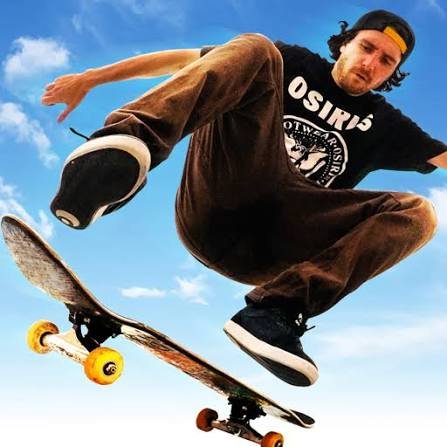
Free Skate is an open-world skateboarding game where you ride through a busy city, jump from ramps, grind along rails, complete missions, collect stars and improve your equipment as you progress. Instead of placing every challenge inside a closed skate park, the game lets you move through streets and look for useful lines around the wider city.
The controls are easy to understand, but I found that simply holding forward and jumping at everything usually ends badly. It works better to judge the space ahead, line up with a ramp or rail first, and then commit to the jump.
| Game Detail | Information |
|---|---|
| Game | Free Skate |
| Developer | Sleepless Games |
| Genre | Sports, Skateboarding |
| Gameplay Style | Open-world skating, tricks, missions and collecting |
| Controls | W or Up, S or Down, A/D or Left/Right, Spacebar |
| Supported Devices | Desktop, Phone and Tablet |
| Release | March 2026 |
| Latest Verified Update | April 2026 |
| Current Rating | 4.4 |
| Current Votes | 81K+ |
| Multiplayer | Single-player |
| Main Activities | Skate, perform tricks, complete missions, collect stars and upgrade gear |
Riding Through The City
Free Skate gives you a larger city environment rather than moving you through one short course after another.
You can skate through streets, search for ramps and rails, collect stars and find mission objectives around the map.
That freedom changes how I approach the game.
Instead of rushing directly toward the next objective, I usually spend a little time learning which streets are wide enough for gaining speed and where useful ramps connect with rails or open landing areas.
Knowing the surroundings makes later missions easier because you are not learning the controls and the route at the same time.
Free Skate Controls
Desktop controls are simple:
- W or Up Arrow: Speed up
- S or Down Arrow: Reverse
- A and D: Turn left and right
- Left and Right Arrows: Alternative turning controls
- Spacebar: Jump
Because almost every action starts with movement and jumping, there is not a complicated list of trick combinations to memorize.
The MDN KeyboardEvent documentation explains how web applications detect keyboard input such as arrow keys and the spacebar.
Jumps, Ramps And Rails
Ramps and rails turn ordinary city routes into places where you can attempt tricks.
The important part is the approach.
If I reach a ramp while turning sharply, the jump is usually harder to control. Approaching it in a straight line gives me more time to judge where the character will land.
Rails need similar preparation.
Trying to correct your direction at the final moment tends to be less reliable than lining yourself up a little earlier.
A useful rhythm is:
spot the obstacle → line up → build speed → jump → prepare for the landing
That sounds simple, but keeping those steps separate prevents many unnecessary mistakes.
Missions Give Exploration A Purpose
You do not have to skate around without an objective.
Free Skate includes missions spread throughout the city.
These provide small goals alongside free exploration and give you another reason to learn how different streets connect.
I prefer completing nearby objectives instead of constantly crossing the map for a distant one. It reduces unnecessary travel and helps me learn one area properly before moving on.
Collecting Stars
Stars are placed around the game world and encourage you to look beyond the most obvious streets.
Some are easy to reach.
Others may require a better approach angle, a jump or a route you initially overlooked.
That makes collecting them useful for more than completion.
They push you toward ramps, side routes and sections of the city you might otherwise ignore.
Traffic Changes How You Move
The streets are not completely empty.
Vehicles can move through the environment, which means skating directly into the road without checking what is ahead can interrupt a good run.
This is one area where slowing down helps.
I found that crossing at a clear angle instead of moving blindly from the pavement into the road gives much more time to react.
The traffic is part of the game’s arcade environment rather than a lesson in real-world road behaviour.
Upgrading Your Gear
Progression also includes improving your skating equipment.
Upgrades can make movement feel faster or smoother as you continue playing.
I would not treat upgrades as a replacement for learning the basic controls, though.
A faster setup is only useful if you can already line up jumps and turn without constantly overcorrecting.
Learning the movement first makes later improvements easier to appreciate.
Speed Is Useful Only When You Have Space
Going faster makes long streets more enjoyable and helps when a jump needs momentum.
It can also make mistakes harder to recover from.
This became especially noticeable when I approached a ramp from a poor angle.
More speed did not fix the approach. It simply made the bad landing happen faster.
On wide roads I use more speed.
Around rails, traffic and tighter spaces, I prefer enough control to make small corrections.
If you enjoy games where timing your movement matters more than managing complicated controls, Sling Drift takes that idea in a racing direction, with one main action controlling every corner.
Open-World Play Versus Short Sports Matches
Free Skate feels different from sports games built around short rounds.
There is no need to restart a match every minute.
You can move around the same city, choose your next objective and decide whether you want to concentrate on missions, stars or simply finding good places to skate.
For comparison, A Small World Cup keeps its sports action inside very short football matches rather than an open city.
That difference matters when choosing what type of browser sports game fits a short break.
Free Skate suits wandering and experimenting.
A match-based game is usually better when you want one clear start and finish.
Playing Free Skate On Phone And Tablet
Free Skate also supports phones and tablets.
Mobile play replaces physical keyboard controls with touchscreen input while keeping the same basic skating activities.
Touch controls can feel different because your fingers cover part of the screen and there is no physical key edge to feel.
The W3C guidance on target size explains why touch controls benefit from buttons that are large enough and sufficiently separated to reduce accidental presses.
I find deliberate inputs more reliable than repeatedly tapping when entering a tight part of the map.
Learn Turning Before Chasing Tricks
My first instinct was to concentrate on jumps.
Turning turned out to matter more.
If you can comfortably adjust direction, you can:
- Approach ramps straighter
- Reach rails more accurately
- Avoid obstacles
- Cross streets with better control
- Prepare for missions
- Recover after landing
Once movement feels predictable, the tricks become easier because you are beginning them from better positions.
Mistakes That Make Free Skate Harder
A few habits caused most of my early failed attempts.
Jumping without checking the landing
A good takeoff does not help if the landing area is blocked or badly aligned.
Using maximum speed everywhere
Speed works well on long streets but can make tight sections unnecessarily difficult.
Correcting direction too late
Small early adjustments work better than one large turn immediately before a ramp.
Ignoring the city layout
Remembering useful streets and shortcuts saves time during missions.
Focusing only on missions
Taking a few minutes to skate freely can teach you the map before objectives begin demanding more precise routes.
Who Created Free Skate?
Free Skate was created by Sleepless Games.
The developer is also associated with games including Snow Riders.
The game’s current browser listing places Free Skate in the sports category and identifies Sleepless Games as its developer.
Free Skate Release And Update
Free Skate was released in March 2026.
Its latest currently verified update is April 2026.
The supported browser devices are:
- Desktop
- Phone
- Tablet
This is useful because the core game is not limited to keyboard play.
Players can use the same city-based skating format across both computers and mobile devices.
Why Simple Controls Work Here
Free Skate does not need a large number of keyboard commands because most of its depth comes from where and when you use the basic movements.
The MDN guide to desktop game controls gives technical background on how browser games can use keyboards and other desktop input methods.
A smaller control set also makes it easier to concentrate on the environment instead of looking down to remember commands.
Is Free Skate Multiplayer?
Free Skate is presented as a single-player game.
The focus is your own progress through the city, completing missions, collecting stars and improving your equipment rather than racing directly against another online player.
If local competitive sports are more appealing, Basketball Stars offers short basketball matches with one-on-one, two-on-two and local two-player options.
What Makes Free Skate Different?
Free Skate combines several ideas without making any single one overly complicated.
You have:
- An open city
- Skateboarding movement
- Ramps and rails
- Tricks
- Missions
- Stars to collect
- Equipment upgrades
- Traffic to avoid
- Desktop and mobile support
The open setting is the main distinction.
Rather than selecting one skate course and repeating it, you can move through the city and decide what to work on next.
For me, the game feels better once I stop treating every street as a straight race toward the next marker. Looking for a smoother route often produces a better run than simply taking the shortest one.
Related Categories
Free Skate fits naturally into:
- Sports Games
- Skateboarding Games
- Open-World Games
- Skill Games
- City Games
- Casual Games
- Mobile Games
- 3D Games
About Free Skate
Free Skate is built around the freedom to move rather than a strict sequence of races or matches.
You skate through city streets, use ramps and rails, complete missions, pick up stars and gradually improve your gear.
The control scheme stays simple enough for new players, while route choice and accurate approaches give you room to improve.
What matters most is not performing as many jumps as possible.
It is learning when you have enough speed, where you want to land and how the next part of the city connects to the line you are already skating.



Reviews
There are no reviews yet.