Your phone is not broken. That stutter you get halfway through a match, the one that was not there when you started, is almost never the game being too demanding for the hardware. It is usually the page the game is sitting on, the heat building behind the screen, or a battery setting you forgot you turned on.
Cheap Android phones are far better at browser games than people assume. A 2 GB device from four years ago will hold a locked 60 frames per second in the right game, all day. It will also crawl in a game that looks simpler. The difference comes down to a handful of things you can actually check before you tap play.
What 60 FPS Actually Costs On A Budget Phone
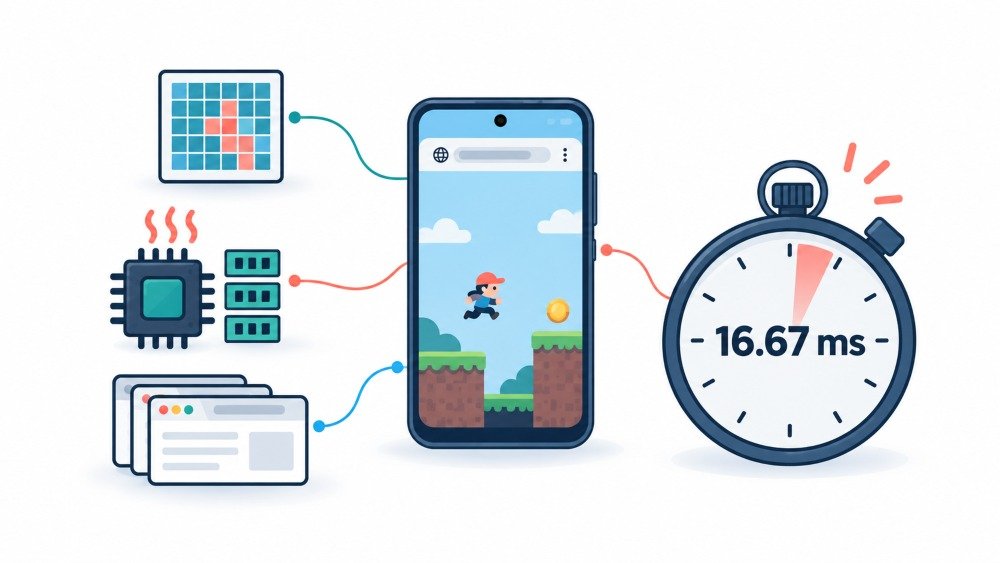
Sixty frames per second means the entire frame has to be finished in about 16.67 milliseconds. Not the game logic. Everything. Input handling, physics, drawing, and the browser compositing the result onto the screen. Android’s own tooling makes this concrete, and the Android documentation on inspecting GPU rendering speed draws a line on its profiler graph at exactly 16.67 ms for that reason. Go over it, and you drop a frame.
On a phone with an entry chip, the browser itself eats a meaningful slice of that budget before your game gets a look in. That leaves maybe 10 to 12 ms of real working time. It is enough for a lot of games. It is not enough for most of them.
Three things quietly spend that budget on cheap hardware.
- Pixel count. A game drawing to a canvas at full device pixel ratio on a 720p screen with a 2x scale is filling four times the pixels it needs to. Weak mobile GPUs have low fill rate. This single choice, made by the developer and invisible to you, decides more outcomes than the chip does.
- Garbage collection. JavaScript pauses to clean up memory. On a 2 GB phone with three other tabs open, those pauses get longer and more frequent. This is the cause of the stutter that arrives in bursts rather than steadily.
- Display ceiling. Your frame rate cannot exceed your refresh rate. The browser schedules frames to match the panel, which MDN’s reference for requestAnimationFrame explains plainly: callbacks generally fire at the display’s rate, and 60 Hz is still the common case. If your phone is 60 Hz, 60 is the target and also the limit.
How To Measure It Yourself Rather Than Guessing
Most people judge frame rate by feel, and feel is unreliable once you are already annoyed. Two methods are worth knowing.
The accurate one is remote debugging. Plug the phone into a computer with a USB cable, turn on USB debugging in developer options, and follow Chrome’s guide to remote debugging Android devices. You get the full DevTools performance panel running against the real device. One warning from that same documentation is worth repeating: turn the screencast off while measuring, because mirroring the screen drags the frame rate down and poisons your own results.
The quick one needs no cable. Many games already show an FPS counter in their settings. Failing that, a small counter pasted into the address bar as a bookmarklet works on any page. The important part is not the tool; it is the discipline.
Test properly, and the rules are simple. Let the phone sit at room temperature first. Play for at least ten minutes, not sixty seconds, because a cold phone lies to you. Record the low point, not the average, because the average hides exactly the moments that ruin a match. Turn battery saver off, then test again with it on, because the gap will surprise you.
Which Games Hold Up, Grouped By What Limits Them
Across entry hardware, the picture sorts into clear bands. The tiers below mean a 2 GB phone on an entry Unisoc or Helio chip for the low end, and a 4 GB phone with a Mali-G52 or Adreno 610 class GPU for the step above. Figures are medians across a ten-minute run, and your device will land somewhere near rather than exactly on them.
| Game Category | Typical Result On 2 GB Entry | Typical Result On 4 GB Entry | What Costs The Frames |
| Puzzle and word games built from HTML elements | Locked 60 | Locked 60 | Nothing. These barely touch the GPU |
| Canvas 2D arcade and multiplayer snake or blob games | 55 to 60 | Locked 60 | Network jitter, which feels like lag but is not frame loss |
| 2D action games built on Phaser or PixiJS | 45 to 60 | 55 to 60 | Particle bursts and large enemy counts |
| Lightweight 3D shooters with real quality sliders | 35 to 50 | 55 to 60 at low settings | Shadows, view distance and canvas resolution |
| Voxel sandbox worlds | Under 30 in busy areas | 45 to 60 | Chunk loading and draw call count |
| Unity-built browser games | Frequently fails to load | 25 to 45 | Memory footprint before anything renders |
| Console emulators running in the tab | Unplayable | Unplayable | Emulation overhead on top of browser overhead |
The pattern is consistent. Anything a developer built directly for the web, with the canvas sized sensibly, runs well on hardware people write off. Anything ported from a desktop or mobile engine struggles, and it struggles hardest on memory rather than raw speed.
That last row deserves its own note. Unity’s own web platform browser compatibility documentation lists Chrome on Android as supported, but support and playability are different claims. These builds ship large WebAssembly bundles and reserve a fixed block of memory up front. On a 2 GB phone with a browser and a launcher already resident, that reservation is often where the session ends. You will see a black canvas or a reload loop rather than a frame rate problem.
Reading A Game Before You Play It
You can predict most of this in ten seconds, before you commit.
Watch the loading screen. A branded engine logo on the progress bar tells you the game was built elsewhere and exported to the web. A bare progress bar or an instant start usually means it was written for the browser.
Watch the download size if your browser shows it. Anything past roughly 30 MB on a first load is a warning on a 2 GB device.
Look for a settings menu with real options. A game that offers shadow quality, render scale, and view distance was built by someone who expected weak hardware. A game with no graphics options at all was built for desktop and shipped everywhere.
Count what is on screen. Dynamic shadows, reflective water, bloom, and heavy particle effects are all fill rate, and fill rate is the exact thing entry GPUs lack.
Fixes That Actually Move The Needle
Ordered by how much difference they make, based on repeated runs rather than guesswork.
- Turn off battery saver. This is the single biggest one, and it is free. Battery saver throttles the processor and caps background work, and on many devices it also drops the refresh rate. People play for months without realising it was on.
- Play the game on its own page, not embedded in a portal. Advertising iframes, video preroll, and analytics scripts compete for the same main thread your game needs. On weak phones, this regularly costs more frames than the game itself. Where a direct link to the game exists, use it.
- Close other tabs before you start. Not for superstition, for RAM. Fewer resident tabs means fewer and shorter garbage collection pauses.
- Add the game to your home screen. Installing it as a web app strips the browser chrome, removes pull-to-refresh misfires, and cuts a small amount of compositing work. The gain is modest but consistent, and the accidental-refresh saving alone is worth it.
- Stay on a Chromium browser for anything 3D. Chrome, Edge, and Samsung Internet share the same engine and the same graphics path. Firefox on Android remains a fine browser and a weaker choice specifically for WebGL-heavy games.
- Drop the render scale in the game’s own settings first. Halving internal resolution quarters the pixels the GPU fills. Nothing else you can control has that leverage.
- Take the case off during long sessions. Not a joke. Thermal throttling is the main reason minute twelve feels worse than minute two.
- What Does Not Help, Despite What You Read
- Booster and RAM cleaner apps. Android already manages memory. These apps add a background process to solve a problem they created the appearance of.
- Force GPU rendering in developer options. This affects how Android draws app interfaces. It does nothing for a WebGL canvas, which is already on the GPU.
- Force 4x MSAA. This adds anti-aliasing work. On an entry-level GPU, it costs frames rather than gaining them.
- Requesting the desktop site. This usually enlarges the canvas and hands your GPU more pixels to fill. It is a frame rate loss dressed as a feature.
- Clearing cache before every session. You are only forcing the game to download and recompile everything.
Animation scale in developer options is the one borderline case. Setting it to 0.5x makes the system feel quicker and costs nothing, but it changes interface animations rather than in-game frame rate. Enjoy the snappier phone and expect no benchmark change.
Limits You Cannot Optimise Away
Some things are physics, and some are arithmetic. Both are immovable.
Sustained load on an entry chip means thermal throttling, and it usually arrives between eight and twelve minutes in. No setting prevents it. You can only delay it by keeping the phone cool and unplugged.
A 60 Hz panel caps you at 60. If the number matters to you more than the smoothness does, that is the ceiling.
Two gigabytes of RAM is a hard wall for heavy builds, and it fails as a crash or a refusal to load rather than as a slow frame rate.
Graphics support varies by device in ways nothing on your end changes. WebGL 2 is near universal now, and the browser support table for WebGL 2 reflects that. The newer WebGPU API is more restricted on mobile. Google’s shipping proposal, the Chromium intent to enable WebGPU on Android, limited it to Adreno and Mali GPUs on Android 12 and above at launch. Plenty of budget phones sit outside that on chipset, OS version, or both.
Staying Safe On Free Game Portals

This part matters more on cheap phones, because the sites that chase this audience are the ones with the most aggressive advertising.
Never install an APK offered by a game site. A browser game does not need an app, and a prompt claiming it does is the oldest trick in the category.
Decline notification permission requests. Nothing in a game needs them, and granted permissions are how portals keep reaching you afterwards.
Treat any full-screen warning about viruses, battery damage, or an outdated browser as an advert. Close the tab rather than the popup, because the close button is often part of the advert.
Watch your data if you are on a metered plan. Video adverts consume more than the game does, sometimes by a wide margin.
Avoid long gaming sessions while fast charging. Charging heat and gaming heat stack; you get throttled sooner, and sustained high temperatures are genuinely unkind to battery lifespan over time.
And a small one that people learn the hard way. Use a browser profile you do not mind clearing, and do not sign into anything important in the same session you are trying random game links in.
Where This Is Heading
The gap between browser games and installed games is closing from the browser’s side. WebGPU reached the point where, as covered in the web.dev announcement that WebGPU shipped across the major browsers, every mainstream engine can now treat it as a real target. It gives developers lower overhead and better predictability than WebGL, which matters most precisely on weak hardware.
The catch is coverage. Mobile rollout is still uneven, and the honest place to check what your browser actually supports today is the official WebGPU implementation status page rather than any article, including this one. Firefox on Android in particular has not shipped it yet.
For now, the practical summary has not changed much. Games written for the web hold 60 on hardware nobody expected them to. Games ported to the web do not. Learn the tells, turn off battery saver, and your cheap phone is a better games machine than the internet keeps telling you it is.
Frequently Asked Questions
Why does my game start smooth and get worse after ten minutes?
- Thermal throttling. The chip reduces its own clock speed to shed heat. Take the phone out of its case, keep it off charge, and expect this on every entry device regardless of settings.
Does closing background apps improve frame rate?
- Closing browser tabs helps, because it frees RAM and shortens garbage collection pauses. Sweeping away every recent app makes almost no difference and costs battery when they reload.
Is 30 FPS acceptable if it is stable?
- Often, yes. A locked 30 feels better than an unstable 45. Consistency matters more than the number for everything except competitive shooters, where input timing genuinely suffers.
Which browser is fastest for games on a weak Android phone?
- Chromium-based browsers, which include Chrome, Edge, and Samsung Internet. They share the graphics stack. The differences between them are small compared with the difference between them and non-Chromium alternatives for 3D content.
Can I play these offline?
- A few. Games installed to the home screen with proper offline support will run without a connection, and Chrome’s built-in dinosaur game is the obvious example. Most portal games load fresh every time and need the network.